3 Sources
[1]
If you're not using Claude Projects, here's why you should start right now
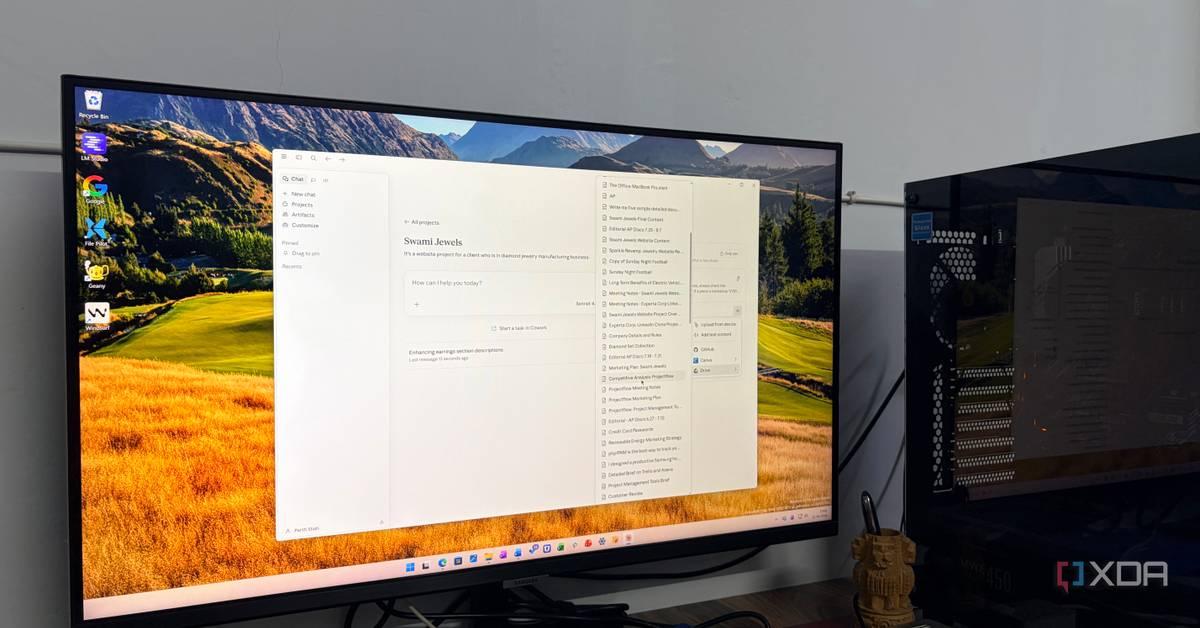
When you hear about Claude's features, people are often referring to powerful features such as Claude Code and Claude Cowork. And while they definitely deserve much of the hype they're getting, one feature that's often overlooked is Claude Projects. But if you haven't tried the feature out yet, you're missing out. Some people essentially use them as organizational folders for their chats with the AI, but projects can help you do a lot more. If you're still holding out on trying the feature out, here's why you should get started right away. Claude Code's real power comes from the tweaks nobody wants to talk about Claude Code gets better when you stop chasing flashy workflows and start tightening the boring setup details. Posts 5 By Jeff Butts Context is a superpower for AI tasks They transform chats from vague to incredibly useful Whether I'm using Claude Projects or Gemini Gems, I've come to realize how important context can be when it comes to getting useful responses from AI tools. Claude Projects allow you to add instructions for the AI, but also important context that it should consider. This saves you from having to repeat yourself when discussing certain topics. For example, when I used Claude to help my plan my day, creating a project for this purpose made the whole endeavor much more efficient. The AI got a better idea of what a typical day looks like for me, so it used this as a template for my schedule. I also added instructions for it to check my Asana tasks and Google Calendar, so that I didn't have to repeat this every time I opened a chat to create a daily schedule. When I created a project on chronic kidney disease in cats, I was able to add context about my cat's disposition and habits to guide the AI. This means that it doesn't give generic advice about the questions I should ask my vet. In fact, the context of my cat's anxiety and her particular dislike of one of her medications resulted in some useful suggestions from the AI that I can run past my vet at the next appointment. Projects also allow you to ground the AI's responses in specific documents and text that you upload. When I was experimenting with Claude as a way to help visualize my taxes, I used a spreadsheet of my expenses and income, as well as text from my country's tax authority's website to guide the AI's answers. You don't need a paid plan to use the feature Claude Projects are available for free plans Unlike Claude Code and Cowork, Projects are available to all Claude users. This means that even if you're on a free plan, you can use the feature. The catch is that free users have a limit of five projects. Once you reach this limit, you need to delete or archive a project to create new ones. However, it's important to note that archiving a project may make it completely unavailable to free users. When I archived specific projects, they disappeared completely, and I couldn't access them from my chat history either. Despite this, I've found that five projects works well for my needs. I've created a project to get advice on what to ask my vet with regards to my cat's chronic kidney disease, a project for vegetarian recipes that will also be suitable for a person with diabetes, and my daily schedule project. Projects help you deal with Claude's limits The context saves you from long prompts Using Projects is actually one of the suggested ways to deal with Claude's limits. According to Claude's usage limit best practices, content in Projects is cached and doesn't count against your limits when reused. This includes the documents you upload to a project. Anthropic notes that when you reference that content, only new or uncached portions will count against your limits. According to the company, this means that you can refer to the same documents repeatedly without using up your messages as quickly when compared to a normal chat. This was the main reason why I used a project when creating visuals and tables with my tax data, especially when working with Claude during peak hours. Deals Save on AI tools and subscriptions with top software deals Discover discounts on AI subscriptions, productivity software, and cloud tools -- grab deals that lower subscription costs, bundle useful apps, and get savings on collaboration, storage, and developer tools to boost your workflows. Deals Explore Software, AI & Subscriptions Deals Since your context is included in the project instructions and uploaded documents, you also don't have to include this in your own prompts. However, it's still recommended that you keep your project instructions concise. I gave Claude Code control of my desktop for a week, and it automated things I didn't think were possible I was seriously stunned. Posts 59 By Simon Batt If you haven't tried Claude Projects, they're worth diving into Claude Projects seem simple at first, but they're more than just a way to organize your chats. Not only can you use the feature whether you're on a free or paid plan, but it actually helps you use your limits more efficiently. Meanwhile, the power of context through your instructions and uploaded files adds incredibly useful nuance to the AI's responses. I've always been impressed by Claude's responses, but when I use Projects, it's as if all of its reasoning and organizational capabilities are amplified. Claude OS Windows, macOS Individual pricing Free plan available; $17/month Pro plan Group pricing $100/month per person for the Max plan Claude is an AI assistant and LLM developed by Anthropic. See at Claude Expand Collapse
[2]
Treating Claude Code as just a coding tool is like using a Swiss Army knife to open cans
Korbin is a Linux system administrator who spends most of his time in a terminal figuring out how things actually work. Over the last decade he's written hundreds of articles about Linux configuration, troubleshooting weird problems, and using open-source tools in the real world. He also works a lot with Windows systems and networking, especially in mixed environments where things don't always behave the way the documentation says they should. Writing things down is how he makes sense of it all and hopefully saves someone else a few hours. The "Code" in Claude Code is really doing the tool a disservice. From the name, most people assume that they point it at a codebase and ask it to fix something. That's a perfectly reasonable way to use it. But I've been throwing increasingly unrelated tasks at Claude Code for weeks, and it's become clear that it can do so much more than its name suggests. I now think of it more as a context-aware terminal agent, which also happens to be great at coding. Claude Code excels at a lot of tasks for the same reason that it's so good at coding: it can read your environment, reason about what it finds, and take action. That capability extends far beyond your IDE, and if you're just using Claude Code for programming, then you're only tapping into a small portion of its potential. Claude Code's real power comes from the tweaks nobody wants to talk about Claude Code gets better when you stop chasing flashy workflows and start tightening the boring setup details. Posts 5 By Jeff Butts Summarizing and searching local files Ctrl + F only takes you so far If you've ever tried to find something specific in a folder full of PDFs, reports, or text files, you know how much time that eats up. It usually involves opening files one by one and scanning each of them for the information you're after. It's a tedious process that Claude Code renders completely unnecessary now. After pointing Claude Code at a directory, it can summarize, cross-reference, or find information across dozens of files in no time. It's one of the tool's most underrated abilities. I've used it to pull key findings from my monthly budget breakdowns and flag conflicting settings across a folder of config files. This is one task where your prompt matters a lot, though. "Summarize this" probably won't give you usable results. It's better to ask a targeted question, like "What does the report say about data retention policies?" That'll actually get you something useful, even if the relevant details are spread across a dozen different files. Untangling file organization messes The cleanup job you've been putting off for a year Most people have at least one directory that has slowly spiraled out of control. I always refer to mine as the junk drawer. It's where files go that I don't have time to sort through, or stuff I simply don't want to deal with yet. There's no consistent naming convention, zero hierarchy, and no semblance of organization. It probably would've kept growing indefinitely if I hadn't asked Claude Code to tame it for me. I've written scripts before that help me organize a directory of files, but it's not the right tool for the job on just any folder. Claude Code can use its judgment to categorize a messy pile of files. It can even read file contents to verify what they actually contain, rather than relying solely on the filename or extension. For example, should IMG_0001.jpg go with your family vacation pictures, or does it belong in the Cat Memes folder? Claude Code knows. That level of nuance isn't possible in a simple PowerShell or Bash script. Building post-install scripts from your current system Get fresh installs up and running quickly There's a whole checklist of things to do whenever you stand up a new machine. You've got packages to install (and some defaults to remove), services to enable, dotfiles to import, and firewall rules to set, among other things. It's a whole ceremony, and I always end up forgetting something, which means the new machine never quite matches my usual setup. Writing a robust post-install script from scratch would be the best solution, but it'd take a couple of hours of work, and I've never gotten around to it. I decided to have Claude Code tackle the job instead. The best part was that I didn't need to describe what I wanted; I just told Claude Code to make a script that would provision a new machine to match my current one. It examined my system to build a list of installed packages, enabled services, systemd configs, shell settings, and other customizations, then compiled all of it into a Bash script. The script includes error handling and other niceties, and the back-and-forth with Claude only took a few minutes, compared to the hours I'd have spent writing the same thing myself. Fixing the dotfiles you're scared to touch Time to get your settings in order My dotfiles have accumulated hundreds of lines of customizations over the years, and troubleshooting them has become a daunting task. There are certain sections that I copied from the internet, and it's been a few years, so I can't be sure what each line does anymore. I'd been meaning to go through my .bashrc file carefully, but it's one of those tedious tasks that I perpetually put off. Deals Score deals on AI tools, software, and subscriptions Explore discounts on productivity software, AI assistants, and developer subscriptions to streamline workflows. Browse offers for cloud storage, terminal utilities, automation tools, and workflow plugins to lock in real savings on essential tools. Deals Explore Software, AI & Subscriptions Deals Claude Code now handles all the dotfile configuration for me. It reads the files, optimizes the configuration, trims redundant lines, and adds inline comments, so I can make sense of the settings the next time I look at them. The files got leaner, but every setting I actually cared about stayed intact. There's more to Claude Code than the name implies Even though it's marketed as a coding tool, Claude Code earned its spot in my terminal because of what else it does. If you've been treating it strictly as a coding assistant, you're leaving a lot of its features on the table. Try giving it a job that has nothing to do with code, and it'll change how you see the tool. Claude OS Windows, macOS Individual pricing Free plan available; $17/month Pro plan Group pricing $100/month per person for the Max plan Claude is an AI assistant and LLM developed by Anthropic. See at Claude Expand Collapse
[3]
I don't get why everyone's ignoring Claude's most useful feature
Mahnoor Faisal is a tech journalist covering AI and productivity tools with bylines at XDA, SlashGear, MakeUseOf, Laptop Mag, and Android Police. She's been writing professionally since she was sixteen, and has since penned hundreds of articles. This includes in-depth coverage of AI tools like NotebookLM to breaking news across the AI space. Her passion for technology started when she received her first iPod Touch (4th generation) on her 8th birthday, and she's been deep in the tech world ever since. Currently pursuing a degree in computer science, Mahnoor brings both a journalist's eye and a technical foundation to her coverage of how AI is reshaping the way we work and learn. I don't really need to begin this article with a classic introduction about why Claude is everyone and their mother's go-to AI tool. It's packed with features competitors don't have, it's constantly shipping something new (and spawning a fresh wave of "my job is in jeopardy" memes every other week), and it can be a genuine productivity powerhouse when used right. A tool is only as good as you make it, though. The onus is on you to actually learn what it can do, push past the surface-level "write me an email quickly" use cases, and figure out which features fit into the way you actually work. Given how quickly Claude (and every other AI lab) is iterating, missing a feature launch isn't exactly surprising. But interestingly, the feature I'm about to talk about isn't some buried setting or recent launch you might've missed. It's been sitting right there in the interface for a while now, and somehow it still flies under the radar for most people I talk to. The problem with how most people use Claude Yes, you're doing it too Most people head to their AI chatbot of choice, ask it a question, continue their conversation within the same chat until they're done, and start a fresh one when they move on to something else. Now, there's nothing wrong with this workflow, especially for one-off questions. If you don't want to Google what the weather is like in Dubai in December, asking an AI chatbot and moving on with your life is a perfectly reasonable use of the tool. The same goes for quick definitions, one-off emails, or generating a quick slide deck from a report you've already written. However, most of what people actually use Claude for isn't a one-off. It's the report you're writing over three weeks, the codebase you've been working on for months, the course you've been taking the entire semester. No matter what type of AI user you are, there is likely some ongoing piece of work in your life that you keep coming back to Claude for. And every single time you start a new chat for it, you're essentially starting from zero. You're re-uploading the same files, re-explaining the same context, and constantly reminding Claude of the same preferences you've already laid out a dozen times before. Claude Pro The Claude Pro plan is a paid subscription designed for high-volume users and professionals. For $20 per month (or $17 with an annual discount), it provides significantly higher usage limits compared to the free tier, reducing interruptions during complex tasks. See at Claude Expand Collapse Now, you might think -- hey, the memory feature within AI tools exists for this entire reason. And you're not wrong, until you're working on a project for work and the AI model keeps referencing the birthday party you were planning last weekend, or the recipe you asked about on Tuesday, or the fact that you mentioned once, in passing, that you're trying to learn Spanish. Memory is great in theory. In practice, it blurs everything together into one pile of context that Claude pulls from whether you want it to or not. Claude Projects lets you create dedicated workspaces for ongoing work Everything in its right place This is where Claude's Projects feature comes in. A Project is essentially a dedicated workspace for one specific thing. This could be a workspace for all the work you do for one specific client, a course you're taking, a project you're working on -- just anything that you know you're constantly going to come back to. Inside that workspace, you can upload the files Claude needs to reference, set custom instructions for how you want it to behave, and start as many chats as you want. Unlike a regular thread, chats within Projects all share the same underlying context that's only specific to what that project is about. While it can continue to browse the web and use its training data, it won't search through your other conversations in Claude and pull unrelated context from chats you've had outside the Project. What happens in the Project stays within the Project. And just as importantly, what happens outside the Project stays outside of it. When you create a Project within Claude, you'll be asked to give it a name and then describe the project and goals. You can then add instructions to tailor Claude's responses, as well as PDFs, documents, and other text that it can reference in the project. Of course, you can totally choose not to fill any of that out and just start chatting right away. Projects work perfectly fine as empty containers if all you want is a way to keep certain conversations grouped together. However, I've found that the more you put in upfront, the less you'll need to repeat yourself later (which is the entire point of Projects). A solid set of instructions and a few well-chosen files at the beginning can save you hours of context-setting. Related I started using Claude instead of these 5 apps -- and I'm not going back The stack got smaller and the work got better Posts 5 By Rob LeFebvre I have countless Claude Projects, and I've been using them for months. For instance, I have Projects created for each course I'm taking every semester, with the syllabus, lecture slides, assigned readings, and my own notes all uploaded inside. I'm also currently at the end of a semester, which always means a bunch of projects. Given that a lot of my projects are technical, I've been turning to Claude constantly. Instead of having my conversations scattered across random chats that I'd inevitably lose track of within a day, every project gets its own dedicated Project. I never have to dig through my chat history trying to remember which conversation had the version of the code that actually worked, or which one had the requirements doc Claude was referencing. It's all in one place, organized around the actual thing I'm working on. Projects are free to try (and worth it) The best part about Claude Projects is that you don't need to be subscribed to a paid Claude plan to give it a shot. While free users can only create a maximum of five projects, I think it's more than enough to get a real feel for whether the feature fits into the way you work.
Share
Copy Link
While Claude Code and Cowork grab headlines, Claude Projects quietly revolutionizes AI workflows. This feature creates dedicated workspaces for ongoing tasks, eliminating repetitive context-setting and making AI interactions more efficient. Available even to free users with a five-project limit, it's changing how professionals approach everything from daily planning to complex research.
Claude Projects represents one of the most underutilized Claude features despite being readily available in the interface. While features like Claude Code dominate conversations about the AI tool, Projects addresses a fundamental problem in how people interact with AI: the constant need to re-explain context
1
. Most users open a new chat, ask questions, and then start fresh next time—losing all previous context in the process3
.
Source: MakeUseOf
The feature functions as dedicated workspaces for ongoing tasks, allowing users to upload files, set custom instructions, and maintain contextual relevance across multiple conversations
3
. Unlike standard memory features that blur everything together—from work projects to weekend party planning—Projects keep context isolated and purposeful. What happens in a Project stays within that Project, ensuring AI responses remain focused on the specific task at hand.Claude Projects allow users to ground the AI's responses in specific documents and text uploads. One user experimented with Claude AI as a way to visualize taxes, uploading a spreadsheet of expenses and income alongside text from their country's tax authority website to guide answers
1
. This document grounding transforms vague AI interactions into precisely targeted assistance.The versatility of Claude becomes apparent through real-world applications. Users have created Projects for medical consultations—adding context about a cat's anxiety and medication preferences to receive tailored veterinary questions rather than generic advice
1
. Others use Projects for daily scheduling, instructing the context-aware AI to check Asana tasks and Google Calendar automatically, eliminating repetitive prompts1
.Unlike Claude Code and Cowork, Claude Projects are available to all users regardless of subscription status. Free users receive a limit of five projects, which must be managed by deleting or archiving existing workspaces to create new ones
1
. However, archiving carries a caveat—archived Projects may become completely unavailable to free users, disappearing from chat history entirely1
.Despite this limitation, five projects proves sufficient for many workflows. Users report maintaining Projects for veterinary consultations, recipe development for specific dietary needs, and daily schedule management within this constraint
1
.Related Stories
Claude Projects offer a strategic advantage for managing usage limits through caching content. According to Anthropic's best practices, content within Projects is cached and doesn't count against limits when reused—including uploaded documents
1
. When referencing this content, only new or uncached portions count against message limits, allowing users to reference the same documents repeatedly without depleting their allowance as quickly1
.This becomes particularly valuable during peak usage hours when limits tighten. One user specifically relied on Projects when creating visuals and tables with tax data during high-traffic periods . Since context lives in project instructions and uploaded documents rather than individual prompts, users avoid inflating message counts with repetitive background information.
The feature addresses a broader issue in AI adoption: most people never move past surface-level use cases. They ask for quick emails, one-off definitions, or simple queries—perfectly reasonable for isolated tasks
3
. But ongoing work—reports spanning three weeks, codebases under development for months, semester-long courses—suffers when users start from zero with each new chat, re-uploading files and re-explaining preferences repeatedly3
.
Source: XDA-Developers
Projects transform this workflow by creating persistent workspaces where all chats share the same underlying context. Inside a Project, users name the workspace, describe project goals, add tailored instructions for the coding assistant or other functions, and upload relevant PDFs and documents
3
. This infrastructure supports the kind of deep, ongoing collaboration that makes Claude AI genuinely useful rather than just convenient.Summarized by
Navi
[2]
1
Science and Research

2
Technology

3
Policy and Regulation