7 Sources
[1]
Apple Intelligence Brings Accessibility Updates Across iPhone, Mac and Vision Pro
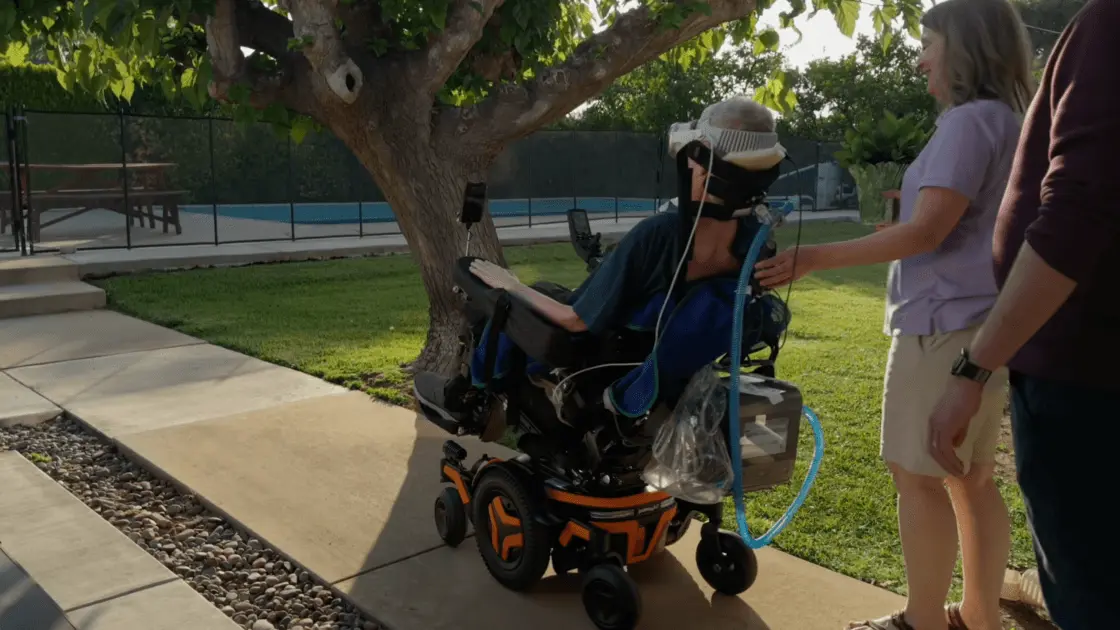
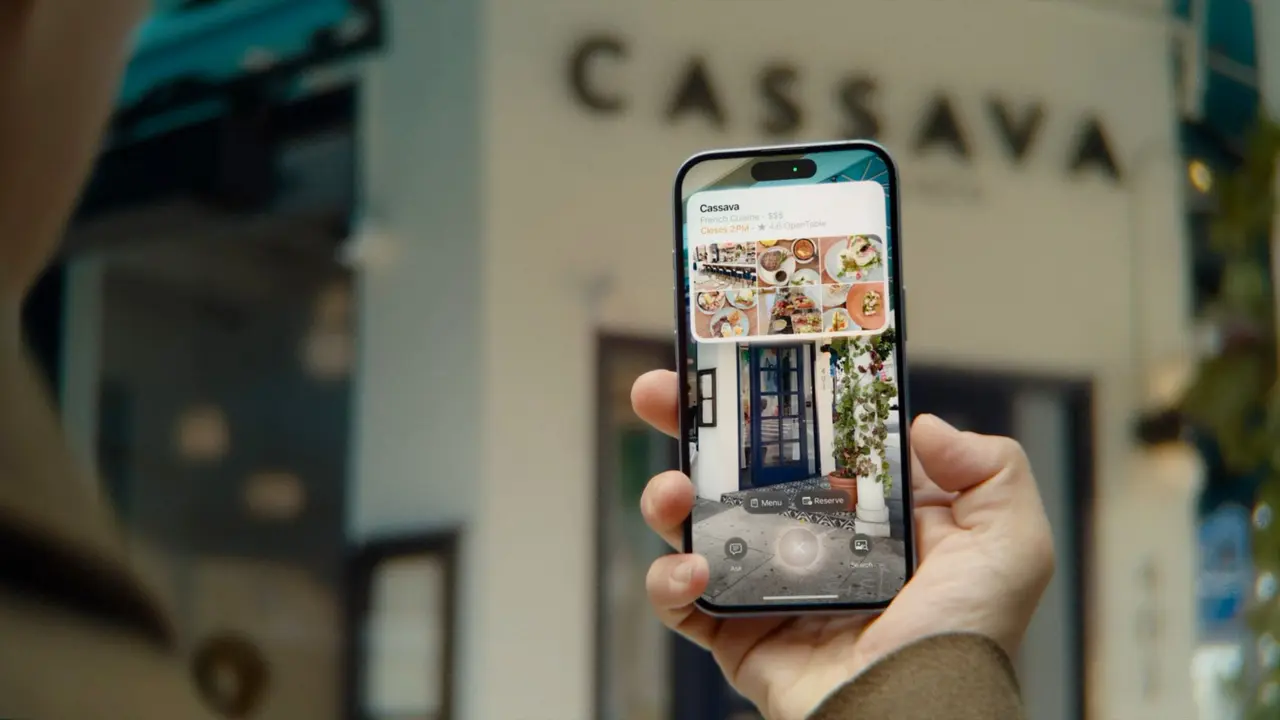
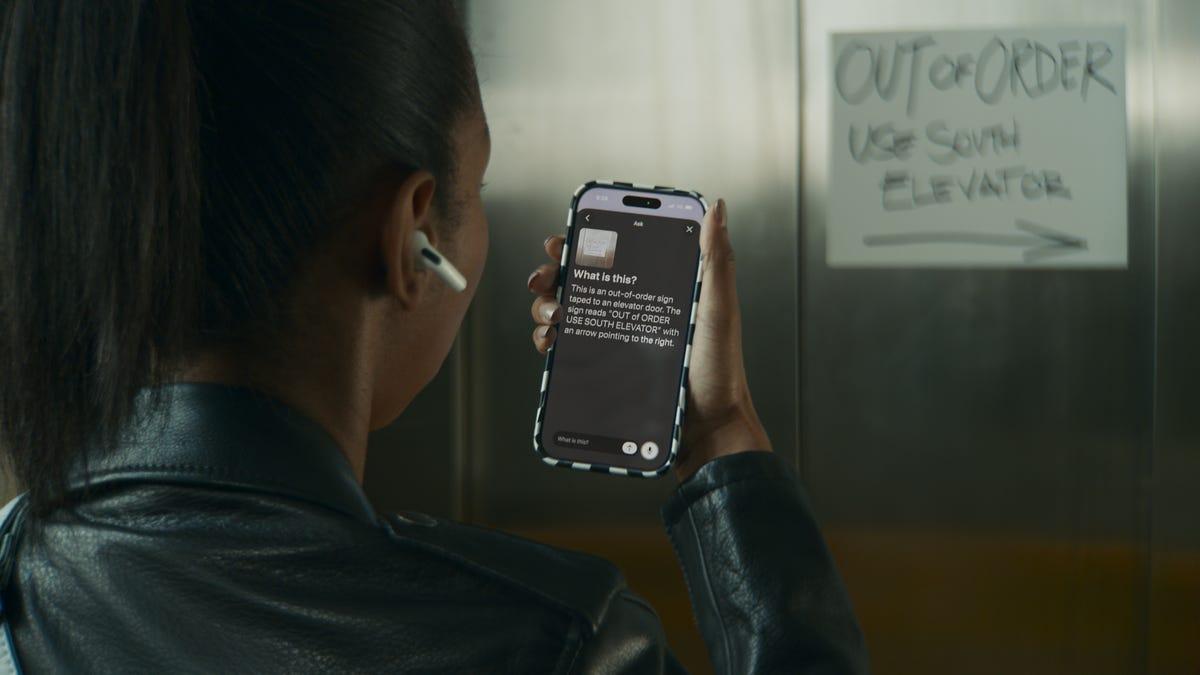
Named a Tech Media Trailblazer by the Consumer Technology Association in 2019, a winner of SPJ NorCal's Excellence in Journalism Awards in 2022 and has three times been a finalist in the LA Press Club's National Arts & Entertainment Journalism Awards. Apple is leveraging AI to boost its accessibility features. The company shared a handful of updates on Tuesday designed to make its products more helpful for people with a range of disabilities. Apple Intelligence, the tech giant's suite of AI features, powers some of these new capabilities. The unveiling comes ahead of Global Accessibility Awareness Day on Thursday, which aims to bolster digital access and inclusion. The updates are arriving for features like VoiceOver, Magnifier and video subtitles later this year. They come as more companies -- from Google to Microsoft to Amazon -- are harnessing AI to make their products and platforms accessible to a wider range of people. Many of Apple's updates build upon features it announced last year. They also come ahead of the company's Worldwide Developers Conference, which is scheduled for June 8 and is expected to usher in more AI updates. Apple's VoiceOver and Magnifier features can describe on-screen information or real-world settings, and Apple Intelligence is pushing each to be more helpful. VoiceOver is a screen reader that speaks aloud what's on your screen, and it can help people who are blind or have low vision navigate their device. Image Explorer in VoiceOver will now give more detailed descriptions of what's in objects like photographs, scanned bills and personal records. And as part of an update to Live Recognition, you can use your iPhone's Action button to quickly gather more information about your surroundings. Just point the camera at what you want to learn more about and ask follow-up questions for additional details. Magnifier allows people who are low vision to zoom in, view high-contrast text and detect objects around them on an iPhone, iPad or Mac. Now, you can ask questions about what your camera is seeing. For instance, you can point your phone at a recipe and ask how many servings it yields or how long to bake for, and it'll find and share that information using large, high-contrast text. Apple Intelligence will also support natural language using Voice Control, which lets you navigate your iPhone or iPad with your voice. That means if you want to click on something, you no longer have to pinpoint the location using a numbered on-screen grid. Instead, you can just say what you want to select, like a specific file name or folder color. You can also tell your device where you want to zoom in by stating which word or image you want to punch in on. Voice Control with Apple Intelligence will be available in English in the US, Canada, UK and Australia. Apple debuted Accessibility Reader last year on iPhone, iPad, Mac and Vision Pro. It lets you customize text and adjust font, color and spacing, making it easier for some people to read, such as those with low vision or dyslexia. Now, Accessibility Reader can work on more complex materials like scientific articles, which tend to format text in multiple columns among several images and tables. You can also remove headers and page numbers for a simpler interface and generate summaries for a quick overview before diving in. Plus, you can translate the text into your ideal language. Closed captioning may be nearly ubiquitous in TV programming and movies, but it isn't as common in some media like personal videos. Now, generated subtitles automatically display transcriptions of spoken audio when captions or subtitles aren't already available. That includes videos recorded from an iPhone, sent by friends and family or streamed online. On-device speech recognition generates the subtitles privately. They'll appear in non-captioned videos on iPhone, iPad, Mac, Apple TV and Vision Pro. You can customize elements like font and text background in the video playback menu or in settings. Generated subtitles will be available in English in the US and Canada. A new eye-tracking feature on Vision Pro allows people to control their power wheelchair -- no joystick required. They can use eye gaze to select controls and determine how and where their wheelchair moves. This can be especially helpful for people with limited mobility. Eye tracking on Vision Pro doesn't require regular calibration and can work in a variety of lighting conditions, according to Apple. The feature will be compatible with Tolt Technologies and Luci alternative drive systems in the US, with support for both Bluetooth and wired accessory connections. Apple says it'll work with developers to expand access to more wheelchairs. "Over the past decade, we've seen eye-driven wheelchair systems evolve in incredible ways," Blair Casey, CEO of Team Gleason, said in a statement. "Leveraging Apple Vision Pro's eye-tracking capabilities in this way is a huge step forward. Team Gleason is proud to support this initiative and excited to see the benefits it can bring to people who use power wheelchairs." Apple debuted the Hikawa Phone Grip and Stand late last year for the iPhone. It's an adaptive, ergonomic accessory that was designed using input from people with a range of disabilities, including ones affecting dexterity, grip and hand control. Now, as part of a collaboration between Hikawa and PopSockets, the accessory is on sale globally for the first time, and in three new colors. It's available starting today on Apple's website.
[2]
Apple's New Accessibility Features Include Wheelchair Control for Vision Pro
The Vision Pro will use its precision eye-tracking system to record directional inputs. It's part of a suite of accessibility updates Apple announced today. Apple has announced a new set of accessibility features for its devices, including a Vision Pro update that lets users control compatible wheelchairs with eye movements. The new features are set to roll out later this year, and some are powered by Apple Intelligence. "With Apple Intelligence, we are bringing powerful new capabilities into our accessibility features while maintaining our foundational commitment to privacy by design," says Apple CEO Tim Cook. For wheelchair support, the Vision Pro will use its precision eye-tracking system to record directional inputs. In a promotional video, Apple shows that a wearer can move their wheelchair in eight directions and stop or pause its motion using eye movements. The feature will benefit those unable to operate a power wheelchair's joystick, Apple says. Since the feature uses Vision Pro's eye-tracking, it will work in various lighting conditions and won't require frequent calibration, the company adds. At launch, Vision Pro's wheelchair control will be supported by Tolt and LUCI alternative drive systems in the US. Support for more wheelchairs will be added in the future. VoiceOver, Magnifier, and Voice Control Get AI Smarts VoiceOver, a feature that reads out screen contents to help people with low vision navigate their iPhones, is getting smarter with Apple Intelligence. The Image Explorer in VoiceOver will soon provide more detailed descriptions for photographs, scanned bills, personal records, and other visual content. With an update to Live Recognition, users will also be able to press the Action Button to launch the camera and ask questions about what's in their camera viewfinder. They can also ask follow-up questions. Magnifier, an app that allows people to use their phone camera to zoom in on objects or text in front of them, will soon provide better descriptions for high-contrast app interfaces or websites in voice mode. Users will also be able to use the Action Button to ask questions and provide voice commands such as "zoom in" or "turn on flashlight." With Voice Control, an accessibility feature that allows users to scroll or tap items on their screen using voice commands, users will soon be able to "describe onscreen buttons and controls with natural language instead of memorizing exact labels or numbers," according to Apple. For example, they could just say "tap the purple folder" instead of the folder name to open it. AI Subtitles for Personal Videos While most streaming content comes with closed captions or subtitles by default, personal videos you receive from friends and family do not. To help people who are deaf or hard of hearing understand video content better, Apple will use on-device speech recognition to add subtitles to uncaptioned videos on iPhone, iPad, Mac, Apple TV, and Apple Vision Pro. Appearance of the captions will be modifiable from device Settings. Other accessibility improvements announced by Apple include expanded text support for Accessibility Reader and Larger Text support on tvOS. Apple is also rolling out three new variants for the triangular Hikawa iPhone grip launched last year.
[3]
Apple's new accessibility feature lets Vision Pro users control a wheelchair with their eyes - Engadget
New detailed descriptions and natural language navigation features will be powered by Apple Intelligence. Apple is previewing new accessibility features including Apple Intelligence-powered updates like natural language voice input, along with a new Vision Pro app that allows eye control for motorized wheelchairs. The updates, revealed just ahead of Global Accessibility Awareness Day (GAAD) on May 21, arrive later this year. "With Apple Intelligence, we are bringing powerful new capabilities into our accessibility features while maintaining our foundational commitment to privacy by design," said Apple CEO Tim Cook. The Image Explorer in VoiceOver now uses Apple Intelligence to give more detailed descriptions of images system-wide, including photos (which often lack detailed alt-descriptions), scanned bills, personal records and other content. "With updates to Live Recognition, VoiceOver users can press the Action button on iPhone to quickly ask a question about what's in the camera viewfinder and get a detailed response" and ask follow-up questions, Apple said. Magnifier, meanwhile, will use Apple Intelligence to bring visual descriptions to its high-contrast interface for users with low vision. It also works with the Action button, allowing users to quickly get answer to questions and control the app itself with spoken requests like "zoom in" or "turn on the flashlight." Another big AI addition is natural language for Apple's Voice Control function. "With a new flexible input, users can describe onscreen buttons and controls with natural language instead of memorizing exact labels or numbers," Apple wrote. That will work for navigating any app including those with visual layouts like Apple Maps or Files. For example, users can say things like "tap the guide about best restaurants," or "tap the purple folder." The function could also help users when app elements aren't labeled correctly for accessibility. Accessibility Reader is also getting a dose of Apple Intelligence. It can now work on more complex material like scientific articles or text with multiple columns, images and tables, providing on-demand summaries of articles so readers can get an overview before diving into the details. Another new function is built-in translation that lets users read in their native language while retaining custom formatting, fonts and colors. Generated subtitles, meanwhile provide captions for "personal videos, content shared by friends and family, and other media," rather than just video from platforms like YouTube and Facebook. Customizable subtitles are generated on-device for privacy and appear automatically for un-captioned videos on iPhone, iPad, Mac, Apple TV and Apple Vision Pro. Finally, Apple introduced a new wheelchair control feature for Apple Vision Pro. Using the precision eye-tracking system on the headsets, the new power wheelchair control feature offers a "responsive input method for compatible alternative drive systems." It doesn't require frequent recalibration and works in a variety of lighting conditions, offering compatibility with TOLT and LUCI alternative drive systems with accessory support for Bluetooh and wired connections. "The option to control my power wheelchair on my own is gold to me," said Pat Dolan, who has lived with ALS for 10 years and is a founder of GeoALS. "With this new feature, Apple is developing life-enhancing technology for the people who need it most."
[4]
Apple announces AI-powered accessibility features and eye-control of wheelchairs
Apple has today announced that it's using AI to boost the power of a number of accessibility features. These include VoiceOver, Magnifier, Voice Control and Accessibility Reader. Additionally, power wheelchair users will now be able to use their eyes as controls when using Vision Pro ... Apple says that it has not compromised privacy when adding AI capabilities to its accessibility features. "Apple's approach to accessibility is unlike any other," said Tim Cook, Apple's CEO. "Now, with Apple Intelligence, we are bringing powerful new capabilities into our accessibility features while maintaining our foundational commitment to privacy by design." "The accessibility features our users rely on every day become even more powerful with Apple Intelligence," said Sarah Herrlinger, Apple's senior director of Global Accessibility Policy and Initiatives. "With these updates, we're bringing new, intuitive options for input, exploration, and personalization -- designed to protect users' privacy at every step." VoiceOver and Magnifier assist users who are blind or have low vision to understand both on-screen information and their surroundings. Both are getting an AI boost. The Image Explorer in VoiceOver uses Apple Intelligence to give more detailed descriptions of images systemwide, including what's in photographs, scanned bills, personal records, and other visual content. With updates to Live Recognition, VoiceOver users can press the Action button on iPhone to quickly ask a question about what's in the camera viewfinder and get a detailed response. Users can also ask follow-up questions in their own words to get more visual information. Magnifier also works with the Action button so users can quickly ask questions and get answers. And users can control the app itself with spoken requests, such as "zoom in" or "turn on flashlight." Voice Control has so far required users to memorize exact words and phrases. With AI, Apple says that the feature now allows people to use natural language. With a new flexible input, users can describe onscreen buttons and controls with natural language instead of memorizing exact labels or numbers. The option to "say what you see" is great for navigating any app, including those with visual layouts such as Apple Maps or Files, using intuitive language like "tap the guide about best restaurants" or "tap the purple folder." This can also help users overcome barriers when elements aren't properly labeled for accessibility. For those who struggle to read text, Accessibility Reader is now significantly smarter. Accessibility Reader is a customized reading experience for users with a wide range of disabilities, from dyslexia to low vision, and with Apple Intelligence, the reading experience is more accessible than ever. Accessibility Reader works on more complex source material like scientific articles, handling text with multiple columns, images, and tables. On-demand summaries provide readers the option to get an overview of the article before diving into the details. And with new built-in translation, users can read text in their native language while retaining custom formatting, font, and colors. Any video can now be captioned with AI-generated subtitles. This includes video clips received from family and friends as well as those streamed online. This has the potential to be transformative for users who are deaf or hard of hearing. On-device captioning is used in order to preserve privacy. While captioning solutions are increasingly common for users who are deaf or hard of hearing, subtitles for spoken dialogue are rarely available for personal videos, content shared by friends and family, and other media. With new generated subtitles, videos can display transcriptions of spoken audio automatically when captions or subtitles are not already provided, including in clips recorded on iPhone, received from friends and family, or streamed online. With on-device speech recognition, subtitles are generated privately and appear automatically for uncaptioned videos on iPhone, iPad, Mac, Apple TV, and Apple Vision Pro. While some power wheelchair users have sufficient movement to use joystick controls, this isn't true for everyone. Users will now be able to use eye control within Vision Pro. Leveraging the precision eye-tracking system on Apple Vision Pro, a new power wheelchair control feature offers users a responsive input method for compatible alternative drive systems. With Vision Pro, eye tracking doesn't require frequent recalibration and works in a variety of lighting conditions. The feature launches with Tolt and LUCI alternative drive systems in the U.S., with accessory support for both Bluetooth and wired connections. Apple says further wheelchairs will be supported over time. Apple also listed a number of additional accessibility enhancements. AI is about much more than chatbots. While Apple has been criticized for being slow to adopt AI features, accessibility features is certainly an excellent priority. It also indicates that there will be many other things on which the company is quietly working behind the scenes. I very much hope to see a lot of further AI developments announced at WWDC.
[5]
Apple unveils new AI-powered accessibility features across iPhone, Mac, and Vision Pro
Apple Intelligence is coming to accessibility features across its ecosystem Apple has announced a major set of accessibility updates across iPhone, iPad, Mac, Apple Vision Pro, and Apple TV, with many of the new features powered by Apple Intelligence. The company says the updates are designed to make devices more useful for users with visual, hearing, mobility, and learning disabilities while maintaining Apple's privacy-focused approach to AI. The new accessibility features will roll out later this year as part of Apple's upcoming software updates. Apple is bringing AI into accessibility features One of the biggest updates focuses on VoiceOver and Magnifier for users who are blind or have low vision. Apple says VoiceOver's new "Image Explorer" feature can now provide more detailed descriptions of photos, scanned documents, bills, and other visual content using Apple Intelligence. Users will also be able to ask follow-up questions about what the camera sees through the iPhone's Action button. Magnifier is also getting AI-powered visual descriptions and voice controls. Users can ask spoken commands such as "zoom in" or "turn on flashlight" while using the feature. Recommended Videos Apple is additionally improving Voice Control with natural-language interactions. Instead of memorising exact button labels, users can now describe what they see on screen with phrases like "tap the purple folder" or "open the restaurant guide." The company says this should make navigating apps easier for users with physical disabilities. Generated subtitles and smarter reading features Apple is also introducing automatically generated subtitles for videos without captions. The feature uses on-device speech recognition to create subtitles privately for personal videos, streamed content, and clips shared by friends or family. Generated subtitles will work across iPhone, iPad, Mac, Apple TV, and Apple Vision Pro. Another update expands Accessibility Reader, which is aimed at users with dyslexia or low vision. The feature will now support more complex content such as scientific articles with columns, tables, and images. AI-generated summaries and built-in translation tools are also being added. Apple Vision Pro gains eye-controlled wheelchair support One of the more notable announcements involves Apple Vision Pro. Apple says users with compatible alternative wheelchair drive systems will soon be able to control power wheelchairs using Vision Pro's eye-tracking system. The feature will initially support Tolt and LUCI systems in the US. The company also announced additional Vision Pro accessibility updates, including face gestures, improved Dwell Control, and motion sickness reduction tools for passengers in moving vehicles. Why these features matter Accessibility has long been a major focus area for Apple, but the latest updates show how AI is increasingly becoming part of assistive technology. Instead of positioning AI only as a productivity or chatbot tool, Apple is integrating it into real-world accessibility functions such as visual understanding, navigation, reading assistance, and communication. The company is also continuing to emphasize on-device processing and privacy, especially as AI-generated features become more common across consumer devices. Apple says the new accessibility features will launch later this year across its ecosystem. The company is expected to share more details during WWDC, where it will likely showcase how Apple Intelligence powers these updates across iOS, iPadOS, macOS, and visionOS.
[6]
Apple Unveils AI Push Beyond Siri With Smart Writing, Accessibility Features - Apple (NASDAQ:AAPL), Alpha
The company said the new features will arrive later this year and focus on navigation, visual assistance and communication tools. Apple also introduced AI-driven subtitle generation, enhanced Voice Control functions and new wheelchair controls for Vision Pro users. Apple also confirmed its Worldwide Developers Conference will run from June 8 through June 12, 2026, where investors may expect major software and Apple Intelligence updates. In fact, Apple is reportedly preparing new AI-powered writing tools, wallpaper generation features and smarter Shortcuts capabilities for iOS 27 ahead of WWDC 2026, according to a Bloomberg report. The update could also introduce natural language shortcut creation and Grammarly-style writing assistance across Apple devices. AI Expands Accessibility Tools Apple said VoiceOver will soon deliver richer image descriptions across apps and documents using Apple Intelligence. Users can also ask follow-up questions about objects viewed through the iPhone camera. Magnifier received similar upgrades for visually impaired users. The feature now supports spoken commands like "zoom in" and "turn on flashlight." The company also upgraded Voice Control with conversational navigation support. Users can interact with apps using natural phrases instead of memorizing exact button labels. Apple said the feature could improve accessibility across visually complex apps, including Maps and Files. New Reading And Subtitle Features Accessibility Reader now supports dense layouts containing tables, graphics and multiple text columns. Apple also added article summaries and built-in translation tools. The company introduced automatic subtitle generation for videos lacking captions. The feature works across iPhone, iPad, Mac, Apple TV and Vision Pro. Apple said on-device speech recognition handles subtitle creation privately without cloud processing. Vision Pro Wheelchair Controls Apple also announced eye-tracking controls for compatible power wheelchairs using Apple Vision Pro. The system supports TOLT Technologies and LUCI alternative drive systems in the United States. Users can connect through Bluetooth or wired accessories. Pat Dolan, founder of GeoALS, praised the development for improving independence among wheelchair users. "The option to control my power wheelchair on my own is gold to me," Dolan said. Additional Ecosystem Updates Apple also expanded support for hearing aids, sign-language interpretation apps and Sony Access gaming controllers. The company said tvOS will support larger text settings, while Name Recognition now works across more than 50 languages. AAPL Price Action: Apple shares were down 0.16% at $297.37 at the time of publication on Tuesday. The stock is approaching its 52-week high of $303.20, according to Benzinga Pro data. Photo by Tada Images via Shutterstock This content was partially produced with the help of AI tools and was reviewed and published by Benzinga editors. Market News and Data brought to you by Benzinga APIs To add Benzinga News as your preferred source on Google, click here.
[7]
Apple previews AI-powered accessibility features for 2026 By Investing.com
CUPERTINO, Calif. - Apple Inc. (NASDAQ:AAPL) announced a series of accessibility updates on Tuesday that incorporate Apple Intelligence into features including VoiceOver, Magnifier, Voice Control, and Accessibility Reader, according to a press release statement.The announcement comes as Apple maintains its position as the world's most valuable technology company with a market capitalization of $4.37 trillion. The stock trades at $297.84, just shy of its 52-week high of $303.20, delivering a strong 43% return over the past year. According to InvestingPro analysis, the stock currently appears overvalued relative to its Fair Value -- placing it among companies on the most overvalued list. The updates will enable VoiceOver's Image Explorer to provide detailed descriptions of images across the system, including photographs, scanned bills, and personal records. Users can press the Action button on iPhone to ask questions about what appears in the camera viewfinder and receive detailed responses. Magnifier will use Apple Intelligence to provide visual descriptions through a high-contrast interface designed for users with low vision. The feature will allow users to control the app with spoken requests such as "zoom in" or "turn on flashlight." Voice Control will support natural language input, allowing users to describe onscreen buttons and controls without memorizing exact labels or numbers. The feature will be available in English in the U.S., Canada, the UK, and Australia.Apple's innovation push comes amid strong analyst confidence, with InvestingPro Tips revealing that 26 analysts have revised their earnings upwards for the upcoming period. The company also boasts a perfect Piotroski Score of 9, indicating exceptional financial health. These are just 2 of the 18+ exclusive ProTips available to subscribers, alongside comprehensive Pro Research Reports that transform complex financial data into actionable intelligence for over 1,400 US equities. Accessibility Reader will handle more complex source material including scientific articles with multiple columns, images, and tables. The feature will include on-demand summaries and built-in translation. Apple announced generated subtitles for video content without existing captions across iPhone, iPad, Mac, Apple TV, and Apple Vision Pro. The subtitles will be generated using on-device speech recognition and will be available in English in the U.S. and Canada. Apple Vision Pro will support a power wheelchair control feature using eye-tracking technology. The feature will be compatible with TOLT Technologies and LUCI alternative drive systems in the U.S., supporting both Bluetooth and wired connections. The Hikawa Grip & Stand for iPhone, an adaptive MagSafe accessory, became available today in three new colors on the Apple Store online in 20 countries. The accessibility features and Apple Intelligence updates will be released later this year. Apple Intelligence is available in beta with support for 18 languages.For investors seeking deeper insights into Apple's financial performance and valuation metrics, the company's comprehensive Pro Research Report offers intuitive visuals and expert analysis covering everything from the company's 47.86% gross profit margin to its revenue growth trajectory. In other recent news, Apple Inc. has been the focus of several noteworthy developments. Evercore ISI raised its price target for Apple to $365, citing growth in its services sector. This comes as the firm maintains an Outperform rating on the stock, projecting mid to high single-digit revenue growth and low to mid-teens earnings per share and free cash flow growth. Meanwhile, Apple plans to introduce a customizable Camera app in its upcoming iOS 27 update, allowing users to tailor features such as flash, exposure, timer, and resolution. Additionally, Apple and Google have collaborated to roll out end-to-end encryption for Rich Communication Services messaging, enhancing security for chats between Android and iPhone users. Security researchers at Calif have identified a method to bypass Apple's security technology using Anthropic's Mythos AI software, revealing vulnerabilities in Mac devices. In related news, Varta, a supplier for Apple, announced it will cut 350 jobs and halt button cell production after losing its largest client. These recent developments highlight a mix of strategic advancements and challenges for Apple. This article was generated with the support of AI and reviewed by an editor. For more information see our T&C.
Share
Copy Link
Apple announced AI-powered accessibility features ahead of Global Accessibility Awareness Day, introducing Vision Pro wheelchair control via eye-tracking and enhanced VoiceOver, Magnifier, and Voice Control capabilities. The updates use Apple Intelligence while maintaining on-device processing for user privacy, rolling out later this year across Apple's ecosystem.
Apple announced a comprehensive suite of AI-powered accessibility features ahead of Global Accessibility Awareness Day on Thursday, leveraging Apple Intelligence to make its devices more useful for people with visual disabilities, mobility disabilities, and other challenges
1
. The updates, set to roll out later this year across iPhone, Mac, and Vision Pro, represent a significant integration of assistive technologies with artificial intelligence while maintaining the company's commitment to user privacy through on-device processing5
. "With Apple Intelligence, we are bringing powerful new capabilities into our accessibility features while maintaining our foundational commitment to privacy by design," said Apple CEO Tim Cook2
.
Source: Benzinga
One of the most notable announcements introduces Vision Pro wheelchair control that allows users to operate compatible power wheelchairs using only their eyes
3
. The eye-tracking feature uses Vision Pro's precision eye-tracking system to record directional inputs, enabling wearers to move their wheelchair in eight directions and stop or pause motion without requiring a joystick2
. This capability works in various lighting conditions and doesn't require frequent recalibration, launching initially with Tolt and LUCI alternative drive systems in the US with support for both Bluetooth and wired connections4
. "The option to control my power wheelchair on my own is gold to me," said Pat Dolan, who has lived with ALS for 10 years and is a founder of GeoALS3
.
Source: PC Magazine
VoiceOver, Apple's screen reader for people who are blind or have low vision, now includes an Image Explorer feature that provides more detailed image descriptions of photographs, scanned bills, personal records, and other visual content
1
. With updates to Live Recognition, VoiceOver users can press the Action button on iPhone to quickly ask questions about what's in the camera viewfinder and receive detailed responses, with the ability to ask follow-up questions4
. Magnifier, which helps people with low vision zoom in and detect objects, now allows users to ask questions about what their camera is seeing, such as pointing at a recipe and asking how many servings it yields or how long to bake for, displaying information using large, high-contrast text1
.
Source: 9to5Mac
Related Stories
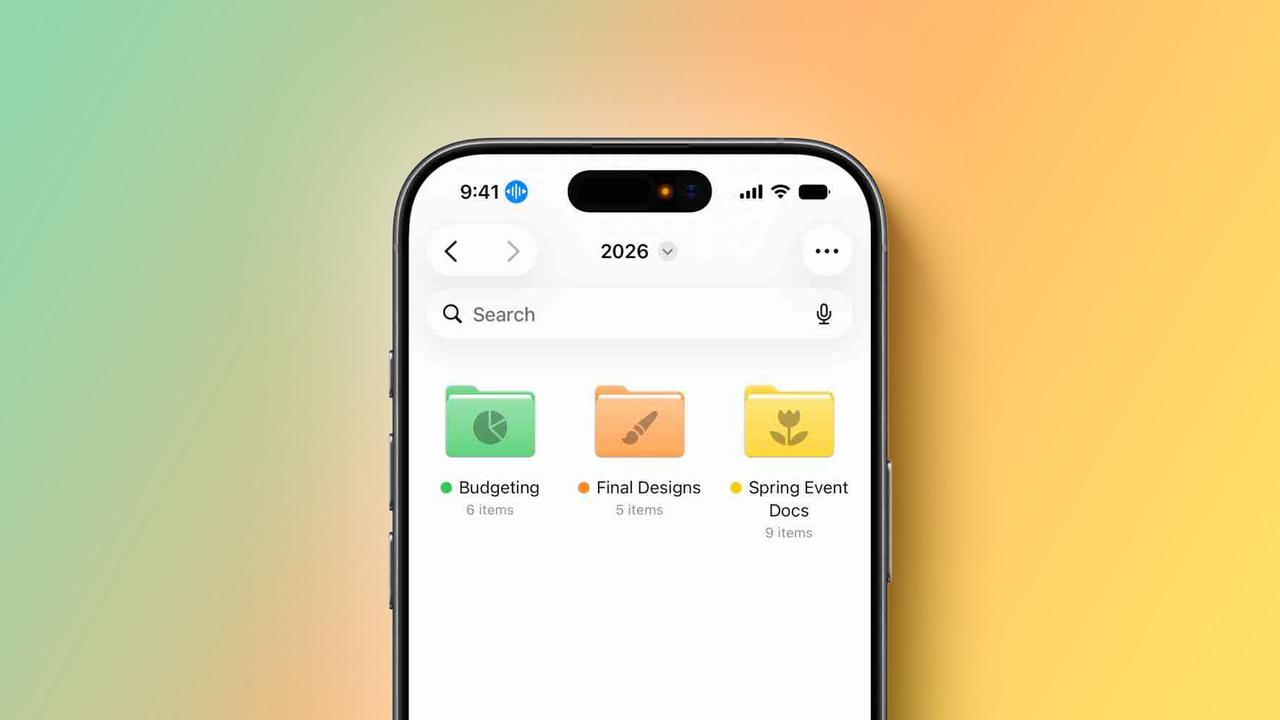
Voice Control is receiving a significant upgrade with natural language navigation capabilities, eliminating the need for users to memorize exact labels or numbers when navigating their devices
2
. Users can now describe onscreen buttons and controls with natural language instead of precise commands, saying things like "tap the purple folder" or "tap the guide about best restaurants" to navigate apps including Apple Maps or Files3
. This feature can also help users overcome barriers when app elements aren't properly labeled for accessibility4
. Voice Control with Apple Intelligence will be available in English in the US, Canada, UK, and Australia1
.Apple introduced generated subtitles that automatically display transcriptions of spoken audio for videos without existing captions, including personal videos, content shared by friends and family, and streamed media
5
. Using on-device speech recognition for privacy, the subtitles appear automatically on iPhone, iPad, Mac, Apple TV, and Vision Pro, with customizable font and text background options1
. Accessibility Reader now works with more complex materials like scientific articles with multiple columns, images, and tables, offering on-demand summaries and built-in translation that lets users read in their native language while retaining custom formatting3
. These updates arrive as more companies are harnessing AI to make their products accessible to a wider range of people, with the announcements coming ahead of Apple's Worldwide Developers Conference scheduled for June 8.Summarized by
Navi
[3]
1
Technology

2
Technology

3
Technology