10 Sources
[1]
WatchOS 27 Finally Fixes Siri, but You May Need to Buy a New Apple Watch to Get It
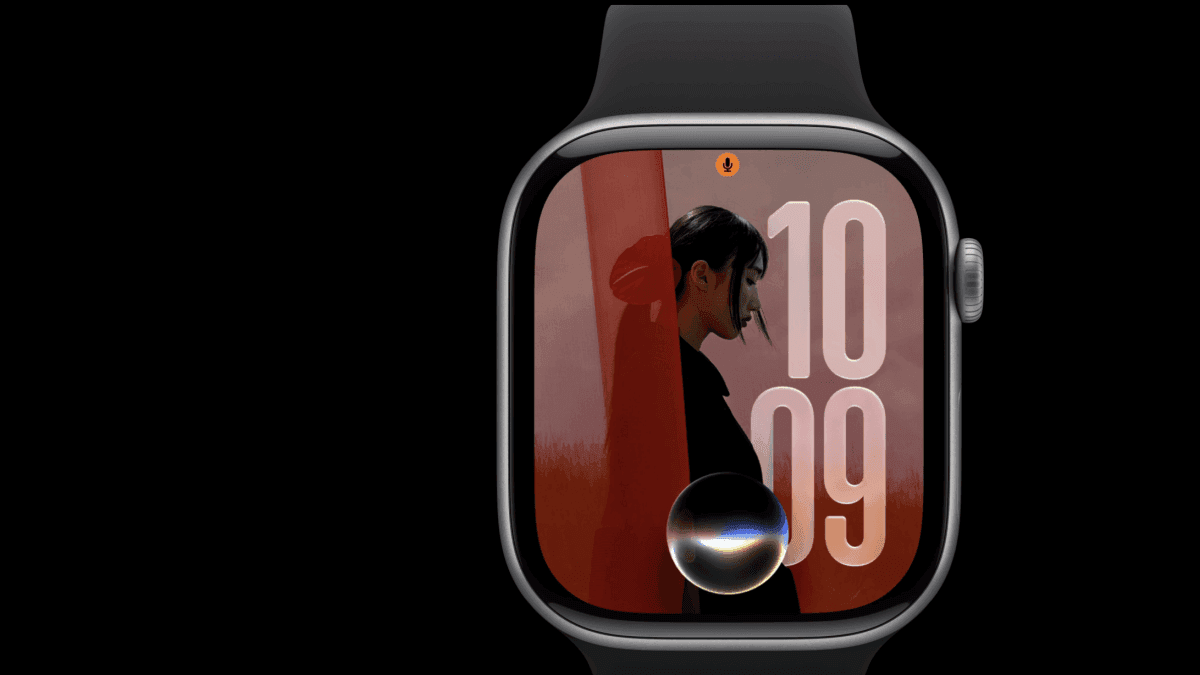
Apple's WWDC keynote put a supercharged Siri in the spotlight, but the ripple effects of that upgrade will likely be felt most on the Apple Watch -- if you have a new enough model, that is. With WatchOS 27, Apple is bringing a revamped Siri -- now dubbed Siri AI -- to the wrist, with better contextual awareness, natural language support and the ability to pull information from other apps on the fly. In theory, that should finally stop Siri on Apple Watch from defaulting to showing a list of web links for nearly every request. That's especially important on a device where you don't have the screen real estate or time to dig through websites or conduct a back-and-forth chat with a chatbot. If you've used an Android-based watch running Wear OS recently, the gap is pretty obvious. Google brought Gemini to the wrist last year, and after I tested it on the Galaxy Watch, the difference was stark. Ask a Pixel Watch "how do I make buttermilk," and it surfaces a list of ingredients with quick steps onscreen, then reads them aloud so you don't even have to look down. Ask the same thing on an Apple Watch, and you get a list of websites you'd have to wait to load, and then squint and scroll to read through on a tiny display (if they even load at all). Multiple follow-ups? Not happening. That kind of on-the-fly, hands-free utility changes how you actually use a watch, and I'm glad it's finally arriving on Apple Watch, even if it's coming a year late. The end of the update road for many Apple Watch owners The problem is that not many current Apple Watch owners will get to use WatchOS 27. The update will be available only on the Series 9 and newer, Ultra 2 and newer and the SE 3. It's a much more aggressive cutoff than usual: Apple is dropping the Series 6, 7 and 8, the original Ultra, and the second-generation SE. So, if you bought an Apple Watch before 2024, there's a good chance you're at the end of the update road. Some of the new AI features have legitimate hardware requirements, but Apple hasn't traditionally treated that as a reason to cut older watches off entirely. Last year, older models still received the update while newer hardware got access to the more advanced AI features. This year, Apple appears to have tied the entire update to the same compatibility wall, even though many of the new features don't seem to require the hardware needed for Siri AI. With more people holding onto secondary devices like smartwatches for longer, that's a notable shift. What else is coming in WatchOS 27 Apple didn't spend much time on WatchOS individually (nor on any of the other OS updates like iOS 27) during the WWDC keynote, but a number of other upcoming features were revealed in the presentation and on Apple's website. A smarter app grid Press the Digital Crown, and you'll now see a dynamic grid with five Siri-suggested apps based on what you use frequently and most recently, with the new Siri app front and center. Previously, you were stuck sorting alphabetically and scrolling through your entire app list or navigating a grid of all your apps to find anything. Workout Buddy goes bilingual and phone-free Apple's in-ear motivational coach, Workout Buddy, is now available in Spanish and can operate without your iPhone nearby, as long as you have a Bluetooth headset. It also incorporates more fitness data into its coaching nudges. There's no word yet whether the buddy will get more coach-like features or continue existing as a chipper hype companion during workouts. Menopause and perimenopause insights in the Health app Apple Watch is expanding its menstrual cycle-tracking features by identifying patterns that may signal the start of perimenopause, which can cause cycle irregularities due to shifting hormone levels. While much of the cycle data remains self-reported, wearing an Apple Watch overnight unlocks retrospective ovulation estimates based on wrist temperature data. That helps you better understand your fertile window. Apple is pairing the feature with a new Fitness Plus program, Strong Through Menopause, and a Time to Walk episode featuring actress Busy Philipps discussing her perimenopause journey. Better one-handed Smart Stack control A new gesture system lets you navigate the watch without using your other hand: double-tap your index finger and thumb to scroll the Smart Stack, single-tap to select a widget (a new capability) and flick your wrist to return to the watch face. Smarter Smart Stack The watch will proactively surface relevant widget suggestions, such as a parked-car reminder from Maps when you leave your vehicle, a birthday message prompt for close contacts and a Theater Mode suggestion when you're at a movie theater or concert venue. A consolidated Find My Find Devices, Find Items and Find People are now combined into a single Find My app. Workout accuracy improvements Treadmill workouts get more accurate distance calculations through new machine learning models, and the route maps in your workout summary (in the Fitness app) will also be more accurate. Wallet upgrades You can now pin transit cards to the Smart Stack and view balances from your wrist. You can also create a custom pass from any card with a barcode or QR code, including a library card. What about battery life? Left out of the conversation entirely was battery life. That's still one of the biggest complaints about the Apple Watch, particularly as sleep tracking and long-term health features require you to wear it overnight. With no mention of battery or efficiency improvements, it feels like a missed opportunity. The only battery-related mention on Apple's site is that "battery optimizations may be suggested." Hopefully, the silence around battery life doesn't imply the opposite: that all these shiny new AI features come with a battery-life trade-off. For what is otherwise a fairly modest WatchOS 27 update, the thing many people will notice most isn't a new feature; it's whether their watch still supports it. That's especially awkward in a year when Apple was touting iOS 27's broad iPhone support as a selling point. Whether the new Siri experience is enough to get people to upgrade, or whether being left behind makes people jump ship entirely, will be the real test of the Apple Watch's staying power.
[2]
Apple announces watchOS 27, now with Siri AI
Apple just announced watchOS 27, the next version of its Apple Watch operating system, introducing support for Siri AI, a redesigned "dynamic" app grid, and improvements to health and fitness tracking. The watchOS 27 update will be available "this fall," according to Apple, though support is notably limited -- the new OS will only be available for Apple Watch Series 10 models or newer, including the Ultra 2, Ultra 3, and SE 3. The biggest update coming to supported Apple Watch models is Siri AI -- the next-generation of Apple's virtual assistant, powered by Apple Intelligence. This comes with a new, dedicated Siri app that "brings together all your conversations in one place," according to Apple, allowing users to start a conversation with the chatbot directly on their Apple Watch, or ask questions on their iPhone and then pick up where they left off from their wrist. Siri can also perform actions in apps, including playing songs, sending emails, or setting new Activity ring goals without the user "having to look around for them," Apple says. Siri AI won't be available until the beta launches sometime later this year. Using it with watchOS 27 will require Watch users to pair it with an Apple Intelligence-enabled device, though Apple says Siri AI isn't coming to iOS and iPadOS devices in the EU just yet. There's also a new dynamic app grid that automatically highlights Siri-suggested apps. The Siri Apple watch app is displayed at the center of this new grid, and will be surrounded by your most popular and recently used apps, making them easier to access without hunting around in the app menu. New insights are coming to Workout Buddy -- the AI-powered personal trainer feature introduced in watchOS 26 -- that provide a better look at your pace, distance, and workout duration, and improve run tracking for both outdoor runs and treadmill sessions. Menstrual health support has also been expanded to notify you when logged cycle patterns are suggestive of perimenopause. And after initially launching in English, Workout Buddy will now also be available in Spanish. Apple has made some general system improvements in watchOS 27 too, including suggestions for more widgets in your Smart Stack, faster music playback, battery optimizations, a more streamlined experience in the Find My app for locating your devices, and a refined Liquid Glass experience that should make text easier to read. There's also a new gesture that allows you to select a widget in the Smart Stack by tapping your index finger and your thumb together. This is the follow-up to last year's watchOS 26 update, in which Apple changed the numbering system of its various operating systems to match the upcoming year (switching from the watchOS 11 naming convention it used in 2024). Last year's update, which rolled out in September, also introduced Apple's Liquid Glass design language to the Apple Watch, alongside other features, including a wrist-flicking gesture control for dismissing notifications, Apple Intelligence-powered fitness features, and support for Apple's Notes app. This year's updates also come after Apple fitness chief Jay Blahnik, the creator behind the three-ring fitness tracking feature on Apple Watches, stepped down in April following allegations that he sexually harassed an employee and fostered a "toxic work environment." Health and Apple Watch marketing chief Stan Ng also retired in April after 31 years with the company. Incoming Apple CEO John Ternus was put in charge of Apple Watch hardware in late 2022.
[3]
WWDC 2026 Barely Touched watchOS 27. Here's What We Know and What's Still Missing
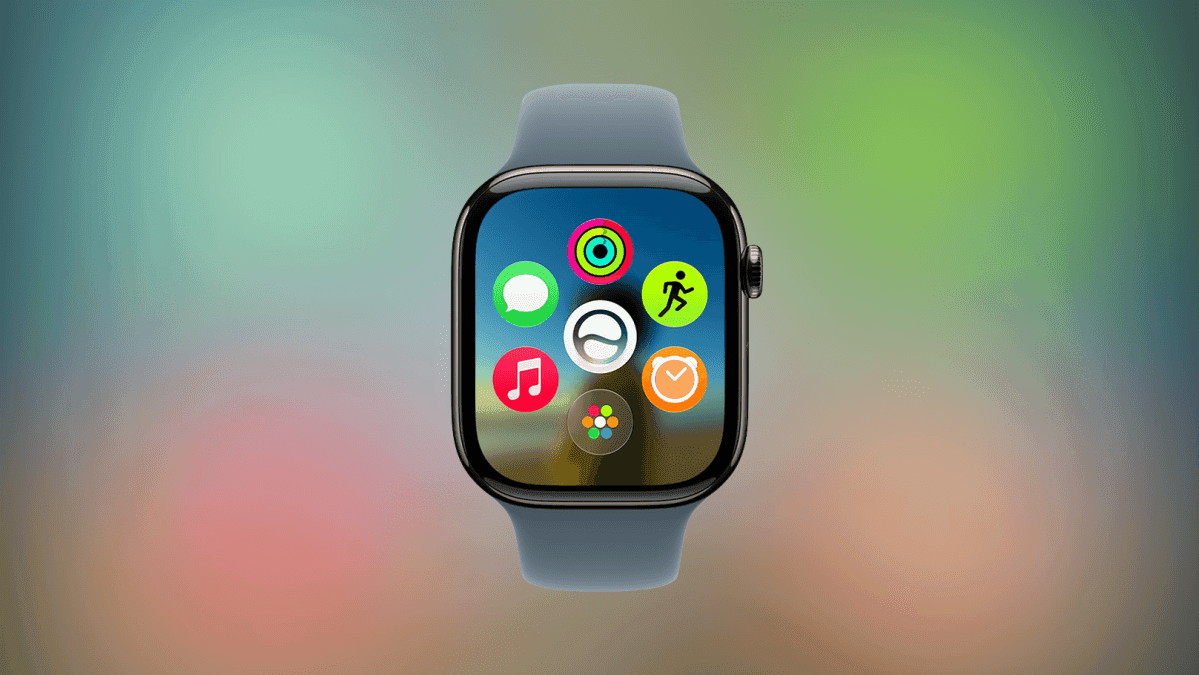
WatchOS 27 will feature a dynamic app grid with Siri AI at the center. (Credit: Apple/PCMag) Apple's WWDC developer keynote came and went with only a cursory mention of the company's latest smartwatch software. Available in beta for developers now, watchOS 27 is expected to arrive as a public beta this summer, ahead of a general rollout this fall. The lack of time in the spotlight was unusual, as the new watchOS has gotten its own dedicated section of the keynote in recent years. More details have dribbled out through Apple's newsroom posts since then, but I still have questions. With that in mind, here's what we know now, the big questions that remain, and what I ultimately hope for from watchOS 27. Siri AI Takes the Spotlight as Apple Quietly Expands Watch Health Features Part of the reason Apple glossed over watchOS 27 during the keynote was the focus on Siri AI. Presenters demonstrated its capabilities across platforms, offering a sweeping overview of Apple's various operating system updates instead of a piecemeal approach. The dedicated Siri AI app will launch in beta later this year. Apple partnered with Google to gain access to Gemini and will integrate its capabilities into all of the company's devices to make them more agentic (able to perform tasks for you), creative, and conversational. The Siri AI app will give you a place to ask the AI direct questions and continue those conversations across your Apple devices. It'll be able to take into account contextual information, such as any personal information about you it has access to, saved media on your device, and even whatever is currently on your screen. The latest Apple Watches will have access to Siri AI in a wrist-based version of the app. You'll be able to have a conversation with the AI on the watch, and the experience will be tailored to make information on the display easy to understand at a glance. It can pick up where you left off on your other devices and build its answers from prior questions. The smart stack, a dynamic and scrollable collection of widgets on the Apple Watch, will include a Siri AI suggestion. It will prompt you to continue a recent conversation if that topic proves relevant to your current activity, for instance. Aside from new Siri AI capabilities, the other big change coming to watchOS 27 is support for menopause and perimenopause within the existing Cycle Tracking feature in the Health app. You'll get notifications about cycle deviations related to the transition to menopause. Also on the health front, Workout Buddy, the AI Coach that offers words of encouragement and stats while you exercise, is incorporating additional fitness data into its repertoire. It'll update you on heart rate zones now, for example. It's also gaining Spanish language support and will be usable without an iPhone nearby. Otherwise, watchOS 27 will deliver a new look, fresh watch faces, and navigation controls. Pressing the digital crown will open a dynamic app grid that surfaces your most common and recently used apps, with Siri AI always in the center. A redesigned Find My app on the watch will let you locate devices, items, and people from a consolidated interface. You'll also be able to open Smart Stack widgets with gesture controls, allowing for one-handed navigation. Double-tap your index finger and thumb to scroll through the stack, single-tap the same fingers to select a widget, and flick your wrist to return to the watch face. Apple's AI Fitness Push Is Coming Into Focus -- But It Still Feels Early On Google's wearables, Gemini can do much more than answer questions. As I detailed in my Fitbit Air review, the Gemini-powered health coach can create a fitness plan for you after a quick text chat, and adapt it to accommodate your schedule changes on the fly. It can import workout data from Peloton home gym machines or even a photo of a whiteboard, and can recommend workouts to help you stay active even if you're stuck in a hotel room sans equipment. Given Apple's partnership with Google on Gemini, it's a realistic possibility that the Apple Watch could have similar AI-powered health coaching features in the near future. Apple didn't reveal anything on this front beyond teasers like the image above, so I assume an AI health coach isn't part of watchOS 27. That said, Apple does occasionally save some of its best software features for when it launches new hardware in the fall. WatchOS 27 Leaves Big Questions -- Especially Around AI, Health, and Compatibility The only known disappointment regarding watchOS 27 thus far is its limited compatibility. It will only work with Apple Watch Series 9 and newer, so Series 8 and earlier models will be left behind. That's a big jump forward, especially since iOS 27 maintains similar generational support as last year's software. For reference, watchOS 26 works with the Series 6 and newer, as well as the first Apple Watch Ultra and the second edition of the Apple Watch SE. My main questions revolve around AI. For this update to be good, the AI will need to be polished and speedy, at the very least. I also hope Apple is underselling its AI's health and fitness capabilities. I'd appreciate being able to at least chat with the AI about a recent workout to get pertinent details and guidance on what to do next or how to improve. Apple has a lot to mine on this front from Google, and while I don't expect a full-on health coach, even some contextual awareness of workouts and the ability to converse about them would be helpful. I'd be quite impressed if Workout Buddy's new tricks involved contextual information. Google's Health Coach doesn't offer voice prompts during workouts, so Workout Buddy could get a step ahead if it could offer analysis of your form and advice for how to improve it on the fly. This is a long shot, but I'd love for Apple to launch blood pressure tracking in watchOS 27. Current Apple Watch models have hypertension notifications, but can't measure blood pressure on demand. Samsung rolled out a feature for its Galaxy Watches that lets you take blood pressure readings, but it's a pain to use and requires a separate cuff. Apple could get ahead if it surprises us this fall with a similar but more polished version of this cutting-edge health tech feature. With well-implemented AI, watchOS 27 could offer a drastically smarter interface than on previous Apple Watches, and that could explain why so many older models were cut off. WatchOS runs on the company's smallest interface, which comes with inherent challenges for complex tasks but also offers plenty of room to impress if it delivers truly helpful AI right on your wrist.
[4]
watchOS 27: Everything We Know | MacRumors
watchOS 27 is the newest version of watchOS, the operating system for the Apple Watch. Apple introduced watchOS 27 at WWDC 2026, and it's now available to developers in a beta capacity. A public beta is coming in July, and the update will launch in September. Like iOS 27, watchOS 27 incorporates Siri AI, an overhauled version of Siri that's much smarter and more capable than before. Siri AI uses generative AI models and it performs more like ChatGPT or Claude than the prior version of Siri. Siri AI capabilities extend to the Apple Watch so you can get help on the go, though processing is not done on-device. Siri can hold full back-and-forth conversations, and it has access to your personal data so it knows more about you and can complete complex tasks. It can search across Mail, Messages, Notes, Reminders, Calendar and other apps on your iPhone to find things for you, with info relayed to the watch. A dedicated Siri app lets you see all of your Siri conversations in one place. Siri has broad world knowledge and can search the web to answer questions for you on any topic, plus it is able to see what's on your screen so you can ask for more information about what you're looking at. Siri can also take action in apps like Messages, Music, and Reminders, so you can do things like share flight details, play a song, or set a new goal for your Activity rings. Siri AI on the watch requires a paired iPhone that supports Apple Intelligence. The watchOS 27 Liquid Glass design has been updated with more uniform refraction and improved contrast to improve readability. Apple added a simplified Dynamic app grid that's displayed when you press the Digital Crown. It highlights Siri Suggested apps, including your most recently and most used apps, and puts Siri front and center. There's a new tap gesture, and you can tap your index finger and thumb together to select a widget in the Smart Stack. There are lots of new Smart Stack Suggestions in the Smart Stack, including Parked Car to find your vehicle, birthday messages, pinned messages, celebrations, noise alerts, Theater Mode reminders, and identity and transit cards. The Apple Watch can turn off unused features like Raise to Speak and gestures to extend battery life, letting users know with a notification. Workout Buddy works on the Apple Watch in watchOS 27 even when an iPhone isn't nearby. It includes new metrics like progressive increases to distance, pace, or duration. It also now supports Spanish. Cycle Tracking now has perimenopause and menopause support for tracking symptoms suggestive of perimenopause. Treadmill readings are more accurate thanks to new machine learning algorithms that are better at distance calculations on treadmills. There's an all-in-one Find My app that brings together Find Devices, Find Items, and Find People. It has a map-centric interface for locating people and devices, and the home screen has quick access to actions like getting directions and finding nearby items. Precision Finding is available for locating a paired iPhone, AirPods Pro 3, or AirTag 2. Custom Wallet passes generated in iOS 27 sync to the Apple Watch, and Call Context brings up relevant information you might need while on a phone call. Music playback on the Apple Watch starts faster than before. Apple added new Child Safety features in watchOS 27, including a updated Apple Watch For Your Kids setup process. Screen Time has been updated with a more intuitive interface that lets parents monitor what apps websites kids are using, with support for setting schedules and approving contacts. watchOS 27 is available on the Apple Watch Series 9 and later, the Apple Watch Ultra 2 and later, and the Apple Watch SE 3. It requires a paired iPhone running iOS 27. Developers can download watchOS 27 now, and a public beta will be released in July. watchOS 27 will launch in September.
[5]
Will your Apple Watch run watchOS 27? Apple just quietly made six current-gen watches obsolete, including Ultra and SE models -- here is the full list
Another WWDC, another set of operating systems. This year's WWDC 2026 keynote has been chock-full of highly-advanced AI-powered features, led by a revamped Siri AI designed to work across the whole Apple ecosystem -- but these advanced features need devices capable of running them. Because Apple updates its software each year, users of older versions of the best iPhones, Macbooks and, of course, the best Apple Watches worry their old technology may not get the new update, and thus official support for it would end. Although there was no mention of compatibility in this year's keynote speech, the official Apple website confirms it will end support for a mammoth six watches, presumably because those models can't handle the new Siri AI. Here are the watches that will still be supported when watchOS 27 lands later this year: Which watches will get watchOS 27? The full list of compatible models are as follows: * Apple Watch Series 10 * Apple Watch Series 11 * Apple Watch Ultra 2 * Apple Watch Ultra 3 * Apple Watch SE 3 These are the models without support for watchOS 27: * Apple Watch Series 6 * Apple Watch Series 7 * Apple Watch Series 8 * Apple Watch Series 9 * Apple Watch Ultra * Apple Watch SE 2 The Apple Watch Series' 6, 7, 8 and 9, the latter of which is just three years old, seem to have been officially retired, and do not appear on Apple's list of compatible devices. Users running those watches will not receive any further software updates. The first-generation Apple Watch Ultra, which is only four years old, and Apple Watch SE 2 are also included in this list. This will be a blow to so many users. Traditionally, Apple has ended support for watches after six or so years, not three -- to place this in context, last year's watchOS 26 supported Apple Watch Series 6, which was originally released in 2020. First-generation Apple Watch Ultra users will also be incredibly irate -- spending $799 / £849 / AU$1229 on a watch that was only supported for four years will be seen as a very predatory move by Apple, and may drive some customers away to competitors like Garmin. After an exciting WWDC speech for AI fans, this news will leave a sour taste. All the above watches' core features will still work, although users will run into problems as the watches reach the end of their lives. For example, you may be unable to update apps which are designed to work with the latest software features. Series 10 is now the oldest watch to receive software updates. How to download the watchOS 27 beta If you do have a supported watch and can't wait until September to try out all the new features, you can sign up to beta test Apple's latest OS. To do so, you'll need to enrol in Apple's beta program, which you can do either on Apple's developer portal here for the developer beta, or wait until the public beta next month, which most users will want to do. Remember to always back up your devices before doing so. On your iPhone, go to Settings > General > Software Update > Beta Updates, , and action the software update when available. Once the update is installed, you can go to the Watch app on your phone and use a similar pathway: My Watch > General > Software Update > Beta updates, enter your passcode and away you go. Follow TechRadar on Google News and add us as a preferred source to get our expert news, reviews, and opinion in your feeds.
[6]
Apple announces watchOS 27 will support Siri AI
Siri AI is coming to Apple Watch (unless you're in the EU). Credit: Apple Hey, Apple fan! Check your wrist. That thing on it, the Apple Watch, also deserves an upgrade, and it just got it in the form of watchOS 27. Apple barely mentioned watchOS during its WWDC 2026 keynote, though it's probably because the news just couldn't fit into the tight schedule. But the company did send a press release outlining the new features and yes, there is a healthy number of new features present on watchOS. The most important among these is Siri AI, which will be available on the Apple Watch (unless you're in the EU); when you need answers in a slightly more lavish format, you'll be able to continue the convo on a different Apple device. Also new is the dynamic app grid which you can access buy pressing on the Digital Crown, with the spotlight being on the five Siri-suggested apps, based on your recent usage. Other improvements include support for perimenopause and menopause in the Health app, Workout Buddy now being available in Spanish, a new Find My app which consolidates Find Devices, Find Items, and Find People (it was never quite clear to me why Devices and Items are separate), and the ability to open a new widget in the Smart Stack with a new tap gesture. Apple's watchOS 27 is available as a developer beta now, and it will arrive to end users this fall. Look for a public watchOS 27 beta in July. For more WWDC 2026 news, follow our live blog to see all of the latest announcements and surprises from the annual Apple event.
[7]
Apple launches watchOS 27 with Siri AI, smarter fitness tools, and a redesigned Apple Watch experience
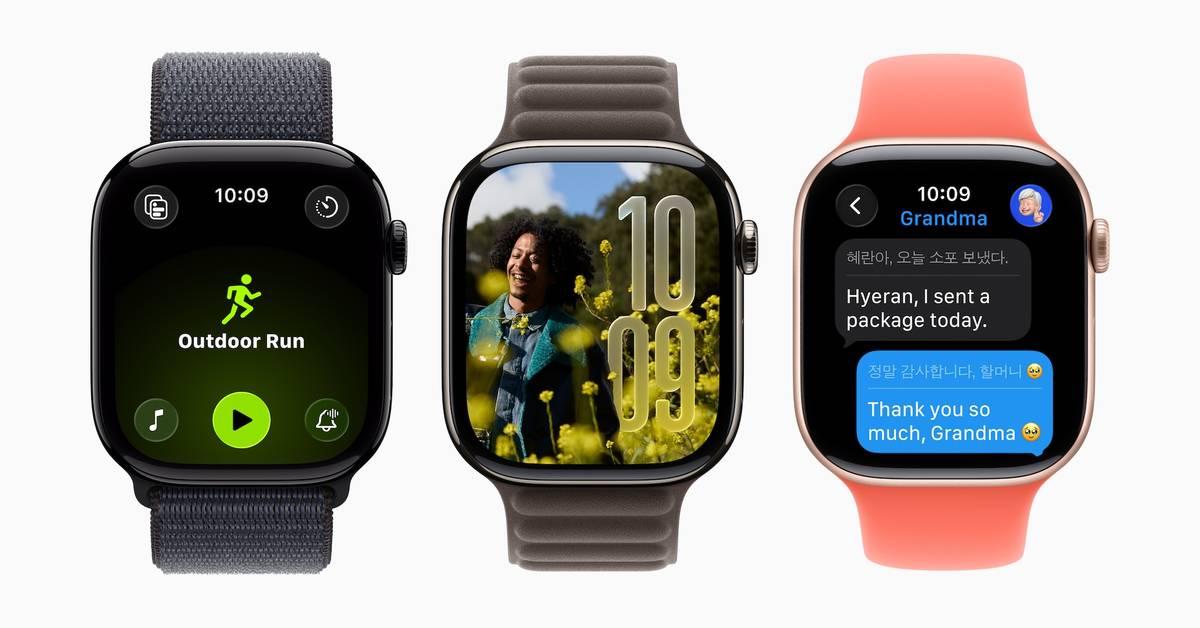
This story is part of our complete Apple WWDC coverage Updated less than 43 seconds ago Apple has officially unveiled watchOS 27 at WWDC 2026, bringing one of the biggest updates yet to the Apple Watch. The new software introduces Siri AI, expanded Apple Intelligence features, smarter fitness tools, and a refreshed user interface designed to make the smartwatch more useful throughout the day. The update is part of Apple's broader push to bring Apple Intelligence across its ecosystem. While the Apple Watch has long focused on health and fitness, watchOS 27 aims to make the device more proactive, contextual, and capable of handling everyday tasks directly from the wrist. Recommended Videos One of the headline additions is Siri AI, a dedicated AI-powered assistant experience for Apple Watch. Users can interact with Siri using natural language, ask follow-up questions, and perform tasks across apps more efficiently. Siri AI is powered by Apple Intelligence and is designed to understand context better, making interactions feel more conversational than before. Siri AI and Apple Intelligence take center stage Apple is also expanding Apple Intelligence features on the Apple Watch. Siri can now provide more contextual assistance, while smart suggestions throughout the system aim to surface relevant information when users need it most. The company has also improved the Smart Stack, which now uses better prediction algorithms to recommend useful actions and widgets based on daily routines. Messages gains additional intelligence features, including Live Translation and smart action suggestions that can help users quickly respond to messages or share information such as their location. Fitness remains a major focus of watchOS 27. Workout Buddy returns with more personalized coaching and motivation powered by Apple Intelligence. The Workout app has also been redesigned to make frequently used features easier to access, while Apple Music can automatically suggest playlists based on workout type and listening habits. Apple has also introduced features such as automatic volume adjustment based on ambient noise levels, improved notification management, and enhancements to the Notes app, which is now available directly on the Apple Watch. Which Apple Watches will get watchOS 27? Compatibility is one of the biggest changes this year. Apple has significantly narrowed support for older Apple Watch models. Reports indicate watchOS 27 will be available on newer Apple Watch hardware, including recent Series models, Ultra models, and the latest SE variants, while several older generations are being left behind. Apple later clarified that support includes Apple Watch Series 9 and newer devices. The developer beta is available now, while the public beta is expected to launch in July. Apple plans to release the final version of watchOS 27 later this fall alongside its broader software rollout. With Siri AI, deeper Apple Intelligence integration, and new health and productivity tools, watchOS 27 represents Apple's most ambitious attempt yet to transform the Apple Watch from a fitness companion into a more capable everyday assistant.
[8]
Siri AI, a Dynamic App Grid, and More New Features Coming to watchOS 27
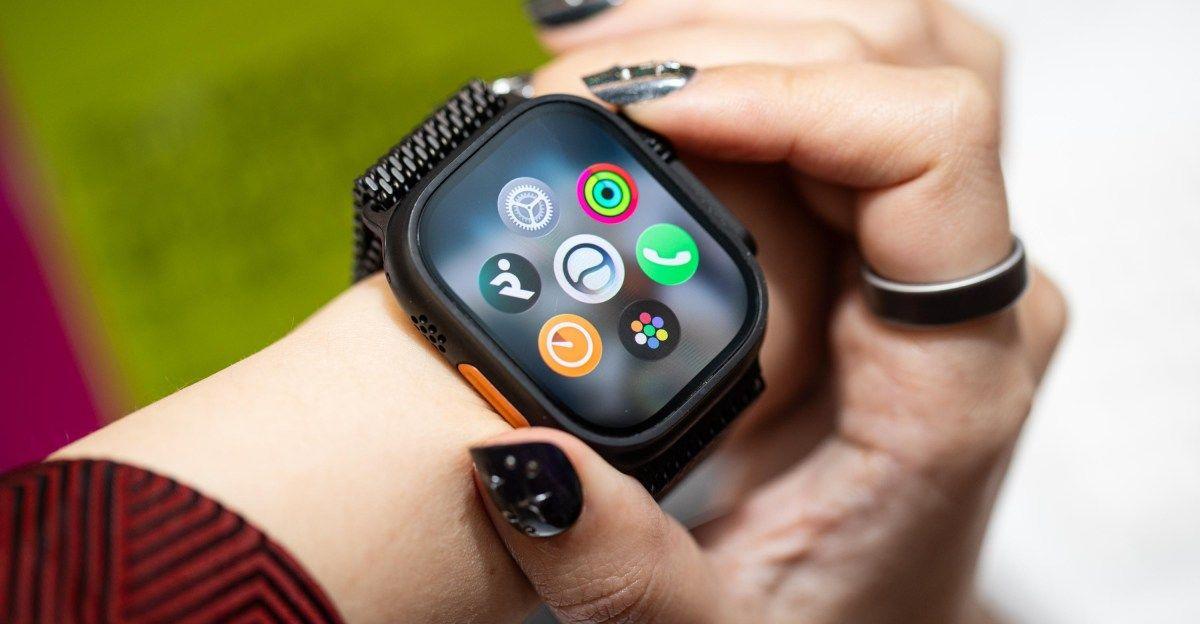
watchOS 27 also comes with a new app grid, a single-tap gesture, and more quality-of-life updates. During its big WWDC 2026 keynote, Apple didn't spend much time on watchOS 27. In fact, Apple didn't spend much time on any specific OS at all. Instead, the event was about Apple Intelligence and how the new Siri AI is integrated throughout Apple's apps and platforms. While the Apple Watch had a few "blink and you'll miss it" moments, it got very little airtime, but that doesn't mean that the watch is left out in the dust: watchOS 27 comes with a new app layout, a brand new gesture, and yes, the updated Liquid Glass design is here too. Here's what's new, assuming your Apple Watch is supported. watchOS 27: Siri AI is front and center As you might expect with this new set of updates, it's all about Siri and Siri AI. The Siri app will be available on the Apple Watch, so you can access all your Siri chats without using your phone. The watchOS Siri app supports the same conversational Siri as Apple's other products, so you can "chat" with Apple's assistant if you want. Siri AI for watchOS is not rolling out yet, though, and it's not a part of the current developer beta cycle. Apple says it's coming out in beta later this year. watchOS 27: A new dynamic app grid Finding the right app on your Apple Watch is a chore, whether you use the "Honeycomb" view or the List view. Now, when you press the Digital Crown, you'll see a dynamic view of six apps that watchOS will suggest based on your usage history. If the app you're looking for isn't here, you can tap "All Apps" to view all installed apps on your Apple Watch. I could see this feature being useful if it works well, but I could also see it adding one more layer of frustration to the mix. We will find out soon enough. watchOS 27: More insights in Workout Buddy Workout Buddy, the voice coach that shows up during workouts, is getting smarter. It will now motivate you using new data insights like pace, distance, and workout duration. It's also coming in Spanish, and now works without an iPhone nearby. watchOS 27: A new single-tap gesture watchOS already has some useful gestures: You can double-tap to do things like answer calls and reply to messages, and flick your wrist to dismiss notifications. In watchOS 27, there's now a single-tap gesture exclusively for the Smart Stack widgets. To try it, use the double-tap gesture to open and move between all the widgets in the Smart Stack. Then, tap once with your index finger and your thumb to quickly open the highlighted widget or app. That way, you can open apps from the watch face, without even touching the screen. watchOS 27: An array of smaller changes A couple of noteworthy features to talk about:
[9]
Apple's watchOS 27 Lets Siri AI Brainstorm Workouts And Read Your Mail Mid-Call, While A New Pinch Gesture Makes Widget Selection A Breeze
Apple's WWDC 2026 has kicked into a high gear and we're bringing you fresh goodies as they roll out on stage. And now, without a further ado, it's the turn of the watchOS 27 to shine in the spotlight. Apple unveils the watchOS 27 with nifty features, including Workout Buddy, a new gesture for widget selection, and much more Siri AI As expected, Apple is placing Siri AI first and center within watchOS 27, with the ability to ask open-ended questions, brainstorm ideas for workout routines, and more, all in natural language. It can also tap into your personal information to surface context-appropriate responses, and take action across apps. Siri AI can also highlighted suggested apps, based on your usage patterns. Health & Fitness A new Workout Buddy delivers personalized insights, can even work without an iPhone nearby, and is capable of conversing in the Spanish and English languages. The new watchOS 27 is also bringing a more accurate mile tracker as well as a dedicated period tracker, replete with support for perimenopause and menopause. OS Improvements Elsewhere, you can now tap your index finger and the thumb together once to select a widget in the Smart Stack. This should come handy when your other hand is occupied. Also, more widgets now appear within the Smart Stack, and that tok at context-appropriate times. Also, the Find My app is now gaining a map-centric view within the watchOS 27, while Liquid Glass enhancements bring readability improvements. Interestingly, while on a call, the Call Context feature can now surface relevant information from across your apps, such as the confirmation code from sent to your Mail during a call to an airline. Other improvements: Follow Wccftech on Google to get more of our news coverage in your feeds.
[10]
watchOS 27 brings Siri AI, Health Advancements, and Ecosystem Refinements
At its annual Worldwide Developers Conference (WWDC 2026), Apple officially previewed watchOS 27. Slated for a public release this fall, the upcoming operating system shifts the Apple Watch from a passive health and notification tracker into a more proactive, context-aware companion. The update centers heavily around the integration of Apple Intelligence, expanded wellness metrics, and deep user-interface refinements. Siri AI and Apple Intelligence The definitive focal point of watchOS 27 is the introduction of Siri AI, an overhauled version of Apple's voice assistant rebuilt from the ground up using Apple Intelligence. The system shifts away from rigid command structures toward natural, multi-turn conversational capabilities. * Personal Context Awareness: Rather than simply executing isolated tasks, Siri AI can cross-reference information from across a user's Apple ecosystem. Users can request specific data stored in other applications directly from their wrist -- such as locating a driver's license number, a saved door code from a house rental, or flight details from an email. * Broad World Knowledge: Siri AI can pull up-to-date, real-time insights from online sources to answer open-ended queries while on the go, such as verifying public transit timetables or brainstorming workout structures. * The Dedicated Siri App: For the first time, watchOS includes a centralized Siri app. The application logs ongoing conversations, allowing users to start an interaction on an iPhone and seamlessly pick up the thread on their Apple Watch. * Dynamic App Grid: To accommodate these capabilities, the traditional app layout receives a structural update. A new dynamic app grid automatically prioritizes and positions application icons based on Siri's contextual suggestions, keeping frequently used and recently accessed apps front and center. Health and Fitness Enhancements Apple continues to deepen its health architecture in watchOS 27 with major updates targeting exercise metrics and long-term biological tracking. Workout Buddy Upgrades The systemic workout companion, Workout Buddy, receives a suite of analytical and accessibility updates: * Independent Tracking: The feature now functions completely decoupled from a paired iPhone, delivering full motivational guidance and real-time alerts strictly using the watch's internal hardware. * Advanced Data Insights: The tracking engine cross-references historical fitness data to provide deeper pacing, duration, and distance benchmarks mid-workout. * Expanded Language Support: Personalized motivation and physical guidance options are now fully localized in Spanish. Precise Indoor Tracking For treadmill runners and walkers, watchOS 27 introduces overhauled motion-tracking algorithms. The update specifically targets indoor scenarios where GPS data is unavailable, using refined wrist-motion telemetry to yield vastly more accurate mileage data. Reproductive Health and Menopause Support The Cycle Tracking platform expands its diagnostic capabilities by monitoring logged cycle variations for patterns that may indicate perimenopause. If these irregularities are detected, the Health app proactively alerts the user, tracking corresponding symptoms and serving relevant educational resources. OS Refinements and Usability Beyond artificial intelligence and fitness, watchOS 27 introduces several system-level improvements designed to streamline interaction and increase single-handed efficiency. * Single-Tap Gesture Control: Building upon previous gesture iterations, users can now select and expand specific widgets within the Smart Stack by simply tapping their index finger and thumb together once. This allows full widget interaction when the user's secondary hand is occupied. * Contextual Smart Stack Suggestions: The Smart Stack carousel becomes more predictive. Widgets dynamically surface based on real-world events -- such as displaying a contact's birthday, showing a pinned transit card balance at a station, or noting a parked car's location. * Streamlined Find My App: Apple has consolidated its location services. The standalone Find Devices, Find People, and Find Items applications are now unified into a singular, map-centric Find My application. * Call Context: When calling a business, the operating system can proactively crawl peripheral apps to surface relevant data. For example, dialing an airline will trigger the watch to find and present booking confirmation codes found within the Mail app directly on the calling screen. * Wallet Pass Customization: The native Wallet app now allows users to generate custom digital passes for any physical card utilizing a standard barcode or QR code -- such as library cards or gym memberships -- which can then be pinned to the Smart Stack. Hardware Compatibility and Requirements The architectural demands of Apple Intelligence and local processing mean watchOS 27 features a significantly narrower compatibility window compared to previous years, drawing a strict line at devices running modern Apple Silicon architectures. The software requires a paired iPhone 11 or later (including iPhone SE 2nd generation or later) operating iOS 27, and is compatible with the following Apple Watch hardware: * Apple Watch SE 3 * Apple Watch Series 9 * Apple Watch Series 10 * Apple Watch Series 11 * Apple Watch Ultra 2 * Apple Watch Ultra 3 Developers can access the watchOS 27 beta through the Apple Developer Program, with a public beta launching next month via the Apple Beta Software Program. Siri AI will be available in beta later this year and requires an Apple Intelligence-enabled device set to a supported language. Available in English to start. Siri AI will not initially be available in the EU on iOS and iPadOS.
Share
Copy Link
Apple announced watchOS 27 at WWDC 2026 with AI-powered Siri that finally delivers contextual answers on your wrist. But the update comes with an aggressive compatibility cutoff—dropping Apple Watch Series 6, 7, 8, 9, the original Ultra, and SE 2. That means devices as recent as three years old won't receive further updates, marking a sharp departure from Apple's typical support timeline.
Apple unveiled watchOS 27 at WWDC 2026, introducing AI-powered Siri as the centerpiece feature designed to transform how users interact with their Apple Watch. The update, available in beta for developers now with a public beta expected in July and general rollout this fall, brings Siri AI—a revamped virtual assistant powered by Apple Intelligence and generative AI models that performs more like ChatGPT or Claude than its predecessor
4
. The new system promises better contextual awareness, natural language support, and the ability to pull information from other apps on the fly, addressing a long-standing frustration where Siri on Apple Watch defaulted to showing web links for nearly every request1
.
Source: Mashable
A dedicated Siri app now brings together all conversations in one place, allowing users to start a conversation on their Apple Watch or iPhone and seamlessly continue across devices
2
. Siri AI can search across Mail, Messages, Notes, Reminders, Calendar, and other apps to find information, take actions like playing songs or setting Activity ring goals, and even understand what's currently on your screen4
. This hands-free utility changes how users actually interact with their watch, particularly on a device where screen real estate is limited. The gap between Apple and competitors like Google, which brought Gemini to Wear OS last year, had become stark—ask a Pixel Watch how to make buttermilk and it surfaces ingredients with steps onscreen, while an Apple Watch returned a list of websites1
.The most controversial aspect of watchOS 27 is its dramatically restricted device compatibility. The update will only work with Apple Watch Series 9 and newer, Ultra 2 and newer, and SE 3
2
. This means Apple is dropping support for Series 6, 7, 8, and 9, the original Apple Watch Ultra, and the second-generation SE—a total of six current models5
. If you bought an Apple Watch before 2024, there's a good chance you're at the end of the update road1
.
Source: Wccftech
This represents a much more aggressive cutoff than usual. The Series 9 is just three years old, while the first-generation Apple Watch Ultra is only four years old—a device that originally cost $799
5
. Traditionally, Apple has ended support for watches after six or so years. Last year's watchOS 26 supported the Series 6 from 2020, providing a stark contrast to this year's approach5
. While some new AI features have legitimate hardware requirements, Apple hasn't traditionally treated that as a reason to cut older watches off entirely—last year, older models still received updates while newer hardware got access to more advanced AI features1
.Beyond Siri AI, watchOS 27 introduces meaningful improvements to health monitoring. Cycle Tracking now includes perimenopause and menopause support, identifying patterns that may signal the start of perimenopause through cycle irregularities caused by shifting hormone levels
4
. Wearing an Apple Watch overnight unlocks retrospective ovulation estimates based on wrist temperature data, helping users better understand their fertile window1
. Apple is pairing this feature with a new Fitness Plus program, Strong Through Menopause, and a Time to Walk episode featuring actress Busy Philipps1
.Workout Buddy, the AI-powered personal trainer introduced in watchOS 26, now operates without an iPhone nearby as long as you have a Bluetooth headset
1
. It incorporates additional fitness data including heart rate zones, pace, distance, and workout duration into its coaching nudges2
. After initially launching in English, Workout Buddy now supports Spanish4
. Treadmill workouts gain more accurate distance calculations through new machine learning models4
.Related Stories

Source: Lifehacker
watchOS 27 introduces a redesigned dynamic app grid that appears when pressing the Digital Crown, featuring five Siri-suggested apps based on frequent and recent usage, with the Siri app positioned front and center
1
. Previously, users were stuck sorting alphabetically and scrolling through their entire app list1
.The Smart Stack receives proactive widget suggestions, including a parked-car reminder from Maps when you leave your vehicle, birthday message prompts for close contacts, and Theater Mode suggestions at movie theaters or concert venues
1
. A new gesture system enables one-handed navigation: double-tap your index finger and thumb to scroll the Smart Stack, single-tap to select a widget, and flick your wrist to return to the watch face2
. The Find My app consolidates Find Devices, Find Items, and Find People into a single interface with map-centric navigation4
. Additional improvements include faster music playback, battery optimizations through disabling unused features, and refined Liquid Glass design with more uniform refraction and improved contrast for better readability2
.Summarized by
Navi
[2]
[4]
1
Policy and Regulation

2
Technology

3
Health