5 Sources
[1]
Siri AI makes the Apple Watch finally feel like a wrist computer
Siri has been on the Apple Watch since day one, though I'm usually hard-pressed to find people who actually make good use of it. It's kind of just... been there -- mostly as a way to set timers when my hands are full. But after playing around with the watchOS 27 developer beta, I get the sense that'll start to change. Not for everyone, and definitely not overnight, but the upgrade from plain ol' Siri to Siri AI feels like a significant shift in how Apple -- and other tech companies -- think we ought to be using our smartwatches. To be clear: If all you want Siri on the wrist to do is set an alarm or get the weather forecast, by golly, it's still good at that. But whereas I previously found the Apple Watch to be useful for health and fitness tracking with a side of notification triage, Siri AI lets me do more actual computing from the wrist. A big reason for that is it doesn't feel like there are two separate Siri experiences on your phone and watch. "Our main goal with the integration with Watch is to make sure that that experience was consistent. What we don't want is the user having this experience where they ask Siri in one place, and they get a different answer if they ask [in] another," says David Clark, Apple's senior director of software engineering for watchOS. "By having the watch tightly connected with the phone, having that personal context drive the whole experience, we can start setting the expectation that it's one Siri AI." The disconnect between phone and watch was an issue I had last year while testing Gemini on the Pixel Watch 4 and Samsung Galaxy Watch 8. I often struggled to gauge when it made sense to experiment with Gemini on the wrist versus pulling out my phone. The use cases suggested to me were either to answer random questions, which the phone was still faster at, or to complete complex queries that spanned multiple apps. Prompts like "Remember to remind me to bring an umbrella when it rains" or "Create a K-pop-inspired playlist in YouTube Music." Gemini on the wrist stank at the former, and while it could generate a playlist, it wasn't an organic request I'd ever really make. When I asked it to recommend a local coffee shop and text the location to a coworker, I got one 40 blocks away. I got better results on my phone, even if I had to manually text the location. I haven't really had this issue with Siri AI on watchOS 27. Partly because Siri AI is very upfront about what prompts it can't do and will suggest alternatives. For example, it can't do reminders based on weather forecasts, but it can set reminders based on when I leave a location. As for the phone versus wrist search results, I haven't noticed any wide discrepancies. In fact, the queries you make on the wrist are stored in the same app as on your phone. Thanks to often-annoying ecosystem lock-in, the Apple Watch is a nifty note-taking device on-the-go. Siri AI makes referencing notes and reminder lists on my phone or MacBook easier because I can just ask it to bring up the contents. At Michael's buying embroidery floss I was able to ask Siri to bring up the list of thread colors I'd stuck in the Reminders app, and then check them off on the wrist as I hunted through the haphazardly stocked bins. Likewise, it's easy to start looking something up while you're out and continue later on your phone or MacBook's Siri AI app. The main drawback of Siri AI is it's a new habit you have to build. When I had to think fast, I often didn't remember my watch's upgrades. You still have to deal with latency while Siri AI thinks, and even if Big Tech says LLMs understand naturally worded prompts, it always works better the more specifically you word your requests. As an AI assistant, it's prone to goofs. If you're an impatient person, chances are Siri AI on the wrist will irk you from time to time. Workout Buddy -- the AI-powered motivational fitness "coach" -- is getting a few upgrades. In watchOS 26, Workout Buddy mostly surfaced milestones. This year, it's expanding what insights get surfaced and now works in Spanish. "This year we've added facts that look even deeper at your trends, not just based on today's workout versus historic [ones]," says Clark. "If you've just conquered a hill, put in a little extra sweat, we'll know that the pace you achieved was in spite of elevation, and so it'll congratulate you for hitting the top of that hill and keeping on going." My workouts have been less intense as of late, so I've yet to get any of these new insights. If you were hoping Siri AI on the wrist would offer health recs, that's not in the cards right now. I'm personally relieved that Workout Buddy or Siri AI aren't more proactive about health advice. However, Clark says that you can use Siri AI's broad world knowledge to get "science-backed answers" for questions like "What is LDL cholesterol?" or recommend stretches for running recovery. In other words, it's mostly intended to be a resource to help people quickly access information. Another nifty update is the new App launcher, a kind of quick menu for the apps you use most frequently or most recently. As someone who tends to use the same six apps on the Watch, this has been incredibly convenient. You might find it less so if you use watchfaces with a lot of complications, but I've been trying a more zen watchface featuring a photo of my derpy cat. This allows aesthetic flexibility without sacrificing functionality. But my favorite watchOS 27 feature is the new single tap gesture. Where the pinchy pinch lets you scroll, and the wrist flick dismisses screens, the single tap lets you select. Combined with the smart stack and raise to talk gesture, it's super easy to use the Apple Watch single-handedly. I'm a gesture power-user, and this has made it easier for me to quickly check information without ever needing a second hand. If you don't make use of these features, I highly encourage giving gestures another go I'm still experimenting with various parts of watchOS 27, but so far, it feels like the culmination of several updates over the past three to four years. The expansion of gestures, smart stack widgets, and now Siri AI make the Apple Watch today feel like a very different device than it was in 2022. One by one, the features were neat but somewhat iterative. With the arrival of Siri AI, these disparate parts start to coalesce into a bigger picture: a watch that can finally be a useful wrist computer. It's not all the way there just yet, but even so -- I'm still pretty excited.
[2]
watchOS 27 beta 3 includes upgraded Siri AI experience and dedicated Siri app
Apple's upgraded Siri AI experience and the standalone Siri app have arrived on the Apple Watch with today's watchOS 27 beta 3 release. Apple first announced that Apple Watch would gain Siri AI as part of watchOS 27 in June during WWDC. The first two developer beta previews lacked Siri AI support, however, and the dedicated Siri app wasn't available yet. Starting with today's watchOS 27 developer beta, however, Apple Watch gains the upgraded Siri experience for the first time. The new dynamic app grid also now features the newly added Siri app as the center option. The other icons around the Siri app on the new dynamic app grid are intelligently chosen by the system The Siri app on Apple Watch syncs with the iPhone, iPad, Mac, and Apple Vision Pro versions. This means you can pick up your Siri conversions with context between devices. Updated Apple Watches may need to wait for the new Siri experience to fully load before using Siri AI or the standalone Siri app. Bringing Siri AI and the dedicated Siri app to the Apple Watch brings a ChatGPT-like experience to the device for the first time.
[3]
Siri AI Comes to Apple Watch in watchOS 27 Beta 3
With watchOS 27 beta 3, Apple added support for Siri AI and the Siri app, so Apple Watch users can now use the features right from their wrist. Apple said Siri AI would be coming to the watch back when watchOS 27 was first introduced, but the feature wasn't live until now. The Dynamic App Grid that pops up when the Digital Crown is pressed displays the Siri app in the center, and the smarter version of Siri is available to answer queries and complete requests. Siri AI on Apple Watch relies on a nearby Apple Intelligence- compatible iPhone for processing. Conversations in the Siri app on Apple Watch sync to the Siri app across all other devices like iPhone, iPad, and Mac.
[4]
AppleInsider.com
Apple Watch owners can now finally use the new-and-improved Siri AI, thanks to watchOS 27 beta 3. At WWDC 2026, Apple's virtual assistant received a long-overdue upgrade. Siri AI, available on iOS 27 beta, supports contextual awareness and understands natural language, effectively making it an Apple-designed chatbot. Initially, Siri AI was made available to developers with an iPhone, iPad, Mac, or Apple Vision Pro. With Monday's watchOS 27 developer beta, however, the revamped digital assistant has made its way to the Apple Watch, in the form of a dedicated Siri app. Siri AI conversations held on one Apple device will appear across all linked and compatible products. This means that, even though Siri AI is new to the Apple Watch, developers can still pick up where they left off on their iPhone or iPad. With watchOS 27 beta 3, the Siri app can be launched from the Dynamic App Grid, which acts as the default Home Screen. The Siri app is now front and center, with five surrounding context-aware applications chosen based on the wearer's routines. Monday's developer beta, and watchOS 27, controversially require an Apple Watch Series 9, Apple Watch Ultra 2, Apple Watch SE 3, or newer. Essentially, the operating system only supports six Apple Watch models, as Apple says newer hardware works best with Siri AI.
[5]
Apple Just Dropped watchOS 27 Beta 3 : and Siri AI is Finally on Your Wrist
The release of watchOS 27 Beta 3 brings a host of updates designed to enhance the Apple Watch's functionality, usability, and integration with advanced technologies. With improvements spanning smarter Siri AI, offline maps, and car location tracking, this update focuses on making the Apple Watch more practical and intuitive. However, certain features, such as the Walkie-Talkie app, have been removed, reflecting Apple's evolving priorities toward performance and utility. The video below from HotshotTek gives us more details. Siri AI: Smarter, Faster, and More Intuitive The Siri AI in watchOS 27 Beta 3 introduces significant advancements, making it a more capable and responsive assistant. These updates aim to improve how users interact with Siri on their Apple Watch: * A refreshed animation for Siri, now consistent with the interface seen in iPhone CarPlay, ensures a unified experience across Apple's ecosystem. * A dedicated Siri app is now available in the app layout, allowing for quicker and more direct access to the assistant. * Enhanced follow-up dialogue enables Siri to maintain context across multiple queries, facilitating smoother and more natural conversations. * New settings allow users to offload the Siri app or configure additional options, though these features remain in beta and may evolve further. These updates make Siri more effective for tasks that require ongoing context, such as step-by-step instructions or managing multiple queries, enhancing its role as a digital assistant. Offline Maps: Navigation Without Connectivity For the first time, Apple Watch users can access offline maps directly on their devices, a feature that significantly boosts the watch's independence and utility. With this update, users can: * Download, view and delete maps directly on the Apple Watch without relying on an iPhone. * Navigate through remote areas or urban locations with limited connectivity, making sure to have uninterrupted access to navigation tools. * Adjust map settings and manage storage preferences directly from the watch for added convenience. This feature integrates seamlessly into the Apple Maps app, making the Apple Watch a more versatile tool for navigation, particularly in scenarios where connectivity is unreliable or unavailable. Car Location Tracking: Simplifying Everyday Tasks The new car location tracking feature in watchOS 27 Beta 3 adds a layer of convenience for users. When the Apple Watch disconnects from CarPlay, it automatically records the last known location of the vehicle. This information can be accessed through the Smart Stack complication, allowing users to quickly navigate back to their parked car. This feature is especially beneficial in crowded parking lots or unfamiliar areas, reducing the hassle of locating your vehicle and enhancing the watch's practicality for daily use. New Watch Faces and Visual Enhancements watchOS 27 Beta 3 introduces exclusive watch faces tailored for the Apple Watch Ultra, including updates to the Waypoint face. These new options allow users to further personalize their devices, aligning with individual preferences and styles. Additionally, subtle visual enhancements, such as refined liquid glass effects, improve the overall aesthetic and functionality of the watch. For instance, smoother transitions in apps like the Camera app contribute to a more polished and immersive user experience. These updates underscore Apple's commitment to blending design with usability. App Management: Simplified but Less Intuitive Changes to app management in watchOS 27 Beta 3 aim to streamline processes, though they may require some adjustment for users. Key changes include: * To force-close apps, users must now press and hold both the power button and the digital crown simultaneously. * The removal of the app switcher makes managing multiple apps less intuitive, potentially slowing down multitasking. While these changes reflect Apple's efforts to refine the interface and focus on essential functionalities, they may initially feel less user-friendly for those accustomed to previous methods. Removed Features: Farewell to Walkie-Talkie One of the more notable changes in watchOS 27 Beta 3 is the removal of the Walkie-Talkie app. Once a distinctive feature of the Apple Watch, it has been permanently discontinued. This decision aligns with Apple's strategy to streamline the device's capabilities, focusing on features with broader utility and adoption. Performance Enhancements and System Improvements watchOS 27 Beta 3 delivers several performance upgrades, making sure a smoother and more efficient user experience. Key improvements include: * Faster app launches and more fluid animations, reducing wait times and enhancing responsiveness. * Minimized system lag, providing a more seamless experience across the watch's interface. * Minor visual tweaks to notifications and activity tracking, improving both usability and aesthetics. These enhancements contribute to a more polished and enjoyable experience, reinforcing the Apple Watch's reputation as a reliable and high-performing device. Refining the Apple Watch Experience watchOS 27 Beta 3 represents a thoughtful evolution of the Apple Watch, combining advanced technologies with practical improvements. From the smarter Siri AI and offline maps to car location tracking and exclusive watch faces, the update emphasizes usability and personalization. While the removal of features like the Walkie-Talkie app may disappoint some users, the overall focus on performance, functionality, and design ensures that the Apple Watch continues to meet the needs of its diverse user base. Unlock more potential in watchOS 27 by reading the previous articles we have written. Source & Image Credit: HotshotTek Disclosure: Some of our articles include affiliate links. If you buy something through one of these links, Geeky Gadgets may earn an affiliate commission. Learn about our Disclosure Policy.
Share
Copy Link
Apple has released watchOS 27 beta 3, bringing the upgraded Siri AI experience to Apple Watch for the first time. The update includes a dedicated Siri app positioned at the center of the Dynamic App Grid, along with contextual awareness and natural language understanding that syncs seamlessly across iPhone, iPad, Mac, and Apple Vision Pro devices.
Apple has officially brought Siri AI to the Apple Watch with the release of watchOS 27 beta 3, marking a significant shift in how users interact with their smartwatches
1
2
. While Apple first announced that Siri AI comes to Apple Watch during WWDC 2026 in June, the feature wasn't available in the first two developer beta previews3
. The upgraded Siri AI experience now transforms the Apple Watch into more of a wrist computer, enabling users to perform actual computing tasks rather than just health tracking and notification management. This update addresses a longstanding issue where Siri on your wrist felt disconnected from the phone experience, creating confusion about when to use which device.
Source: MacRumors
The dedicated Siri app now appears at the center of the Dynamic App Grid, which pops up when users press the Digital Crown
2
3
. The surrounding icons are intelligently chosen by the system based on user routines, providing context-aware app suggestions that adapt to individual behavior patterns4
. This Apple-designed chatbot interface brings a ChatGPT-like experience to the device for the first time, according to reports2
. The Siri app syncs conversations across all linked devices, including iPhone, iPad, Mac, and Apple Vision Pro, allowing users to pick up where they left off regardless of which device they're using2
4
.The upgraded Siri AI experience emphasizes consistency across devices, addressing a major pain point that plagued competitors like Google Gemini on Pixel Watch 4 and Samsung Galaxy Watch 8
1
. David Clark, Apple's senior director of software engineering for watchOS, explained that the main goal was ensuring users receive consistent answers whether they ask Siri on their watch or phone1
. The contextual awareness allows Siri AI to understand follow-up queries and maintain conversation flow, while natural language understanding means users can phrase requests more naturally4
5
. Siri AI is also upfront about limitations, suggesting alternatives when it can't complete a request—for example, offering location-based reminders instead of weather-based ones1
.The Apple Watch becomes a practical note-taking and reference device with Siri AI integration. Users can ask Siri to pull up notes or reminder lists from their phone or MacBook, making tasks like shopping more efficient
1
. One example shows how users can reference embroidery thread colors stored in the Reminders app and check them off directly from the wrist while shopping. Queries made on the watch are stored in the same app as on the phone, creating a seamless experience across Apple Intelligence-compatible devices1
. However, Siri AI on Apple Watch relies on a nearby Apple Intelligence-compatible iPhone for processing, meaning the watch doesn't operate completely independently3
.Related Stories

Source: AppleInsider
Workout Buddy AI, the AI-powered motivational fitness coach, receives upgrades in watchOS 27
1
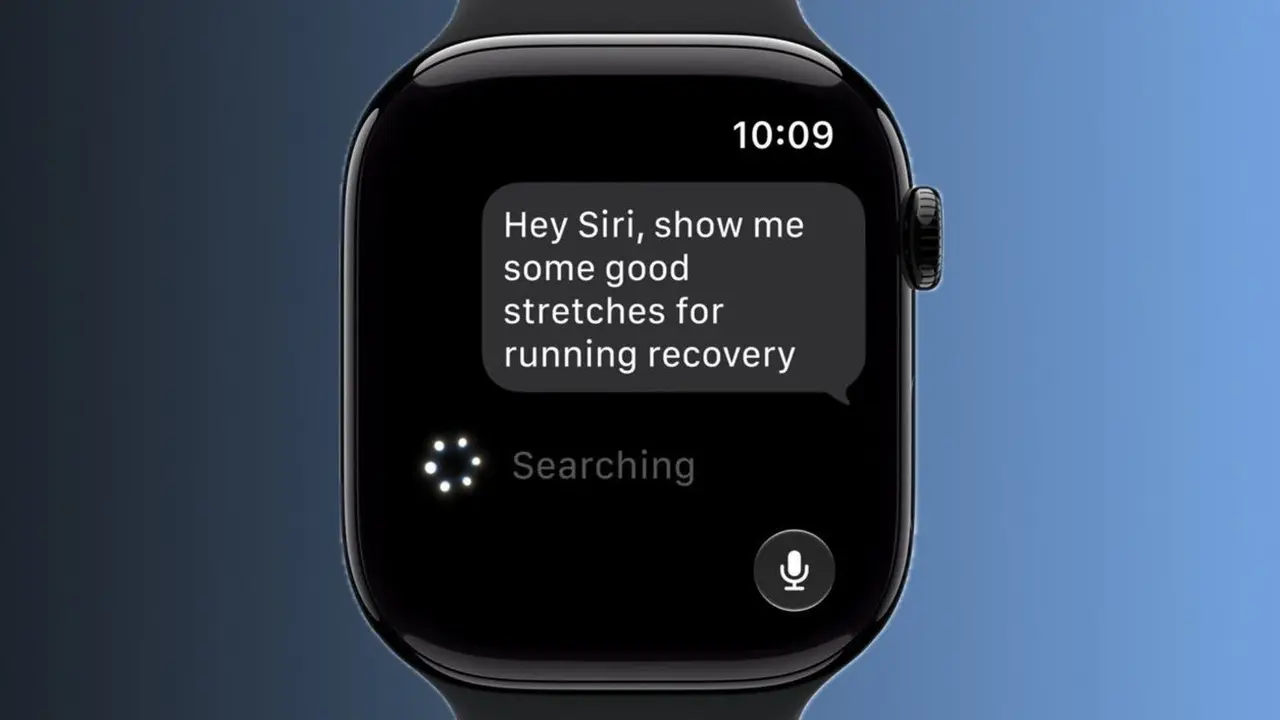
. While the previous version in watchOS 26 primarily surfaced milestones, the new version analyzes trends more deeply and now works in Spanish. The system can recognize when users conquer hills or put in extra effort, congratulating them for maintaining pace despite elevation changes. Clark noted that users can leverage Siri AI's broad world knowledge to get science-backed answers about health topics like LDL cholesterol or receive recommendations for running recovery stretches, though the system doesn't proactively offer health advice1
.
Source: Geeky Gadgets
The watchOS 27 update controversially requires an Apple Watch Series 9, Apple Watch Ultra 2, Apple Watch SE 3, or newer models, limiting support to just six Apple Watch models
4
. Apple justifies this by stating that newer hardware works best with Siri AI capabilities. Beyond Siri AI, watchOS 27 beta 3 introduces offline maps that can be downloaded and accessed directly on the Apple Watch without an iPhone, car location tracking that automatically records parking spots when disconnecting from CarPlay, and new watch faces exclusive to Apple Watch Ultra5
. The update also removes the Walkie-Talkie app permanently, reflecting Apple's shift toward features with broader utility5
. Users may need to wait for the new Siri experience to fully load after updating before they can access Siri AI or the standalone Siri app2
.Summarized by
Navi
[3]
[4]
15 Jul 2026•Technology

08 Jun 2026•Technology

17 Jun 2026•Technology

1
Technology

2
Technology

3
Science and Research