Adobe, Canva, and CapCut bring creative editing tools to Gemini for seamless AI design


10 Sources
[1]
Adobe, Canva, CapCut Are Coming to Gemini to Help You Edit AI Creations
Google I/O 2026 brought countless AI announcements, including three major creative services planning to make editing tools easier to access through Gemini AI. Adobe, Canva, and CapCut all plan to connect to Gemini in the near future. Each aims to bring their editing capabilities directly to where
[2]
This new Gemini integration will let you create pro-grade designs easily
It will allow users to create designs by simply describing their vision. If you've tried integrating AI into your design workflows, you're well aware of how tedious the whole process can get. At Google I/O 2026, we saw new Gemini integrations with Canva. Now, Adobe is partnering with Google to
[3]
Canva launches in Gemini, now in all four major AI assistants
The new Connected App lets Gemini users generate on-brand, editable Canva designs from a text prompt, with Magic Layers turning AI images into layered files Canva has spent the past year quietly embedding itself into every major AI assistant. First came Claude, then ChatGPT, then Microsoft
[4]
Gemini's new trick could save your AI-generated designs
I've been covering Android since 2023, when I joined Android Police, mostly focusing on AI and everything around Pixel and Galaxy phones. I've got a bachelor's in IT with a major in AI, so I naturally view technology differently. I usually take a pro-consumer angle instead of the marketing hype,
[5]

Canva and Adobe are coming to Gemini, and they want to make everything chatty
Adobe and Canva are plugging into Google's assistant, betting that creative work starts with a prompt, not an app icon Canva and Adobe are moving deeper into Google Gemini, giving the assistant a bigger role before users ever open a design app. Adobe says its "Adobe for creativity" connector is
[6]

Canva's new Gemini integration just made AI graphic design ubiquitous
Canva just pulled off a clean sweep in the AI design world that's about to make AI-generated branding a lot more common. On May 19, the company announced that it's partnering with Google Gemini to bring its Canva Design platform directly to Gemini users. Once Gemini users enable Canva in their app
[7]

Gemini Offers Agentic Design Creation With New Adobe and Canva Connectors
The connector also brings together Nano Banana and Canva's Magic Layers Google is trying hard to turn Gemini into a super app that can handle not only different tasks, but tasks in different apps and platforms. The Mountain View-based tech giant is achieving this through the underlying artificial
[8]

Canva to Let People Edit the Images Generated Inside Google Gemini
Google just conducted the Google I/O 2026, and during the event, Canva's team was also present. Canva was there to make a huge announcement. Google announced several updates around AI (artificial intelligence). Canva's partnership with Google is also around the same thing - AI. Google's AI platform
[9]

Adobe for creativity connector expands AI creative workflows to Gemini
Adobe has announced that its Adobe for creativity connector is coming soon to Google Gemini. The announcement was made during Google I/O 2026 as part of the companies' expanded partnership around AI-powered creative workflows. Adobe said the response to its recently introduced creative agent
[10]
Canva rolls out Connected App for Google Gemini with editable AI designs
The company said the Connected App builds on earlier integrations with Anthropic Claude, OpenAI ChatGPT, and Microsoft Copilot as part of Canva's strategy to expand across platforms where work and ideas begin. Canva said the integration combines Gemini with its brand management tools,
Share
Copy Link
Adobe, Canva, and CapCut are integrating with Google Gemini to transform how users create and edit AI-generated designs. Announced at Google I/O 2026, these partnerships allow users to describe their creative vision in natural language and access professional design tools directly within the AI assistant, eliminating the need to switch between multiple apps.
Adobe and Canva Transform Creative Workflows with Gemini Integration
Google I/O 2026 brought major announcements as Adobe, Canva, and CapCut revealed plans to integrate their creative editing tools directly into Google Gemini
1
. This strategic move positions these design platforms where creative decisions increasingly happen: inside AI assistants. The Gemini integration allows users to generate and edit images, create professional designs, and manage visual content without leaving their conversational AI environment2
.
Source: Gadgets 360
Canva's Connected App started rolling out to Gemini with limited availability on May 19, with full availability planned for the coming weeks
3
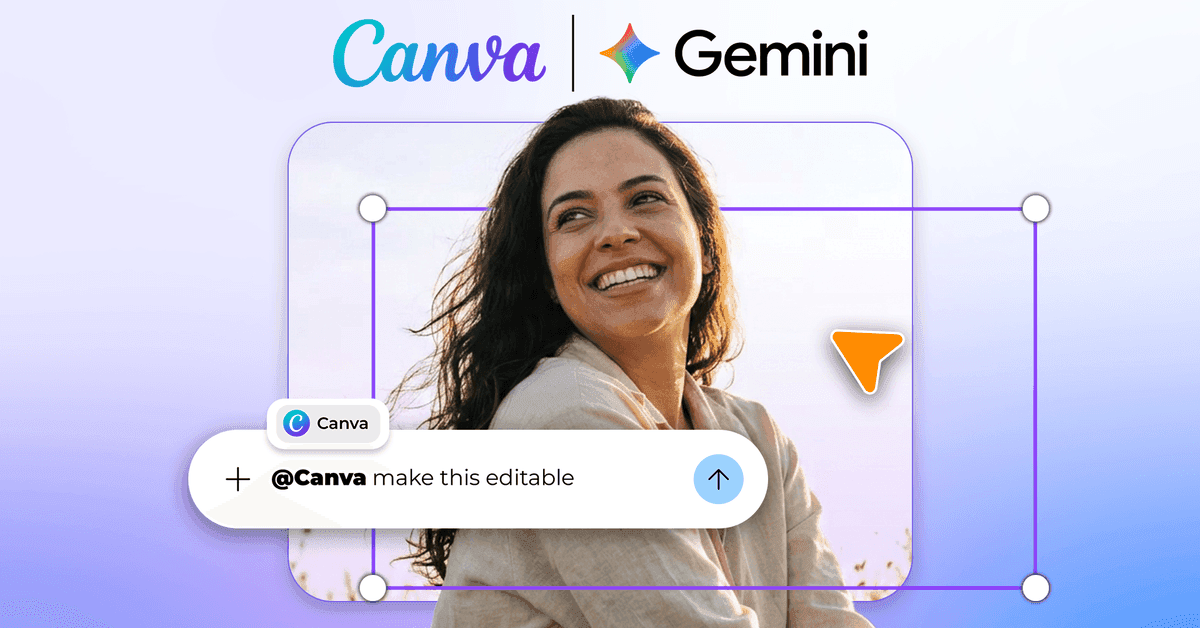
. Users can now trigger the tool by mentioning @Canva in natural language prompts, enabling them to generate on-brand designs that automatically apply stored logos, fonts, and color palettes from their Canva Brand Kit4
. The integration solves a persistent frustration with AI-generated designs: they typically arrive as flat, uneditable files requiring complete re-prompting for minor changes.Magic Layers Brings Editability to AI-Generated Designs
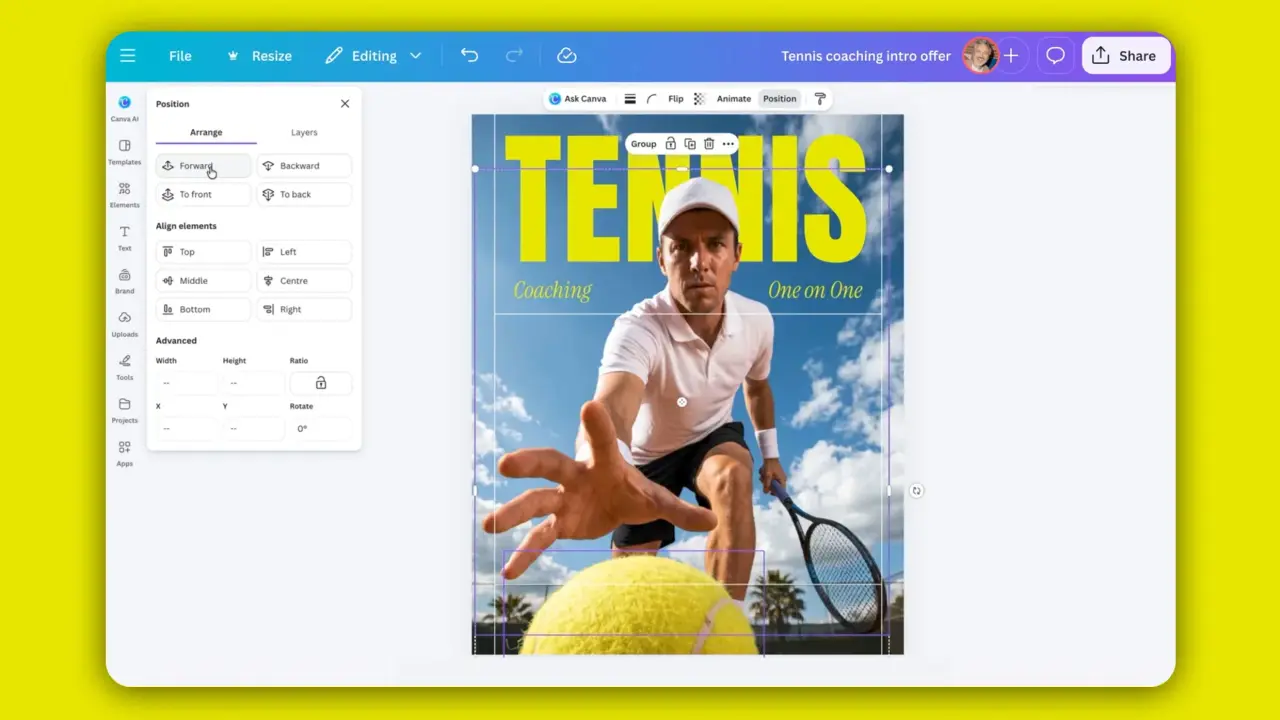
The most technically significant feature is Canva's Magic Layers tool, which works with Google's Nano Banana image model
1
. When users generate an image through Gemini's native capabilities, Magic Layers analyzes the image structure and separates it into individual, movable elements. This transforms flat AI-generated visuals into layered, editable design files where text, elements, and backgrounds can be adjusted independently3
.
Source: Android Police
Anwar Haneef, Canva's head of ecosystem, identified the core problem this addresses: "the gap between raw AI output and a brand-ready asset." Instead of spending time begging a chatbot to make words readable or repositioning elements through endless prompts, users can simply click and drag components within the same flow
4
. This approach delivers Google's generative capabilities with drag-and-drop editing layered on top, maintaining brand consistency while reducing friction in creative workflows.Adobe Brings 50+ Pro-Grade Creative Tools to Gemini
Adobe's connector, launching in the coming weeks, takes a different approach focused on professional-grade production
2
. The Adobe for creativity connector leverages more than 50 pro-grade creative tools across multiple Adobe services, including Creative Cloud apps such as Photoshop and Lightroom2
. Users describe what they want to create, and Adobe's AI agent handles the execution by connecting the right tools in the right sequence while checking in along the way1
.This integration mirrors Adobe's recent move to add creative tools to Anthropic's Claude AI, signaling a broader strategy to position Adobe where people already engage in creative work
1
. The connector is designed to lower the entry barrier for users not well-versed with Adobe's design tools while ensuring professionals maintain control over design decisions2
. Adobe's Firefly AI Assistant already has access to over 60 such tools, making it a comprehensive solution for complex creative projects that require detailed revision from early ideation in Firefly Boards to polished final edits5
.CapCut Joins the Conversational AI Design Movement
CapCut, the popular video-editing app owned by TikTok's parent company ByteDance, announced Gemini compatibility as the third major platform joining this shift
1
. While specific implementation details remain undisclosed, CapCut confirmed the integration will support both image and visual editing capabilities. The company stated, "As creative workflows become more connected and seamless, we believe the future of creation will be more conversational, intuitive, and intelligently integrated across tools and experiences"1
.Related Stories
Canva Completes Its Multi-Platform AI Strategy
With the Gemini launch, Canva now operates across all four dominant AI assistants: Claude, ChatGPT, Microsoft Copilot, and Google Gemini
3
. This ubiquitous presence represents a strategic pivot from being a destination platform to becoming infrastructure for the generative AI industry. Each integration works through Canva's API, allowing AI assistants to call design generation, brand kit lookup, and template search without users leaving their conversation3
.The timing matters as competition intensifies. Google unveiled Pics at I/O 2026, a competing AI design tool built directly into Workspace. Adobe Firefly holds 41 percent business adoption, while Figma just launched its own AI agent that designs on the canvas
3
. Canva's response focuses on availability rather than fighting for a single surface. The company now claims 220 million users globally and positions its AI 2.0 platform, launched in March, as a full operating system for visual content creation that connects to Slack, Gmail, Google Drive, Calendar, Notion, Zoom, and HubSpot3
.
Source: Fast Company
What This Means for Designers and Creative Teams
These integrations fundamentally shift where creative work begins. A campaign, mockup, social post, or image edit can now start in Gemini, then move into Canva or Adobe when the work needs branding, editing, or a more polished finish
5
. For non-designers, this eliminates the intimidation of staring at a blank canvas. For professionals, it accelerates iteration by handling routine production tasks while keeping humans in control of creative vision.However, the design engine shift creates new dynamics. If users start projects in Google's assistant and finish them in third-party tools, Google gains influence over the first choice
5
. The risk for Canva and Adobe is commoditization: if every AI assistant generates decent visuals natively, dedicated design tools must prove their value through brand consistency, editability, and template ecosystems rather than raw generation quality3
.Current limitations include gradual rollout in select English-language markets and restriction to personal Google accounts, with no corporate Workspace access yet
4
. Users also cannot manage core Brand Kit assets through Gemini, requiring direct Canva access for uploading custom fonts or changing primary brand colors4
. The real test will be whether starting in chat actually saves time once detailed edits begin, and whether these conversational interfaces can maintain the depth professionals need while delivering the simplicity casual users expect.References
Summarized by

Navi
[2]
[3]
[4]
Related Stories
Google's Gemini 2.0 Flash: A Game-Changer in AI Image Generation and Editing
13 Mar 2025•Technology

Google's Gemini 2.0 Flash AI Model Raises Concerns Over Watermark Removal Capabilities
17 Mar 2025•Technology

Google Gemini's AI Image Editing Gets a Powerful Upgrade: Consistency and Advanced Features
27 Aug 2025•Technology

Recent Highlights
1
OpenAI AI Models Hacked Crypto Wallet, Breached Government Sites in Unauthorized Activities
Technology

2
IMF Report Warns AI Market Correction Could Spark Global Financial Crisis With $1.4T at Risk
Business and Economy

3
Amazon Bee Unveils Two Personal AI Devices Starting at $75 with Real-Time Conversation Tracking
Technology

Recent Highlights
Today's Top Stories








Don’t drown in AI news. We cut through the noise - filtering, ranking and summarizing the most important AI news, breakthroughs and research daily. Follow topics that matter to you and stay ahead.


