6 Sources
[1]
You can now talk to your Gmail inbox, as seen at Google IO 2026 | TechCrunch
Google isn't finished infusing AI into your inbox. On Tuesday at their IO 2026 developer conference, the tech giant announced an expansion of its "AI Inbox" functionality for Gmail, which is adding conversational AI features. That means you can ask Gmail about things in your inbox instead of typing in search terms. The company says the Gemini AI-powered feature, called Gmail Live, will help you quickly find information buried in your inbox. Perhaps you need information about your upcoming flight, the time of your dentist appointment, the door code for your Airbnb rental, or some details about an event at your kid's school, for instance. Before, you'd have to type in keywords in the search box (or maybe type in someone's email address or domain) to try to narrow down your search. That doesn't always make emails easy to find, however, especially if the search term is something found across several messages. "Gmail Live can answer naturally phrased questions, respond to follow-up questions, and pivot if you need to interrupt it," Devanshi Bhandari, product lead for Gmail, explained in a briefing ahead of Google's annual developer conference, Google I/O, where the feature was first introduced to the public. It's another way that Google is trying to showcase how its AI technology can drive real-world improvements to products used by millions of consumers, at a time when many outside the tech industry are questioning the value of AI, as new data centers get built in their backyards, driving up their power bills. Being able to point to something as simple as making it easier to find something that's lost in your email inbox -- an experience nearly everyone has suffered at some point -- could be a practical and positive use case for AI ... or at least, Google hopes. Bhandari demonstrated Gmail Live to reporters, asking the tool a series of questions about things in the inbox, like a child's show-and-tell project and their class trip, plus hotel and flight information for a trip to Detroit. Similar to using a stand-alone AI chatbot like Gemini or ChatGPT, Gmail users can ask these questions aloud in natural language, and the chatbot responds. In the demo, Gmail Live also understood nuances between things like "field trip" and "trip" and was able to jump from one topic to another, Bhandari pointed out. Plus, the AI can pull granular details from emails, like a hotel room number, or infer which people you're asking about, even when they're not explicitly named. Similar voice technology is also coming to its to-do list, Google Keep, the company noted. Notably, Gmail Live is not replacing traditional Gmail search -- it's just another option. Google may have learned that not everyone is ready for an AI-only experience after it "upgraded" Google Photos with AI-powered search to much backlash. Google Photos later rolled back the feature, making the use of AI optional after numerous complaints. Gmail is also gaining other new capabilities, including ready-to-send drafts, instant file access, and the ability to manage to-dos by marking individual tasks as done. Plus, the AI Inbox experience, which launched earlier this year, will expand beyond Google AI Ultra subscribers to reach Google AI Pro and Plus subscribers as well. This allows you to see an overview of the tasks and items to catch up on that are buried in your inbox, all on one page. The voice-powered Gmail Live feature, however, will roll out later this summer and will initially be limited to Google AI Ultra subscribers. Google Search as you know it is over Google updates Gemini app to take on ChatGPT and Claude
[2]
Google's AI now lets you talk to your Gmail inbox | TechCrunch
Google isn't finished infusing AI into your inbox. On Tuesday, the tech giant announced an expansion of its "AI Inbox" functionality for Gmail, which is adding conversational AI features. That means you can ask Gmail about things in your inbox instead of typing in search terms. The company says the Gemini AI-powered feature, called Gmail Live, will help you quickly find information buried in your inbox. Perhaps you need information about your upcoming flight, the time of your dentist appointment, the door code for your Airbnb rental, or some details about an event at your kid's school, for instance. Before, you'd have to type in keywords in the search box (or maybe type in someone's email address or domain) to try to narrow down your search. That doesn't always make emails easy to find, however, especially if the search term is something found across several messages. "Gmail Live can answer naturally phrased questions, respond to follow-up questions, and pivot if you need to interrupt it," Devanshi Bhandari, product lead for Gmail, explained in a briefing ahead of Google's annual developer conference, Google I/O, where the feature was first introduced to the public. It's another way that Google is trying to showcase how its AI technology can drive real-world improvements to products used by millions of consumers, at a time when many outside the tech industry are questioning the value of AI, as new data centers get built in their backyards, driving up their power bills. Being able to point to something as simple as making it easier to find something that's lost in your email inbox -- an experience nearly everyone has suffered at some point -- could be a practical and positive use case for AI ... or at least, Google hopes. Bhandari demonstrated Gmail Live to reporters, asking the tool a series of questions about things in the inbox, like a child's show-and-tell project and their class trip, plus hotel and flight information for a trip to Detroit. Similar to using a stand-alone AI chatbot like Gemini or ChatGPT, Gmail users can ask these questions aloud in natural language, and the chatbot responds. In the demo, Gmail Live also understood nuances between things like "field trip" and "trip" and was able to jump from one topic to another, Bhandari pointed out. Plus, the AI can pull granular details from emails, like a hotel room number, or infer which people you're asking about, even when they're not explicitly named. Similar voice technology is also coming to its to-do list, Google Keep, the company noted. Notably, Gmail Live is not replacing traditional Gmail search -- it's just another option. Google may have learned that not everyone is ready for an AI-only experience after it "upgraded" Google Photos with AI-powered search to much backlash. Google Photos later rolled back the feature, making the use of AI optional after numerous complaints. Gmail is also gaining other new capabilities, including ready-to-send drafts, instant file access, and the ability to manage to-dos by marking individual tasks as done. Plus, the AI Inbox experience, which launched earlier this year, will expand beyond Google AI Ultra subscribers to reach Google AI Pro and Plus subscribers as well. This allows you to see an overview of the tasks and items to catch up on that are buried in your inbox, all on one page. The voice-powered Gmail Live feature, however, will roll out later this summer and will initially be limited to Google AI Ultra subscribers.
[3]
Gmail Live lets you voice-search your inbox with AI
Google is betting that the future of email search is not typing, but talking. At Google I/O 2026, the company unveiled Gmail Live, a voice-powered conversational search feature that lets users ask their inbox questions out loud instead of fumbling with keywords. The feature is built on Gemini, Google's flagship AI model, and works a bit like chatting with a personal assistant who has read every email you've ever received. Need your Airbnb door code? Ask. Wondering when your dentist appointment is? Just say so. Gmail Live can pull granular details from buried messages, jump between topics mid-conversation, and even infer which contacts you're asking about without you naming them. Devanshi Bhandari, Google's head of product for Gmail and Gemini for Gmail, demonstrated the feature in a briefing ahead of I/O. In one example, the AI distinguished between a "field trip" and a "trip," understanding the context well enough to surface the right email. Users can interrupt, ask follow-ups, or pivot to an entirely different topic without starting over. Google is careful to position Gmail Live as an alternative to traditional search, not a replacement. That caution is likely informed by the backlash it faced over Ask Photos, the AI-powered search tool in Google Photos that drew widespread complaints for inaccuracy. After vocal criticism across Reddit, X, and its own support forums, Google rolled out a toggle in March 2026 letting users revert to classic search. The lesson seems clear: make AI optional, not mandatory. Gmail Live follows that playbook, sitting alongside the existing keyword search rather than overwriting it. Gmail Live is part of a broader push to make Google's email smarter. The AI Inbox experience, which launched in January 2026 exclusively for Google AI Ultra subscribers, is now expanding to AI Pro and AI Plus tiers. It surfaces an overview of critical to-dos, provides ready-to-send draft replies, and links to relevant Docs, Sheets, and Slides, all designed to help users triage faster without opening individual messages. Beyond the inbox, Google is threading the same voice-first approach across its productivity suite. Google Keep is gaining an AI voice mode that can take free-flowing spoken thoughts and sort them into separate, neatly formatted notes. Google Docs is getting its own "Live" treatment too, part of a wider strategy to embed agentic AI across Workspace apps. Gmail Live will roll out later this summer on Android and iOS, initially limited to Google AI Ultra subscribers in the US. AI Pro subscribers will gain access shortly after. The broader AI Inbox features are available now for Pro, Plus, and Ultra tiers. The real test will be whether Gmail Live can deliver consistently accurate results across millions of messy, real-world inboxes. Google's track record with AI search has been mixed, and the regulatory pressure mounting in Europe over its AI integration practices adds another layer of scrutiny. But if Gmail Live works as smoothly as the demo suggests, the days of guessing at the right keyword combination to find that one email may finally be numbered.
[4]
'Gmail Live' is a new way to search emails as AI Inbox comes to AI Plus, AI Pro
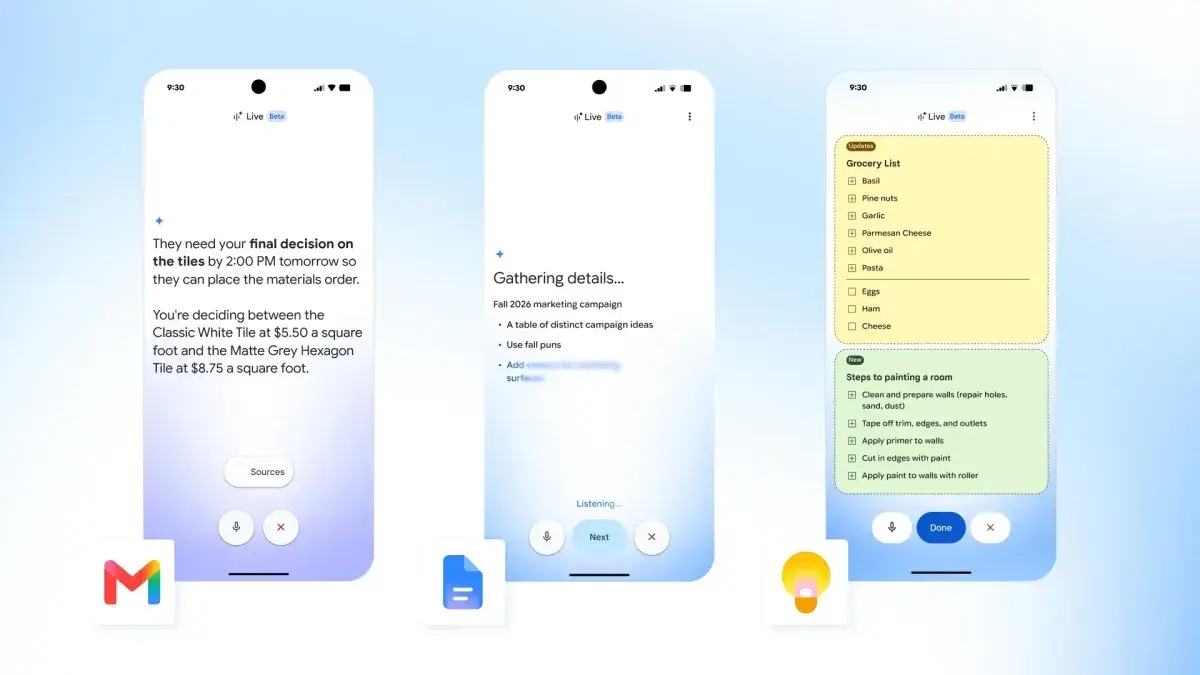
At I/O 2026, Google announced two big updates for Gmail, starting with a new Live voice search experience. On mobile, you'll find the same waveform icon used by Gemini Live in the search bar. This launches a fullscreen experience with a waveform that hugs the edge of your screen. You'll see a transcript of what you asked and Gmail's responses. Buttons at the bottom let you mute the microphone and exit. Questions can be phrased naturally with support for follow-ups and switching topics in the same conversation. It's very much like Gemini Live but optimized for Gmail. In terms of availability, Gmail Live is rolling out to Google AI Pro and AI Ultra subscribers in the US (English) this summer on Android and iOS. Before today, Gmail's AI Inbox was available only to AI Ultra subscribers. Google is now bringing the experience to AI Plus and AI Pro with new capabilities. AI Inbox prioritizes tasks and what you need to accomplish over individual messages. It's grouped by "Suggested to-dos" and "Topics to catch up on." On the web, it appears just below the regular Inbox in your side panel, while it's also available from the bottom bar on mobile. The first new feature today lets you mark tasks as done or mark all emails in a topic as read. There's also the ability to dismiss suggestions. When relevant, each card will have direct shortcuts to mentioned Docs, Sheets, or Slides in the email. The final addition provides contextual and personalized drafts to immediately respond.
[5]
Google I/O 2026: You can talk to your Gmail inbox soon
Soon you'll be able to literally talk to your Gmail inbox. At its I/O developer conference today, Google unveiled a new native AI voice integration feature for Gmail called Gmail Live. The tool will let users get information from their emails by verbally asking Gmail for it, rather than typing keywords into its search bar. According to a company blog post, you can "Say things like, 'What's my flight's gate number?' or 'What's going on at my kid's school this week?' and Gmail Live will search your inbox to find the answer instantly." Similar conversational features are coming to Google Docs and Keep, too. Gmail Live will be available to Google AI Pro and Ultra subscribers this summer. It will launch in preview to Google Workspace business customers at the same time. Also at I/O, Google announced the expansion of its AI Inbox tool it originally rolled out to Google AI Ultra subscribers in January. Per the same blog post, it's getting updated with three extra features, and Google AI Pro and Plus subscribers will soon have access to it as well. As Mashable's Anna Iovine reported previously, AI Inbox is like a personalized briefing. It provides updates on topics you've gotten emails about and suggests next steps. AI Inbox's brand-new features include personalized draft replies; instant file access to relevant Google Docs, Sheets, or Slides; and streamlined task management. With the latter, you can "Keep your view clutter-free by marking individual tasks as done, dismissing unhelpful suggestions or marking all emails in a given topic as read with a single click," the blog post reads. Google will begin deploying AI Inbox's new features and broader availability starting today. In an interview with Mashable, Gmail's VP of product, Blake Barnes, said user privacy is central to both Gmail Live and AI Inbox. "We don't use your data for training, and that remains the case for these features," he said. Barnes added that Google is working to build trust with those who are hesitant to incorporate more AI in their inboxes by building sourcing into the new Gmail features. "So, what are the specific emails that were used to generate the reply and the response that you just received?" he explained. "It's just one of the ways amongst many to sort of give you the confidence that the answer we've given you is the right one and the accurate one," Barnes said.
[6]
Gmail Live is the Future of Searching Your Inbox
There's no avoiding Gemini and AI within Google products at this point. Google is putting Gemini or AI in every conceivable place in order to find spots that stick or get the most use. The latest example of that, following a lengthy Google I/O opening keynote, is in Gmail's search function. Today, Google introduced Gmail Live, a voice-activated way to search your inbox. The idea here is that you might be on the go and don't have time to type out a search query and could instead just talk to Gmail by voice. Think of it like Gemini Live only in Gmail. Google describes it this way: When you're on the go, you don't have time to dig through emails. With Gmail Live, you can just ask for what you need. Say things like, "What's my flight's gate number?" or "What's going on at my kid's school this week?" and Gmail Live will search your inbox to find the answer instantly. To activate it, you would tap on the voice or Live icon in the search bar of Gmail and then start talking to it, just like you do in Gemini Live. In the example above, a person asked Gmail Live if they need to bring anything to kindergarten today for their child? Gmail Live responded by saying, Yes, today is Show & Tell" day, which it knew from knowing the deep ins-and-outs of their inbox. Gmail Live will begin rolling out to Google AI Pro and Ultra subscribers this summer. As an added bonus, Google announced today that they have new features to introduce within the AI Inbox feature they first brought to us in January of this year. Those new features are as follows, according to Google: Gmail's AI Inbox was previously only available to Google AI Ultra subscribers, but starting today, it'll roll out to Google AI Ultra and Pro subscribers in the US.
Share
Copy Link
Google introduced Gmail Live at I/O 2026, a voice-powered feature that lets users search emails using natural voice commands instead of typing keywords. The conversational AI tool, built on Google Gemini, can answer follow-up questions and pull granular details from buried messages. AI Inbox is also expanding beyond Ultra subscribers to reach Pro and Plus tiers.
Google announced Gmail Live at Google I/O 2026, a conversational AI feature that fundamentally changes how users find information in your inbox
1
. Instead of typing keywords into a search bar, users can now talk to their Gmail inbox using natural language questions to locate buried emails. Built on Google Gemini, the AI-powered voice search tool responds to spoken queries about flight gate numbers, dentist appointment times, Airbnb door codes, or school event details3
.Devanshi Bhandari, product lead for Gmail, explained that "Gmail Live can answer naturally phrased questions, respond to follow-up questions, and pivot if you need to interrupt it"
1
. The feature demonstrates contextual understanding by distinguishing between terms like "field trip" and "trip," jumping between topics mid-conversation, and inferring which contacts users reference without explicit names2
. Users can pull granular details such as hotel room numbers from emails through simple voice commands.On mobile platforms, Gmail Live appears as a waveform icon in the search bar, launching a fullscreen experience similar to Gemini Live
4
. The interface displays transcripts of both user questions and Gmail's responses, with buttons to mute the microphone or exit the conversation. This voice technology mirrors the experience of chatting with a personal assistant who has read every email, allowing users to search emails using natural voice commands without fumbling through keyword combinations3
.The same voice technology is extending beyond email to Google's productivity suite, with Google Keep gaining an AI voice mode that transforms free-flowing spoken thoughts into formatted notes
3
. Google Docs is receiving its own "Live" treatment as part of a broader strategy to embed agentic AI across Workspace applications.AI Inbox, which launched in January 2026 exclusively for Google AI Ultra subscribers, is now expanding to reach Google AI Pro and Plus subscribers
1
. The feature prioritizes task prioritization over individual messages, grouping content into "Suggested to-dos" and "Topics to catch up on"4
. On the web, it appears below the regular inbox in the side panel, while mobile users access it from the bottom bar.New capabilities include personalized draft replies that provide contextual and ready-to-send responses, instant file access to relevant Google Docs, Sheets, or Slides mentioned in emails, and streamlined task management
5
. Users can mark individual tasks as done, dismiss unhelpful suggestions, or mark all emails in a topic as read with a single click4
.Related Stories

Gmail Live is not replacing traditional Gmail search but serves as an alternative option
2
. This approach reflects lessons learned from the Google Photos AI-powered search backlash, where the company rolled back mandatory AI features after widespread complaints and later made AI optional1
. By positioning conversational AI as complementary to existing search methods, Google aims to improve user experience without forcing adoption.Blake Barnes, Gmail's VP of product, emphasized that user privacy remains central to both features. "We don't use your data for training, and that remains the case for these features," he told Mashable
5
. Google is building sourcing into the new Gmail features, showing which specific emails generated responses to build confidence in accuracy.Gmail Live will roll out later this summer, initially limited to Google AI Pro and AI Ultra subscribers in the US on Android and iOS
4
. The feature will also launch in preview to Google Workspace business customers simultaneously5
. AI Inbox's expanded features and broader availability began deploying immediately following the announcement.The real test lies in whether Gmail Live delivers consistently accurate results across millions of real-world inboxes
3
. Google's track record with AI search has been mixed, and mounting regulatory pressure in Europe over AI integration practices adds scrutiny. For users, this represents a shift from typing keywords to speaking naturally, potentially ending the frustration of guessing the right search terms to locate that one buried email.Summarized by
Navi
[3]
23 Apr 2026•Technology
21 May 2025•Technology

08 Jan 2026•Technology