5 Sources
[1]
Google's AI Studio now lets anyone build Android apps in minutes | TechCrunch
The AI coding boom is now coming directly for Android app development. On Tuesday, Google announced new native Android app creation capabilities in its web-based Google AI Studio, shrinking a process that takes weeks of setup and coding down to minutes. The company also said that consumers will be able to use Gemini AI to find the apps they need, both on the Play Store and the web, expanding opportunities for developers to have their apps discovered. Google says the new capabilities could make sense for anyone from a seasoned developer looking to prototype a new app quickly to a first-time creator. By offering the ability to essentially vibe-code Android apps via web-based tools, Google is ramping up the competition with other AI-powered development tools, like Cursor, Replit, Lovable, Claude Code, and others, while also opening up Android development to a new type of user: a non-technical creator. The news also represents an expansion of Google's earlier addition of AI-powered coding with Gemini in its desktop version of Android Studio. The apps are built with the Kotlin programming language using Google's Jetpack Compose toolkit and with support integration with hardware sensors like GPS, Bluetooth, and NFC, the company says. However, the resulting creations, for now, are only meant to be used personally, as publishing for family and friends is still on the roadmap. The company suggests the technology could be used for the creation of personal utilities and simple social apps, hardware-enabled experiences, or AI-powered experiences. For now, would-be app developers can use the embedded Android Emulator directly in a web browser to preview and interact with the app as it's being built. Users can then install the app on their Android phone over a USB cable connected to their computer, using the integrated Android Debug Bridge (adb). For those looking to take their project further, AI Studio can automatically create the app record, package the bundle, and upload it to an internal testing track in Google Play Console for developers. This allows users to continue to iterate on their app while updating on their devices along the way. Those who want to take the next steps to publishing the app more publicly can hand off this version of the project to Android Studio by downloading a zip file and exporting it directly to GitHub. In time, Google plans to allow creators to publish their apps for use by family and friends and will add support for Firebase integrations (Firestore, Firebase Auth, Firebase App Check, and other tooling). In doing so, the company is imagining an Android app ecosystem where users find apps from among their own network of friends, not just the Play Store. However, for the latter, Google is infusing AI into the experience here, too. A new "Ask Play" AI-powered overlay will allow users to discover new apps by having natural conversations with AI within the Play Store. Perhaps more importantly, apps will begin to be surfaced with users' conversations with Google's Gemini virtual assistant, exposing developers' apps to millions of users. This will roll out in the weeks ahead across Gemini on the web and on Android. Later this year, Gemini will also surface over 450,000 movies and TV shows, plus where to livestream sports, which can directly link users from their queries to a developer's Android app with the content in question. While Google previewed a number of Android-related announcements last week, it held back on sharing the news of the native Android app development until Tuesday's start of its annual developer conference, Google I/O. That suggests the company believes this is bigger news and more closely tied to its idea of putting AI to real-world use, as was the larger theme of this year's event, where AI was spread across Google products, from workspace productivity apps to AI tools, search, mobile apps, and more.
[2]
Google just made it possible to build Android apps with only a text prompt
Google is doing more at I/O than introducing Android 17's AI overhaul -- it's also transforming how you create apps. The tech giant has launched a slew of AI-powered programming tools at its conference, including a simple way to write code for native Android apps. You can now develop complete native Android apps in Google AI Studio on the web using only a prompt. You don't even need software or libraries to make full use of hardware, Google says. This effectively lets you write apps with virtually no experience, although you might want to send projects to Android Studio for further work. Google Pixel 10 Brand Google SoC Google Tensor G5 See at Amazon $799 at Best Buy $799 at Google Store $799 at AT&T Expand Collapse Google pitches this as a way to ease into development, but it's also a way to create highly personalized apps, much as Android 17 will allow for custom widgets. You can write an app that helps you pack for your hiking trips, the company explains. In other words, you don't have to wait for someone to cater to your exact needs. Upgrades to Android Studio for AI agents You can even use OpenAI to build apps with Google tools More experienced programmers are getting their own vibe coding upgrades. Android Studio now lets you use any AI model you like for agent-based app development, including Anthropic Claude, OpenAI GPT, or Google's own tools. This includes local models like Gemma 4. How I used Android Studio and Antigravity to make my first app I explored Antigravity to see what makes it different and how it helped me build my first app. Posts 10 By Patrick Campanale If you're using Canary (early pre-release) versions of Android Studio, you can also feed AI "Agent Skills" that make sure the models are aware of your special workflows and knowledge sets. You can run parallel conversations in Agent mode to test apps while you plan them, and New Project Agent will both correct build errors and set up dependencies even as you write apps for big-screen devices like foldable phones and Googlebooks. If you're using Android CLI, the Android Studio Quail Canary release lets agents make better use of tools. They can check files for problems or find symbol declarations, for instance. If you use Antigravity, 2.0 now supports Android development using CLI. Google will help you find Android apps, too Play Store apps will show up in Gemini searches Google is also helping everyday Android users find apps as well. The company plans to surface Play Store apps in Gemini searches and queries in the "coming weeks," so you may find your ideal app without a conventional web or store keyword hunt. Movies and TV shows are coming later in 2026. A new Ask Play feature, meanwhile, will help you find apps using more natural conversations that include both follow-ups and highlights for advanced searches. This comes on top of Play Shorts, a YouTube-like (and TikTok-like) video feed that previews app features. It's available to U.S. users and certain developers now, with more countries and developers coming aboard in the months ahead.
[3]
Google AI Studio can now build Android apps, Android Studio adds iOS app porting
Following The Android Show, Google made several developer announcements at I/O 2026, led by AI Studio's new capability to build native Android apps. The web-based AI Studio now lets you build native Android apps. Google notes that applications are "built with development best practices like Jetpack Compose, Kotlin, and APIs," as well as recommended developer patterns. You can go from prompt to prototype, iterate with an embedded Android Emulator in your browser, and then install the app on your Android phone over USB using the integrated Android Debug Bridge (ADB). If you have a Google Play developer account, you can also publish your app directly from AI Studio for internal testing. To prepare for a wider release, Google recommends using Android Studio for "advanced debugging, testing, and UI polish." You can add the project to Android Studio by downloading a ZIP file or exporting to GitHub. Google will be adding more features in the future, including: Meanwhile, Android Studio's Migration Assistant can be used to "port apps from platforms like iOS, React Native, or web frameworks to native Android." It reflects how developers have already been using LLMs for this purpose. Google's agent will take an existing project and "intelligently map features, convert assets like storyboards and SVGs, and implement Android best practices using Jetpack Compose and our recommended Jetpack libraries." This will effectively transform what used to be weeks of manual porting into a streamlined agentic workflow that only takes hours. We shared a preview of this upcoming feature in the developer keynote. After five years, Google has made Compose the standard for UI development. This Compose-first approach is reflected in all future guidance and libraries. Building on five years of evolution, the latest releases deliver a mature toolkit, from the highly customizable Styles API to refined shared element transitions and enhanced input support. These updates allow you to build beautiful, adaptive apps with less code and better performance. On that front, "Android 17 marks a shift toward a single, Compose-based development model for all widgets." Google is unifying the developer experience across mobile, Wear OS (Tiles have been renamed to "Wear Widgets"), and cars through Jetpack Glance.
[4]
Google AI Studio can now build Android apps without you writing a single line of code
Google just made building real apps faster, cheaper, and more accessible than ever. Google I/O 2026 This story is part of our complete Google I/O coverage Updated less than 1 minute ago Google AI Studio had already become one of the best tools for developers to turn ideas into working apps. At Google I/O 2026, the company announced a wave of updates that make it even more powerful, and honestly, more fun to use. Here's a rundown of everything new. Could this be the end of complicated Android dev setups? Probably the biggest announcement is that you can now build native Android apps directly inside AI Studio without installing an SDK, setting up a local environment, or even owning a high-performance computer. You can describe your idea, and AI Studio will generate production-quality code. From there, you can preview your app inside a browser-based Android Emulator or install it directly on your Android device. Recommended Videos When you're ready, you can publish to Google Play's Internal Test Track with a single click by connecting your Play Developer account. This is a big deal because native Android development used to be intimidating and resource-heavy. Now, anyone can go from a prompt to a real app in minutes. What else is new in AI Studio? Google also added Google Workspace integration, so you can build apps that work directly with Google Sheets, Drive, and Docs data without switching tools. If you prefer local development, you can now export to Google Antigravity, with your conversation history and project files. On the design side, AI Studio can now generate custom images on the fly using Nano Banana, and a new annotation tool lets you draw directly on the app preview to tweak components and generate new visuals. Finally, Google is launching a mobile app for AI Studio, available for pre-registration today, so you can build and iterate on apps from your phone. Of course, you will still need a design and development basic understanding to create a good app, but the barrier to entry has been significantly reduced for all app builders.
[5]
Bring any idea to life: Google AI Studio at I/O 2026
For millions of builders, Google AI Studio has become the fastest path from prompt to a production app. At Google I/O 2026, we reimagined not just how you build, but what you can build, too. Here's everything we announced. Great apps don't live in isolation. We've steadily woven AI Studio into the broader Google ecosystem, and we're continuing that expansion. Google Workspace is now directly accessible from the apps you build within AI Studio. With this integration, you can build dashboards on top of your Sheets data, create tools that organize your users' Drive or spin up apps that work with the documents and data your team already lives in. You can do this all without leaving AI Studio. And if you want local development for faster iteration, you can now export directly to Google Antigravity. Your conversation history, project files and secrets all come with you, so you can pick up exactly where you left off, bring in your wider team and start scaling your development workflow. You should have control over your app's look and feel, designing it to reflect your vision and work well for your users. We've shipped several new design features in AI Studio to help you customize your app's visual style: Great ideas don't wait for you to be in front of a laptop. That's why we're bringing the full build-mode experience to your phone with a new mobile app. Available for pre-registration today, the AI Studio app allows you to iterate on code and preview builds directly from your pocket. With the Google AI Studio app, you can start on mobile on the go and then go deep in the flow when you're back at your desk. Remix apps from the mobile gallery for inspiration and share live deployments with your friends to gather feedback and collaborate. Create and share your next idea in minutes, all from your phone.
Share
Copy Link
Google announced native Android app creation capabilities in its web-based Google AI Studio at I/O 2026, shrinking weeks of setup and coding down to minutes. The new tools enable both seasoned developers and non-technical creators to build apps using text prompts, while Gemini AI will help users discover apps through natural conversations in the Play Store.
Google unveiled a significant shift in app development at Google I/O 2026 on Tuesday, introducing capabilities that allow anyone to build Android apps directly within its web-based Google AI Studio
1
. The announcement marks a dramatic acceleration in native Android app creation, compressing what traditionally takes weeks of setup and coding into a process that now takes mere minutes1
.
Source: Google
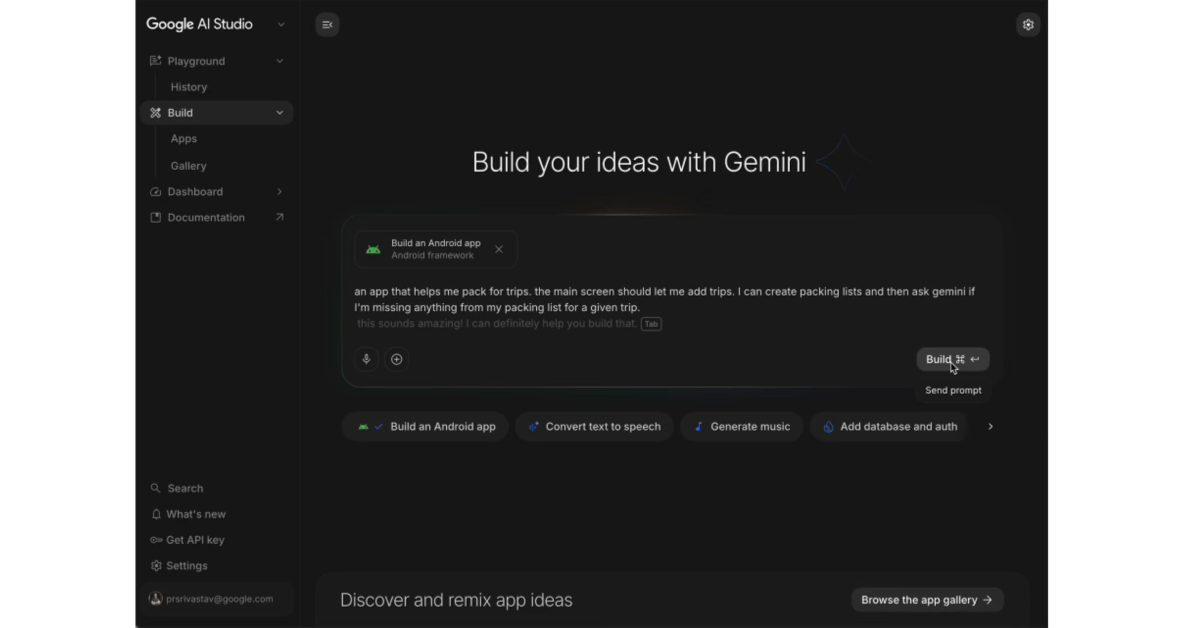
The new feature enables users to build Android apps with a text prompt, eliminating the need for software installations or extensive library configurations
2
. This approach opens Android development to non-technical creators while giving seasoned developers a faster path to prototyping1
. Applications are built using Kotlin programming language and Jetpack Compose toolkit, following development best practices and recommended patterns .
Source: 9to5Google
The AI-powered workflow supports integration with hardware sensors including GPS, Bluetooth, and NFC, enabling creators to build hardware-enabled experiences alongside personal utilities and AI-powered applications
1
. Users can preview their creations using an embedded Android Emulator directly in a web browser, then install apps on their Android phone over USB using the integrated Android Debug Bridge .
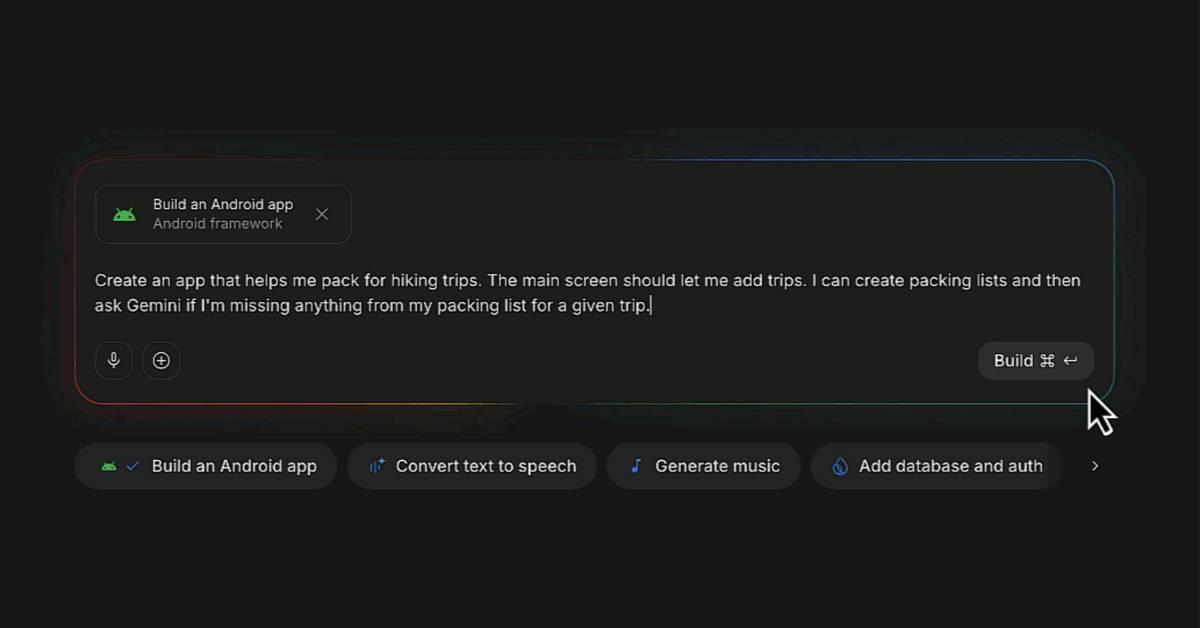
Source: How-To Geek
For developers with a Google Play developer account, Google AI Studio can automatically create the app record, package the bundle, and upload it to an internal testing track in Google Play Console
1
. When projects require advanced debugging, testing, or UI polish, creators can transition to Android Studio by downloading a ZIP file or exporting directly to GitHub . Google plans to add Firebase integrations and enable publishing for family and friends in future updates1
.Google Workspace integration now allows developers to build dashboards on top of Sheets data, create tools that organize Drive content, and develop apps that work with existing documents without leaving Google AI Studio
5
. For teams preferring local development, projects can export to Google Antigravity with conversation history, project files, and secrets intact5
.New design features include custom image generation using Nano Banana and an annotation tool that lets creators draw directly on app previews to tweak components and generate new visuals
4
. Google is also launching a mobile app for AI Studio, available for pre-registration, enabling full build-mode experiences from smartphones5
.Related Stories
Beyond creation, Google is transforming app discovery through AI. A new Ask Play feature will enable users to find apps through natural conversations within the Play Store
1
. More significantly, apps will surface within conversations with Gemini AI assistant across web and Android platforms in the coming weeks, exposing developers' creations to millions of users1
.Later in 2026, Gemini AI will also surface over 450,000 movies and TV shows plus livestream sports options, directly linking users from queries to relevant Android apps
1
. This shift suggests Google envisions an ecosystem where app discovery happens through AI conversations rather than traditional keyword searches2
.By enabling build Android apps with a text prompt functionality, Google intensifies competition with AI-powered development tools like Cursor, Replit, Lovable, and Claude Code
1
. For experienced programmers, Android Studio now supports any AI model for agent-based app development, including Anthropic Claude, OpenAI GPT, and local models like Gemma 42
.Android Studio's Migration Assistant can now port apps from iOS app porting, React Native, or web frameworks to native Android, transforming weeks of manual work into hours through intelligent feature mapping and asset conversion . This reflects how developers already use AI for cross-platform development while establishing Compose as the standard for UI development across mobile, Wear OS, and automotive platforms .
Summarized by
Navi
[4]
1
Technology

2
Technology

3
Technology