Google explains why AICore storage spikes during Gemini Nano updates on Android devices


3 Sources
[1]
Google AICore using more storage? That's by design
I've been writing about Android since 2011, with a focus on device reviews, Samsung and Google Pixel hardware, and the latest happenings in the ecosystem. In my entire writing career, I've reviewed more than 75 Android phones. Carrying both a Samsung or Pixel flagship and an iPhone as a daily
[2]
Google explains why Android AICore occasionally takes up more storage
Android AICore lets you "run generative AI features directly on your Android phone or tablet's hardware." These models (Gemini Nano) are inherently large, but Google now has a more detailed explanation of why Android AICore storage occasionally spikes. AICore is available on Android 14 and higher
[3]
Google finally explains why Android AICore keeps eating your storage -- and it actually makes a lot of sense
If you've ever glanced at your Android phone's storage breakdown and done a double-take at how much space AICore is consuming, you're not alone. It's one of those things that's easy to notice and hard to explain, and for a while, Google wasn't offering much clarity on it. That's changed now, and
Share
Copy Link
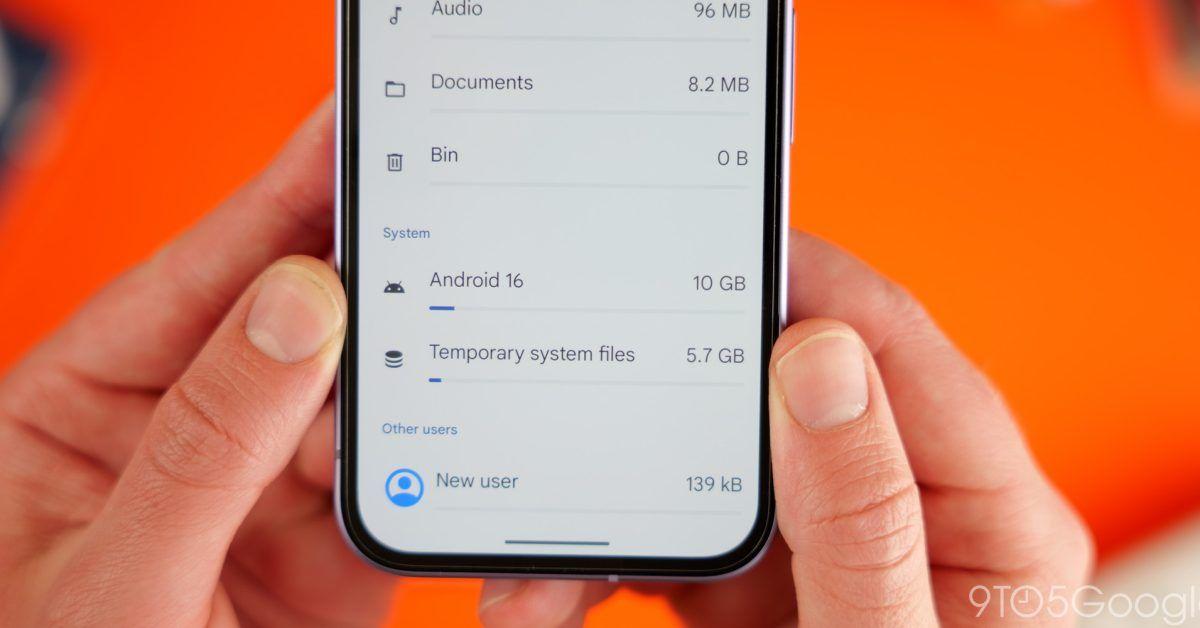
Google has clarified why AICore occasionally consumes more storage than expected on Android phones. The system app keeps both old and new versions of Gemini Nano for up to 3 days during updates as a fail-safe measure. This allows devices to revert to older versions instantly if problems arise, avoiding the need to re-download gigabytes of data.
Google AICore Storage Consumption Gets Official Explanation
Google has finally addressed a persistent question that has puzzled Android users: why does Google AICore occasionally consume significantly more storage space than expected? According to an updated support document
2
, the answer lies in how the system app manages AI model updates. When a new version of Gemini Nano becomes available, AICore temporarily keeps both the old and new versions of the model for up to 3 days1
. This deliberate design choice serves as a fail-safe mechanism, allowing devices to instantly revert to an older version if the new update encounters an error, rather than having to download gigabytes of data again2
.
Source: 9to5Google
The system app is responsible for managing on-device AI capabilities on Android devices, including running Gemini Nano locally on supported hardware. AICore is available on Android 14 and higher for compatible processors, powering features like scam detection in messages, smart replies in WhatsApp, real-time transcription, grammar correction, audio summarization, and translation
3
. These on-device AI features work without an internet connection and deliver faster performance compared to cloud-based alternatives, enhancing both privacy and reliability2
.Understanding Multiple AI Model Versions and Storage Spike
The storage spike occurs specifically during the transition period when AICore installs AI model updates in the background. On most Android phones, AICore typically takes around 7GB of storage space under normal conditions
1
. However, when holding multiple AI model versions simultaneously, AICore storage consumption can balloon to as much as 11-12GB1
. Once AICore verifies that the new AI model is working properly, it deletes the old version to free up storage space, returning to typical usage levels.
Source: Android Police
Users have also reported increased battery and CPU usage during these periods, which Google attributes to the app installing the updated AI model in the background
1
. This temporary increase in resource consumption is part of the normal update process for on-device generative AI capabilities.Impact on Different Storage Configurations
Google's approach makes sense from a reliability standpoint, particularly for devices with ample storage. Most premium and flagship Android phones from manufacturers like Samsung and Google Pixel now ship with 256GB storage as standard
1
. For these devices, Android AICore storage taking gigabytes of space during updates poses minimal concern. However, the situation differs for phones with 128GB or less storage, where the device may not have enough free space to store both versions of the AI model together1
.Ironically, Google itself sells the $999 Pixel 10 Pro with 128GB of storage, potentially creating storage challenges for users during AICore updates
1
. While users can reclaim storage space by disabling AICore, doing so would turn off Gemini Nano-powered features including scam detection, smart replies, summarization, enhanced grammar check, and translation capabilities1
.Related Stories

Why This Matters for On-Device AI Adoption
The broader case for on-device AI remains compelling despite the storage trade-offs. Sensitive data never leaving your device represents a meaningful privacy win in an era when cloud processing dominates
3
. Features that work in airplane mode prove more useful than they initially sound, particularly in areas with patchy connectivity. Local processing delivers snappier performance than waiting on server responses, improving the overall user experience.However, the goodwill only extends so far when users face unexplained AICore storage consumption with no context
3
. The updated support document represents a step toward transparency, though many argue Google should have communicated this engineering decision sooner given the confusion it caused. As on-device generative AI features become more prevalent across the Android ecosystem, clear communication about resource requirements will prove essential for user trust and adoption. Watch for how Google balances model size optimization with feature expansion in future updates, particularly as more devices in the mid-range segment gain access to these capabilities.References
Summarized by

Navi
[1]
Related Stories
Apple Intelligence Consumes Up to 30GB Storage on macOS 27 Macs, Double Apple's Stated Limit
24 Sept 2026•Technology

Google Chrome quietly installs 4GB AI model on user devices, raising privacy and consent questions
06 May 2026•Technology

Apple Intelligence Storage Requirements Double, Raising Concerns Among iPhone Users
04 Jan 2025•Technology

Recent Highlights



Recent Highlights
Today's Top Stories




Don’t drown in AI news. We cut through the noise - filtering, ranking and summarizing the most important AI news, breakthroughs and research daily. Follow topics that matter to you and stay ahead.


