Google's next-generation of Android Auto brings Immersive Navigation and Gemini AI control


3 Sources
[1]
Google showed me the future of Android Auto - and now I dread my own car
My first thought after demoing the upcoming Android Auto features at Google I/O this week was the dread of going back to my own car, innocently parked on the other side of the country. I've been an Android Auto user for years now, and while I'd like to think that I'm one of the more fortunate
[2]
Google's new Android Auto trick could save you from last-second lane panic
I've been covering Android since 2023, when I joined Android Police, mostly focusing on AI and everything around Pixel and Galaxy phones. I've got a bachelor's in IT with a major in AI, so I naturally view technology differently. I usually take a pro-consumer angle instead of the marketing hype,
[3]
I just tested the next-generation of Android Auto, and it's a huge leap forward that embarrasses Apple CarPlay
The next generation of Android Auto was announced at the Android Show, and I got to properly test it at Google I/O. In short: Apple CarPlay feels washed in comparison -- let me explain. It takes the car from simply being something you go from Point A to Point B in, and adds an additional layer of
Share
Copy Link
Google showcased major Android Auto updates at I/O 2025, introducing Immersive Navigation with detailed 3D view of maps, Gemini AI integration for conversational control, and Material 3 Expressive design. The upgrade targets over 250 million compatible vehicles and promises to transform the driving experience with AI-powered features that handle everything from lane guidance to vehicle settings.
Android Auto receives its biggest upgrade in over a decade
Google unveiled sweeping changes to Android Auto at Google I/O this week, introducing features that mark the platform's most significant evolution since launch. The next-generation of Android Auto centers on three core improvements: Immersive Navigation with a detailed 3D view of maps, deep Gemini AI integration for conversational control, and a refreshed Material 3 Expressive design that adapts to any dashboard configuration
1
2
. These updates target more than 250 million Android Auto-compatible cars currently on the road, with rollout planned in waves later this year2
.
Source: ZDNet
Hands-on demonstrations at the event revealed how these AI-powered features work together to address common pain points in the driving experience. Testing in vehicles like the Volvo EX60 and Kia EV9 showed the platform now handles tasks that previously required multiple taps or caused driver distraction
1
3
. The interface flows more seamlessly with round-edged designs and color theming that make car screens feel less like split-screen app displays and more like integrated Android tablets1
.Immersive Navigation tackles last-second lane panic with spatial understanding
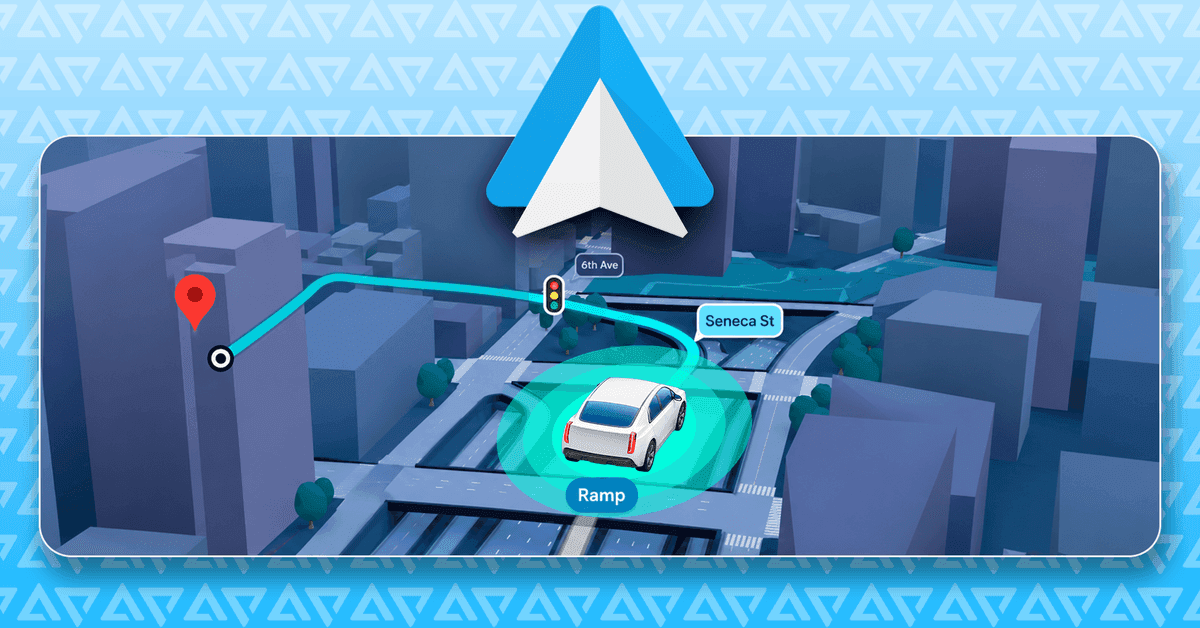
The headline feature, Immersive Navigation, transforms Google Maps from flat abstraction into a three-dimensional environment that matches what drivers see through the windshield. The system renders 3D buildings, terrain features, overpasses, stop signs, crosswalks, and traffic lights directly in the navigation view
1
2
. This spatial understanding pulls from Street View data and aerial photography to create landmarks that help drivers orient themselves instantly, particularly useful in downtown areas where missed turns lead to confusing one-way street mazes2
.
Source: Android Police
Google addresses a critical concern with this visual density: tall buildings that might obscure route information automatically become semi-transparent, allowing drivers to see through to the path ahead while maintaining spatial context
2
. The software adjusts framing dynamically as vehicles approach complex junctions, pulling the camera back and angling down to make every lane visible. For vehicles running Google Built-in (Android Automotive OS), the system gains access to forward-facing cameras for Live Lane Guidance, which reads physical road signs and lane markings in real time to prevent last-second lane panic2
3
.Navigation prompts also received refinement. Gemini AI now offers directions as "turn left at the intersection" rather than "turn left after 0.2 miles," making instructions easier to process while driving
1
. This change reflects understanding of how drivers actually process information during navigation.Gemini AI enables conversational control and multimodal queries
Gemini AI integration represents a fundamental shift in how drivers interact with their vehicles, particularly for cars with Google Built-in. The assistant can now tap into vehicle controls and onboard sensors to handle tasks that previously required navigating through multiple settings panels
3
. During demonstrations, Gemini adjusted sunroofs, changed ambient lighting colors, and modified climate controls through simple voice commands1
3
.The AI handles multimodal queries by accessing the car's surrounding cameras. In one demonstration, Gemini identified the Transamerica Pyramid in San Francisco and provided contextual information about the landmark
1
3
. This capability extends to agentic actions like ordering meals through DoorDash for arrival time or adjusting smart home controls before reaching home3
.The effectiveness depends on manufacturer optimization. Cars with Android Automotive built-in gain deeper sensor integration and camera access, while standard Android Auto users connecting phones still benefit from improved navigation and customizable widgets
1
2
.Related Stories

Material 3 Expressive design adapts to diverse dashboard configurations
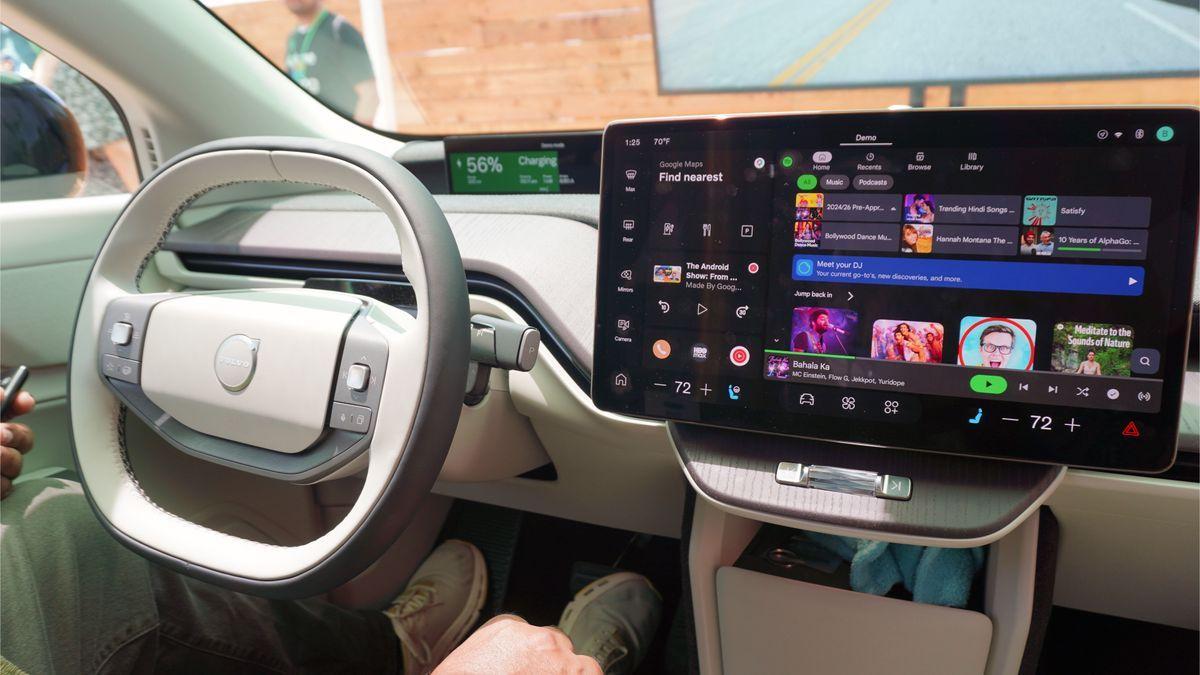
Google redesigned the interface using Material 3 Expressive design language to handle the wide variety of modern car displays, from circular OLEDs in Mini Coopers to ultrawide rectangles and BMW's Neue Klasse-style shapes
2
. The new three-panel layout accommodates smart home controls, customizable widgets, and even video playback capabilities1
.
Source: Tom's Guide
Drivers can generate custom widgets through prompts. One demonstration showed a weather widget indicating whether conditions suited running and biking, though the system accepts requests for traffic summaries, local business searches, and other personalized information
1
. For parked vehicles or charging sessions that can last 30 minutes, the platform now supports full HD video up to 60 FPS with Dolby Atmos surround sound3
. Video automatically minimizes to audio-only overlays when the vehicle starts moving, addressing the growth in video podcasting on platforms like YouTube3
.The distinction between Android Auto and Google Built-in matters for feature availability. Standard Android Auto projects phone content onto car screens, while Google Built-in operates natively on Android Automotive OS without requiring phone connection
3
. Vehicles with Google Built-in gain access to the full suite of Gemini capabilities and deeper hardware integration, positioning these systems as standalone devices rather than extensions of smartphones. This architectural difference explains why features like Live Lane Guidance and vehicle control through Gemini remain exclusive to Google Built-in implementations. As the update rolls out, the gap between smartphone-projected experiences and native automotive platforms will likely influence purchase decisions for drivers prioritizing advanced AI-powered features in their next vehicle. The updates position Android Auto ahead of Apple CarPlay, which lacks comparable AI integration or 3D navigation capabilities3
.References
Summarized by

Navi
Related Stories
Android Auto's Biggest Update Yet Brings 3D Maps, Gemini AI, and Video Playback to 250M Cars
12 May 2026•Technology

Gemini for Android Auto outperforms Google Assistant but users struggle with AI verbosity
11 Jul 2026•Technology

Google Sets March 2026 Deadline for Assistant Phase-Out as Gemini Rollout Accelerates Across Android Ecosystem
24 Nov 2025•Technology

Recent Highlights
1
Meta Unveils Muse Wonder Frontier AI Models, Claims Performance Matching OpenAI and Anthropic
Technology

2
IMF Report Warns AI Market Correction Could Spark Global Financial Crisis With $1.4T at Risk
Business and Economy

3
OpenAI Releases 722 AI-Generated Math Solutions, Triggering Existential Crisis in Mathematics
Technology

Recent Highlights
Today's Top Stories








Don’t drown in AI news. We cut through the noise - filtering, ranking and summarizing the most important AI news, breakthroughs and research daily. Follow topics that matter to you and stay ahead.


