8 Sources
[1]
How to Download the iOS 27 Developer Beta and Try the New Siri AI
Sleep Science Coach Certification from The Spencer Institute. Apple officially announced its long-rumored Siri upgrade at WWDC 2026. While you typically have to wait until the fall to try out the new features announced at WWDC, you can download the iOS 27 developer beta and try out the new Siri today. Here's how. Before you download the iOS 27 developer beta It's best to back up your iPhone before you install the beta software. To do this: * Go to Settings * Press your name * Select iCloud * Chose iCloud Backup * Tap on Back Up Now Apple recommends installing betas on a secondary device because early software can drain battery life and cause app instability. If your main phone is all you have, ensure your backup is up to date. iOS 27 will be available on iPhone 11 and later models, but most new features require Apple Intelligence, which only works on iPhone 15 Pro, 15 Pro Max and all versions of iPhone 16 and later. Step-by-step guide on how to download the iOS 27 developer beta Step 1: Create or sign in to your Apple Developer account Go to developer.apple.com and sign in with your Apple ID. You don't need a paid developer membership to access the beta. Step 2: Download the Apple Developer App The Apple Developer App is how you'll get access to beta resources, announcements and a direct link to the beta installation process. If you don't have it, you can download it directly from the App Store. Step 3: Enroll your device Follow the prompts in the Developer App to enroll your iPhone in the beta program. After that, open Settings, click General and navigate to Software Update. You'll see the iOS 27 developer beta listed there. Step 4: Download and install Just like you would with any software update on an iPhone, tap Download and Install. This will take a few minutes, depending on your internet connection. Once it's done, your iPhone will restart with iOS 27 and the new Siri AI. What to expect with the new Siri Siri AI can now hold conversations with you, understand what is on your screen, summarize documents and even search the web. You can also customize how it sounds, adjust its pace and accent. The free public beta is expected to arrive in mid-July and should be more polished than the developer build. The full release is expected to drop around September with the new iPhone lineup.
[2]
iOS 27 beta 1 has a waitlist for accessing new Siri AI
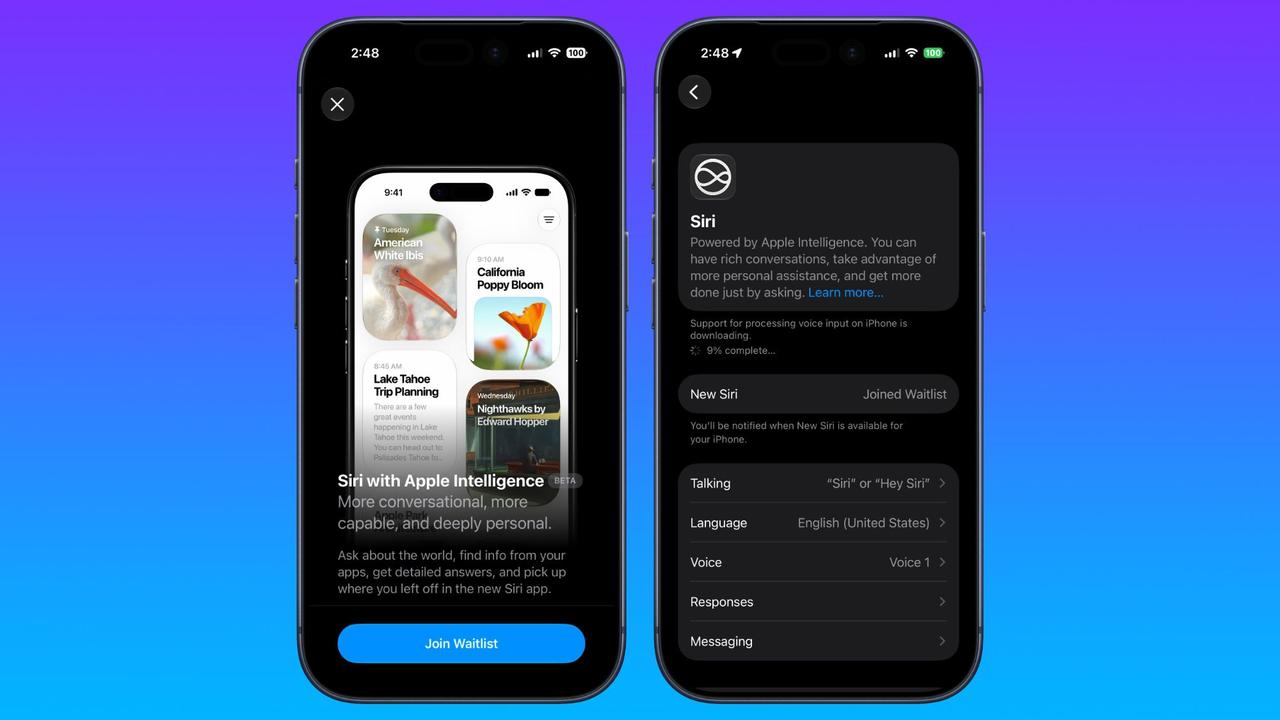
iOS 27 beta 1 is officially here, but if you're hoping to try the new Siri AI, you might have to wait a bit longer. Siri AI requires joining waitlist in iOS 27 developer beta Apple unveiled iOS 27 today with 'Siri AI' one of the tentpole new features. And shortly after the WWDC keynote ended, iOS 27 beta 1 was released to developers. The beta includes Siri AI, but only after you join a waitlist. After installing iOS 27 beta 1, do this to join the waitlist: The process is very similar to the waitlist Apple used in iOS 18.1 for Apple Intelligence access. Once you've joined the waitlist, Apple says you'll be notified when 'New Siri' is available for your iPhone. We have yet to gain access, but we'll let you know with hands-on reports of Siri AI after it becomes available. Check out our WWDC News Hub for all the latest announcements from Apple. Have you been able to use Siri AI on iOS 27 yet? Let us know in the comments.
[3]
iOS 27 vs iOS 26: What's new, what's improved?
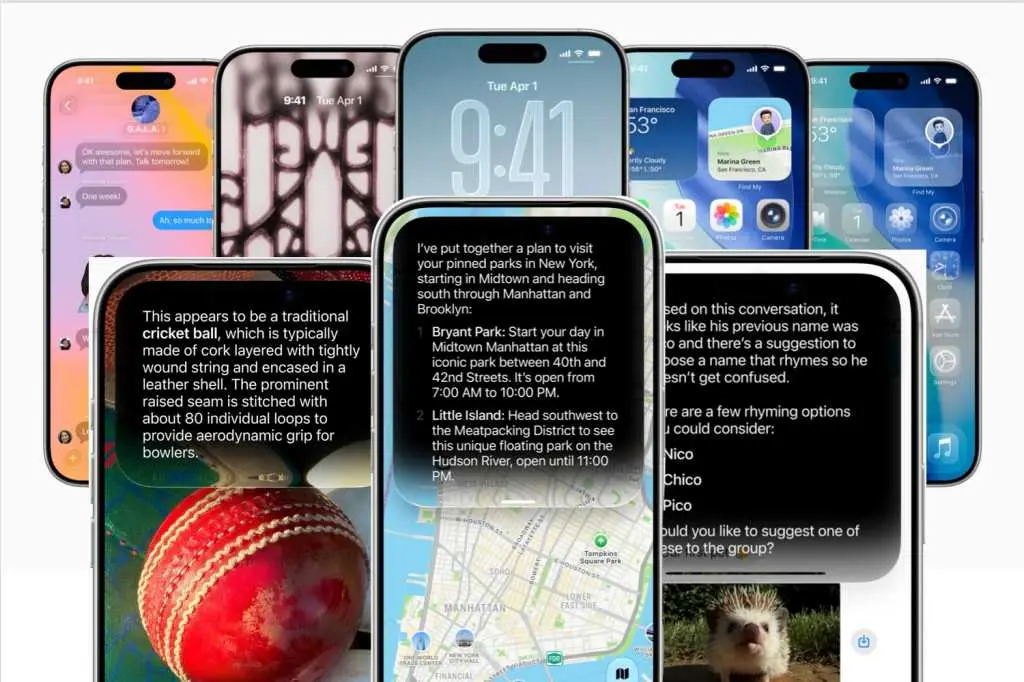
By comparison, iOS 27 focuses less on introducing entirely new features and more on improving Siri, boosting performance, enhancing security and expanding AI capabilities. Here are the biggest changes coming later this year. A large chunk of Apple's keynote was taken up with the new, improved version of Siri. Powered by the next generation of its Apple Intelligence models (which now combines with Google's Gemini technology) Siri AI will bring some advanced features to the platform when it arrives later this year. The new models use two main information pools - Personal Context understanding (all the data stored on your iPhone) and Broad world knowledge (all it can draw from the web) - combining to provide a complete picture of what you're looking for or want to do. Thanks to deep integration into the OS itself, and in particular Apple apps like Mail, Messages and Photos, Siri AI will be able not only to answer questions in a conversational manner, but it can also monitor communications you have and then offer context-based actions. Say you exchange a few emails with a friend about a potential meet-up. Siri AI can surmise from the text what's going on, then offer to create a Calendar entry for the relevant time and date, all without you needing to ask for anything. It should also be able to find photos or things mentioned in messages just by you asking it to track them down. For example, if someone sent you a message about a new TV show they thought you would like, but you can't remember what it was, you can simply ask Siri AI 'Hey, what TV show did Paul say I should watch?', which will trigger a search through your conversations to find the answer. In the demonstration, Apple also showed how the new Siri AI functionality works across multiple Apple applications. For instance, in one section we saw Siri AI being asked when a certain performer's concert was coming up. Then, it was asked how to buy tickets, with the answer showing that there was a lottery draw. The demonstrator then told Siri AI to set a reminder for when the lottery would begin, while also playing a song from the artist in Apple Music. This was all seamlessly in the conversation, rather than a separate set of tasks. In another example, Siri AI was asked where a contact's new address was? This was found in a Message, then it was instructed to plot the journey there in Apple Maps, which it did without issue. Other features include Call Context, where Siri will automatically bring any relevant information to your attention when you're on a call with someone. So, if you call a builder you've arranged some work with, Siri will show you the emails exchanges and any other data it thinks you might need for the conversation. There seems to be plenty of scope for the new Siri AI, and it will accessible either by the normal voice command, swiping down from the Dynamic Island or holding the Side Button for longer interactions. You'll also be able to see all your previous interactions and conversations in the new dedicated Siri app, which syncs across all your Apple devices. Ok, we've been burned in the past with Apple's AI promises, but the focus on this year seems to be more on making the basics work well and that could be what most people actually want. One caveat is that due to an ongoing disagreement with the EU, countries in the Union won't be able to get Siri AI on iPhone or iPad at launch.
[4]
iPadOS 27: Everything We Know | MacRumors
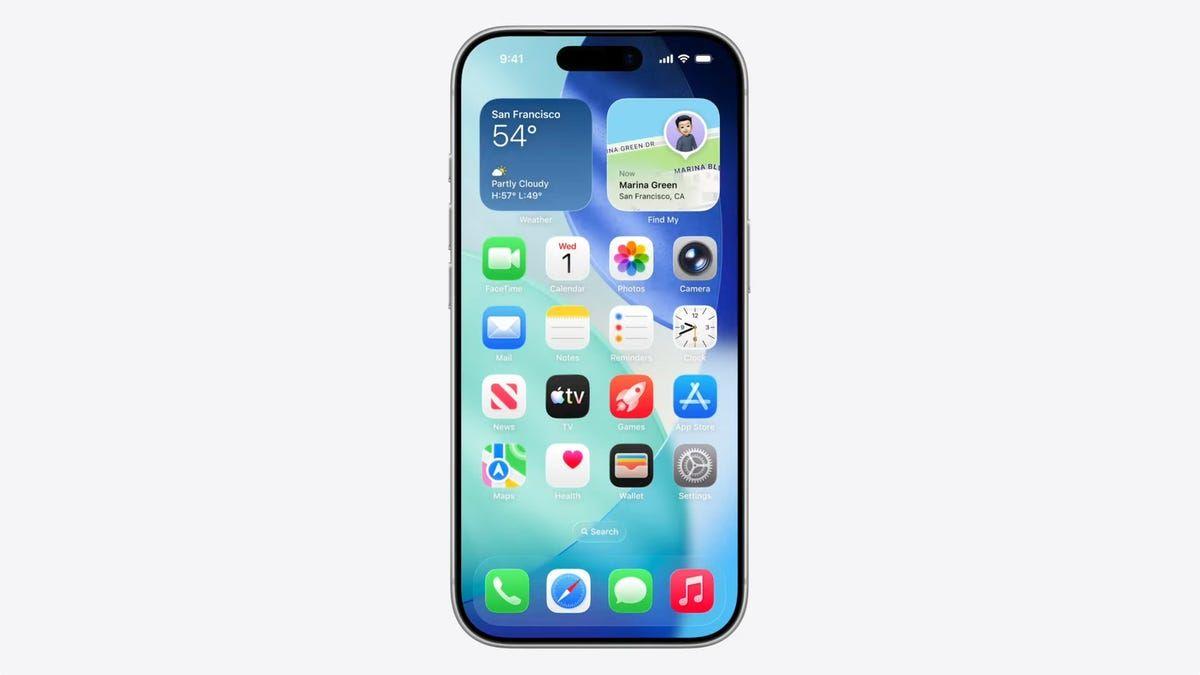
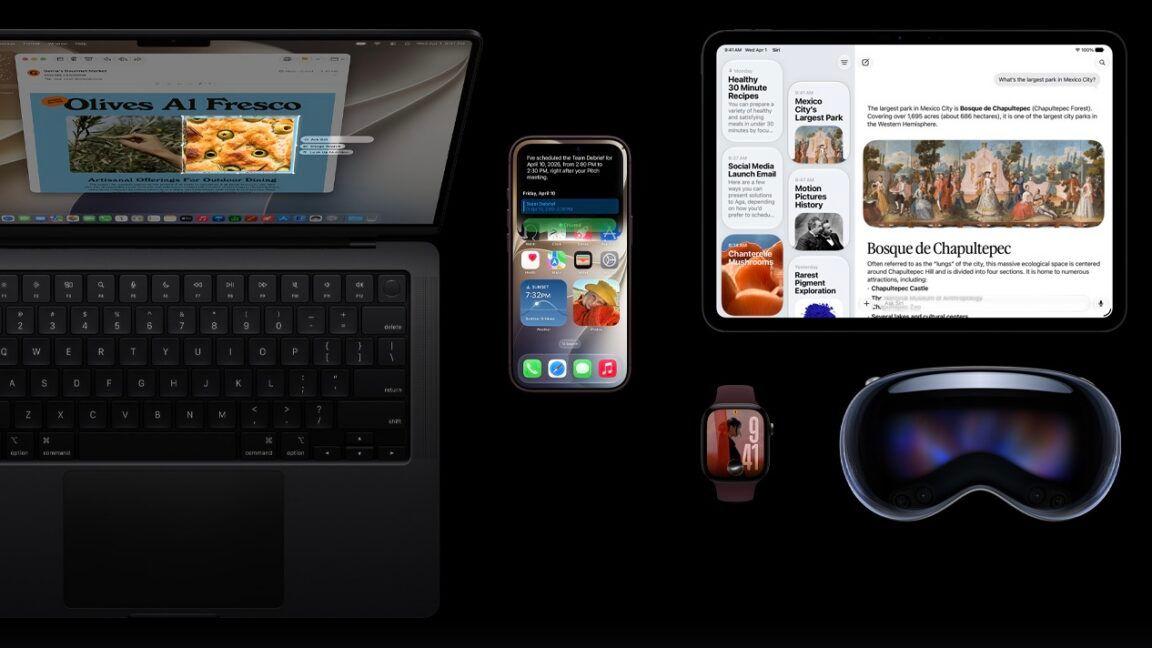
iPadOS 27 is the latest version of iPadOS, the software that runs on the iPad. Apple demoed iPadOS 27 at WWDC, and it's now available to developers. A public beta is coming in July, with a launch to follow this September. Apple has different operating systems for the iPhone and the iPad, but they share many similarities. Most of the features that are available in iOS 27 are also available on the iPad. There are sometimes features exclusive to Apple's larger-screened devices, but this year, almost all capabilities are cross-platform. iPadOS 27 introduces Siri AI, an overhauled version of Siri that's much smarter and more capable than before. iPadOS 27 adds new Apple Intelligence features in apps, updated parental controls, and performance improvements that speed up your iPhone. Siri AI uses generative AI models and it performs more like ChatGPT or Claude than the prior version of Siri. Siri can hold back-and-forth conversations, and it has access to your personal data so it knows more about you and can complete complex tasks. It can search across Mail, Messages, Notes, Reminders, Calendar and other apps to find things for you. Siri has broad world knowledge and can search the web to answer questions for you on any topic, plus it is able to see what's on your screen so you can ask for more information about what you're looking at. Siri can also take action in apps, doing things like drafting emails, adding events to Calendar, and adding Photos to an album. There is a standalone Siri app where you can talk to Siri, revisit existing conversations, and see a history of your chats. On the iPad, the app has a dedicated sidebar and support for windowing. The Siri app is available on compatible iPads, Macs, iPhones and more, and conversations sync across devices. Siri lives at the top of the iPad's display, and swiping down from the top of the display brings up a new Search or Ask interface that replaces the Spotlight Search interface. Apple rebuilt the search index for Siri AI, so content is indexed faster and it brings up more relevant results, especially in the Mail app. You can type to Siri from Search or Ask, say Hey Siri, or activate Siri with the top button, and you'll see a new Siri animation. Concise Siri responses show up at the top of the screen, and you can swipe down for more information or to ask a follow-up question. You can upload files and photos by tapping on the "+" button. On the M4 iPad Pro/Air and later with 1TB+ storage, you can set a custom voice for Siri, with personalized pace and expressivity. Apple's newest iPads also support improved dictation capabilities with special on-device AI models. Visual Intelligence has expanded to the iPad, and it can be used whenever you take a screenshot to get information on what you're looking at, with options to highlight specific information with Apple Pencil. Visual Intelligence has new capabilities, and it can tell you the nutritional info from a meal, import multiple events to your calendar at one time, split up a receipt for you, import contacts from a business card photo, or import a membership card into the Wallet app. Siri is integrated into apps with systemwide context menus so you can select text or images and then ask Siri about your selection. With the Write with Siri feature, Siri can generate text from scratch, correct your grammar, or give feedback on your writing. Siri can even write in your own style when composing email and text messages, and it works with handwritten notes. For the AirPods, Apple added a redesigned Settings interface and custom EQ for personalizing AirPods sound by adjusting lows, mids, and highs. The Photos app has AI photo editing tools. Clean Up is better at removing objects from images and filling in missing areas, and there are Reframe and Extend options. Extend lets you change the crop of an image, using AI to generate new fill, while Reframe combines AI and spatial images so you can change the perspective or composition of a photo. iCloud Shared Albums support full-resolution sharing, and friends with Android and Windows devices can contribute images to iCloud albums. There's also a new 30-day expiration option and an option to sync content immediately to iCloud for quicker uploads. Any set of photos or videos can be played as a slideshow, and you can save a video frame as a photo. Apple added a Captured by Me collection in the Photos app. With the new Selection View, you can review and modify metadata like location for multiple images, and there is support for keywords and star ratings. Safari can automatically organize tabs, bookmarks, and Reading List by topic, create custom extensions for you based on natural language prompts, and monitor webpages for changes with Notify Me, letting you know when an update is detected. The Passwords app uses AI to change weak and compromised passwords for you, upgrading them to strong passwords. When saving files or folders, Apple Intelligence will suggest names based on content. Image Playground was overhauled, and it generates images in any style, including photorealistic. You can create images of people, modify images using descriptions for small changes, and make tweaks with touch gestures. Image Wand in Notes can now transform a rough sketch into a photorealistic image. Apple also updated Genmoji to be faster and better quality. Image Playground supports creating wallpaper, Contact Posters, images for social media, and more with different aspect ratio options. Image generation and similar resource-intensive AI features will have daily usage caps with more access tied to paid iCloud+ plans, but Apple's AI features will be otherwise free. The Shortcuts app can create shortcuts for you based on natural language requests. Just tell it what you want a shortcut to do, and the app will generate it automatically with AI. On the iPad, Shortcuts now supports Magic Keyboard triggers so you can have a shortcut run when you attach a keyboard. Calendar and Reminders support natural language for adding and modifying events and tasks. The Maps app uses aerial imagery and Vision Intelligence models for enhanced Flyover with sharper, more lifelike detail. The Journal app supports generative writing prompts for writing inspiration. In the Home app, HomeKit Secure Video supports 4K capture, and it uses AI to summarize activities from video footage. Multiple notifications are aggregated, and it can stitch together footage from multiple cameras for a complete picture of what's happening. It also supports searching for specific moments. Mail makes intelligent suggestions for taking action on content with apps, and in Messages, there are AI suggestions for actions you might want to take like inserting a photo or sharing a location. Sending large photos and videos no longer slows text conversations, and there is a send indicator for outgoing messages. Tapback notifications are now consolidated, so you get fewer notifications. The Phone app has Call Context, a feature that brings up relevant on-device information you might need when calling a business for help, like a flight number. The Music app has new artist pages and AutoMix has more immersive transitions. The Clock app supports setting alarm volume independent of system volume. There's now a Liquid Glass slider for customizing translucency level, and Apple updated Liquid Glass to improve readability. Toolbars are more uniform to make text headings and larger groups of controls more legible in apps like Mail, and sidebars extend to the edges of windows instead of float. Sidebar icons are also once again colorful, and Apple now uses menu bar icons selectively to make it easier to find commonly used actions. Liquid Glass icons have more detail and sharpness, and navigation bars, menus, and buttons have more depth and separation. The Home Screen supports extra large widgets for apps like Calendar, Photos, and Music. Apple focused on performance improvements across iPadOS 27, and everything feels faster. Apps launch quicker, AirDrop transfers are faster, the keyboard loads quicker, swapping Home Screen pages is speedier, and App Library is faster. Browsing files on iPad and transferring them to an external USB drive is up to five times faster, and it is just as fast as Finder on a Mac. Gestures for closing, switching, and dragging windows are quicker, and multitasking is faster. Context menus in iPadOS open faster when using a cursor, and Apple expanded the CPU scheduler to all iPadOS 27-supported iPads for faster performance. App names show in the iPad's status bar to make it easier to see which app is active, and it's quicker to get to the menu bar by tapping on or hovering a cursor over the app name. iPhone apps that run on iPadOS can be resized to be bigger. Apple is updating parental controls and introducing child safety features in iPadOS 27. Screen Time has been redesigned, and parents can see the apps and websites children are visiting and make adjustments in real-time. Time Allowances let parents set the amount of time children can use app categories like Entertainment, Games, and Social Media, with customizable schedules based on time and day. Ask to Buy and Ask to Browse require kids to get parental permission for every app download and new website visited in Safari, plus parents can manage contacts and require permission before kids contact someone new. Communication Safety now blocks gore and violence in addition to nudity in Messages and FaceTime. iPadOS 27 is available on the 6th-generation iPad mini and later, the 9th-generation iPad and later, the 2nd-generation 11-inch iPad Pro and later, the 4th-generation 12.9-inch iPad Pro and later, and the 4th-generation iPad Air or later. Registered developers can download iPadOS 27, and Apple plans to release a public beta in July. iPadOS 27 will be released to the public in the fall. Siri AI is available in English and will expand to other languages in the future. Siri AI for iPhone and iPad will not initially be available in the European Union because of issues with the Digital Markets Act. Siri AI and the new Apple Intelligence features are not available in China.
[5]
You can install the iOS 27 developer beta right after WWDC -- here's how
Test Apple's revamped Siri immediately with the iOS 27 developer beta WWDC 2026 focused pretty much on one thing: the new Siri. Apple's revamped assistant is powered by Google's Gemini and represents the most significant Siri update since 2011. The new Siri understands context from your personal data, sees what's on your screen, and can handle complex tasks. It's the biggest bet Apple has made on AI. You can test iOS 27 and the new Siri immediately by installing the developer beta on your iPhone. Anyone with an Apple developer account can download it for free. If you prefer a more stable version, wait until the public beta arrives. But if you're itching to get started testing out some of the new features Apple unveiled, here's how to get the developer beta up and running on your iPhone. As with any beta software, you're likely to run into some bugs and issues along the way. It could also drain your battery more quickly than usual. If possible, we'd always recommend installing it on a separate device, given the amount of sensitive data likely stored on your main iPhone. The more stable public beta will launch next month. Follow Tom's Guide on Google News and add us as a preferred source to get our up-to-date news, analysis, and reviews in your feeds. Subscribe to Tom's Guide on YouTube and follow Tom's Guide Entertainment on TikTok and Instagram. Finally, you can visit our dedicated Tom's Guide Savings Squad hub for expert help on getting the best products for less.
[6]
Hands-On With iOS 27's Siri AI
The smarter, more capable version of Siri is finally here, available in iOS 27, iPadOS 27, and macOS Golden Gate. The updates are limited to developers right now, but there's a lot to look forward to this fall. Siri can see what's on your screen with onscreen awareness, and answer questions about what you're looking at. If there's an image on Instagram and you want to know where it was taken, you can just ask Siri where it was taken and get a response. Visual Intelligence is now part of the Camera app, and Siri can answer questions about anything you take a picture of. Like other chatbots, Siri can search the web and access general world knowledge, so it can provide responses to any questions you might have. It can evaluate documents, solve math problems, craft recipes, walk you through DIY tasks, help you plan a party, and more. Siri can take action in and across apps, getting detailed maps directions with multiple stops, editing and sharing photos, or writing an email from scratch in your own writing style. It can do multiple tasks that are included in the same request. Siri is located in the iPhone's Dynamic Island, and there's a glassy new Siri bubble with bright colors that pops up when Siri is activated. You can use Hey Siri or hold down the side button, but Siri also comes up with a swipe down from the top center of the display. Responses show up in that same area, and if you swipe on a response, you can get more information and ask follow-up questions. Apple also created a full Siri app where you can revisit past conversations and start a new conversation. The Siri app syncs across devices, so you can start a conversation on your iPhone and wrap it up on your Mac. Siri AI is available in iOS 27, iPadOS 27, macOS Golden Gate, watchOS 27, and visionOS 27, plus it works on AirPods and CarPlay. Siri AI has the same device requirements as Apple Intelligence, so you'll need an iPhone 15 Pro or later to use it. Siri AI is available in beta right now, and Apple is still refining. iOS 27 is limited to developers, with a public beta set to come out in July. iOS 27 with Siri AI will launch in September.
[7]
How to Get iOS 27's New Siri AI: Join the Waitlist First
Apple released the first betas of iOS 27, iPadOS 27, and macOS 27 today, introducing a more capable version of Siri called Siri AI. Developers are able to download the betas and try Siri out, but there is a waitlist. After updating to iOS 27, developers will need to open the Settings app, go to the Apple Intelligence section, and opt in to the waitlist to get access to Siri. There is no word yet on how long the wait will be, but Apple used a similar waitlist when rolling out Apple Intelligence in iOS 18. It could be a matter of hours for some of the first developers to update to iOS 27. The new Siri and Apple Intelligence features that Apple introduced today are available on all devices that support Apple Intelligence, but some on-device capabilities will be limited to newer iPhones, iPads, and Macs. Siri AI is free, but Apple does have daily limits on some capabilities like image generation. Opting into an iCloud+ subscription plan increases AI limits. Siri AI is limited to English, and it is not available in the European Union on the iPhone or the iPad, but EU users can try it on Mac. Siri AI is not available in China.
[8]
How to Get Apple's New Siri AI in iOS 27: Easy Guide
New Siri offers app integration, summaries, camera intelligence, and searches. Apple has finally announced its much-awaited Siri upgrade, iOS 27 Developer Beta, at WWDC 2026 (Apple Worldwide Developers Conference). However, iPhone users may have to wait until fall to try out the new features announced at . For now, one can try developer beta versions available for download and test the new before it's officially released. Users can download the iOS 27 developer beta immediately, while some new Siri AI features may require joining a waitlist. To get into the waitlist, follow these steps.
Share
Copy Link
Apple released the iOS 27 developer beta following WWDC 2026, introducing a revamped Siri AI powered by Google's Gemini technology. However, early testers must join a waitlist to access the new features. The update represents Apple's most significant AI push, with Siri gaining conversational capabilities, on-screen understanding, and deep integration across apps—though EU countries won't get access at launch.
Apple officially unveiled iOS 27 at WWDC 2026, marking the company's most ambitious AI initiative yet. The iOS 27 developer beta became available immediately after the keynote, but users eager to test the new Siri features face an unexpected hurdle: a waitlist
2
. This access control mirrors the approach Apple used with Apple Intelligence in iOS 18.1, requiring users to request access through their device settings before they can experience the AI-powered Siri capabilities.
Source: MacRumors
Anyone with an Apple developer account can download the iOS 27 developer beta for free by visiting developer.apple.com and enrolling their device through the Apple Developer App
1
. The beta software is compatible with iPhone 11 and later models, though most new features require Apple Intelligence, which only works on iPhone 15 Pro, 15 Pro Max, and all versions of iPhone 16 and later1
. A public beta is expected in mid-July, with the full release anticipated in September alongside the new iPhone lineup.The standout feature of iOS 27 is Siri AI, which Apple describes as the most significant update to its virtual assistant since 2011. Powered by generative AI models that combine Apple's technology with Google's Gemini technology, Siri AI operates using two main information pools: Personal Context understanding, which draws from data stored on your iPhone, and Broad world knowledge, sourced from the web
3
. This dual approach enables Siri to provide comprehensive answers and take contextual actions without explicit user prompts.During the WWDC demonstration, Apple showcased how Siri AI can monitor email exchanges about a potential meet-up and automatically offer to create a Calendar entry for the relevant time and date
3
. The assistant can also search across Mail, Messages, Notes, Reminders, Calendar, and other apps to find specific information, such as retrieving a TV show recommendation from a past conversation3
.
Source: Macworld
Siri AI brings conversational capabilities that allow it to handle multi-step tasks seamlessly. In one demonstration, the assistant was asked when a performer's concert was scheduled, how to buy tickets, and then set a reminder for a lottery draw while simultaneously playing a song from the artist in Apple Music—all within a single conversation flow
3
. This represents a fundamental shift from treating each request as a separate task to maintaining context throughout an interaction.The new assistant introduces on-screen understanding, enabling users to ask questions about what they're viewing without needing to provide additional context
1
. A dedicated Siri app now provides a space where users can engage in extended conversations, revisit previous chats, and access a complete history that syncs across all Apple devices4
. Users can activate Siri through voice commands, by swiping down from the Dynamic Island, or by holding the Side Button for longer interactions3
.Call Context is another notable addition, automatically surfacing relevant information when you're on a call with someone. If you call a builder you've arranged work with, Siri will display email exchanges and other pertinent data you might need for the conversation
3
.Related Stories
The same AI capabilities extend to iPadOS 27, which shares most features with its iPhone counterpart
4
. Visual Intelligence has expanded to the iPad, allowing users to get information on screenshots with options to highlight specific details using Apple Pencil. The feature can identify nutritional information from meal photos, import multiple calendar events simultaneously, split receipts, import contacts from business card photos, or add membership cards to the Wallet app4
.
Source: MacRumors
Document summarization and AI-powered photo editing tools enhance productivity across the platform. The Write with Siri feature can generate text from scratch, correct grammar, provide writing feedback, and even match your personal writing style when composing emails and text messages
4
. On M4 iPad Pro and Air models with 1TB or more storage, users can set a custom voice for Siri with personalized pace and expressivity4
.Apple recommends installing beta software on a secondary device due to potential battery drain and app instability
1
. Users should back up their devices through iCloud before installation. Those testing the iOS 27 developer beta report that after joining the waitlist, Apple notifies them when Siri AI becomes available for their device, though access times vary2
.A significant limitation affects users in EU countries, who won't be able to access Siri AI on iPhone or iPad at launch due to an ongoing disagreement with the European Union
3
. This restriction could impact millions of potential users and raises questions about regulatory compliance and Apple's AI rollout strategy in different markets. The company has not provided a timeline for when EU availability might change, leaving users in those regions watching for updates as the September launch approaches.Summarized by
Navi
[3]
[4]
30 Mar 2026•Technology
28 Apr 2026•Technology

06 Jun 2026•Technology

1
Technology

2
Business and Economy

3
Health