6 Sources
6 Sources
[1]
'Essential Voice' Cleans Up, Translates Your Messages on Nothing Phones
Smartphone brand Nothing is introducing a new AI-powered voice-to-text tool called Essential Voice to improve transcription, translate languages, and make it easier to dictate messages. Made exclusively for modern Nothing phones, Essential Voice will take what you're saying and remove the ums, ahs, erms, and other stutters that you probably want removed from a message. An example in Nothing's reveal trailer shows it reworking multiple sends into a single, simpler-to-understand message. You can ask the tool to format what you're saying into a list or bullet points. Essential Voice can auto-detect the language you're speaking, with support for 100+ languages. This lets you quickly translate your messages with AI, without leaving your current app. Nothing is also introducing a voice equivalent of a keyboard shortcut: Personal Mappings. The feature lets you add key information or specific spellings that the Essential Voice will automatically use when you're speaking to your phone. For example, you could add your email address and ask it to insert it each time you say "Contact Details." Nothing also suggests adding links to your favorite restaurants' addresses so you can ask Essential Voice to share them each time. To access the feature on a Nothing Phone, press the Essential Key or activate Essential Voice from the keyboard. The feature works across apps, with Nothing's own marketing showing the tool working in Gmail, Google Keep, and WhatsApp. The feature first launches on the Nothing Phone 3 and Nothing Phone 4a Pro later this month, before coming to Phone 4a in early May. There's so far no sign of this feature launching for other Android devices, unlike the brand's new Warp file transfer service. Warp was first available last week, but was taken down with Nothing saying it needed to "fine-tune" select features.
[2]
Nothing's newest feature turns your stutters into polished prose
It is now available on the Nothing Phone 3 and will arrive on the Phone 4a Pro later this month and on the Phone 4a in early May. Nothing recently launched, pulled down, and relaunched the Nothing Warp app, and now the company is back with another new feature, Essential Voice. This is a brand-new feature designed to bridge the gap between the speed of speech and the clarity of texting. Nothing's Essential Voice is essentially a dictation tool integrated directly into the keyboard and the dedicated Essential Key on Nothing smartphones. The idea here is to provide an easy-to-access tool that processes what you say and outputs exactly what you mean, rather than printing out your literal words. This would be an upgrade over traditional speech-to-text dictation engines, which end up transcribing every filler word and stutter, leaving users to clean up the text and consequently defeating half the purpose of using a speech-to-text dictation engine. Nothing guarantees that Essential Voice cuts out filler words for a more streamlined, considered output. Users can converse with it in more than 100 languages with auto-detection, and even choose regional variants of languages like English and Spanish. Essential Voice can also translate and transcribe in real time. Another feature that makes Essential Voice impressive is the ability to build a text shortcut library, allowing you to use specific spellings and phrases without saying them out loud every time. If you have a favorite restaurant, Essential Voice will link an address to the name and type it out in the transcription instantly. Nothing is taking care of privacy concerns too. The company claims that Essential Voice activates only when the user chooses to use it, and it does not listen in the background. Audio recordings are encrypted and processed on Nothing's servers. The generated text is sent back to your device and not stored on Nothing's servers. Essential Voice is available on Nothing Phone 3 right away. It will be available on the Phone 4a Pro later this month, and the Phone 4a will follow in early May. For the future, Nothing says it will introduce context awareness, allowing Essential Voice to adapt to where you're writing -- like messages, work emails, or searches. If you like the idea of turning your spoken words into usable texts beyond a traditional speech-to-text engine, but hate the idea of cloud-based processing, Google also launched its own AI Edge Eloquent app earlier this month that works similarly, but offline. AI Edge Eloquent is currently available only on iOS, but an Android app could be coming soon, too.
[3]
Nothing upgrades voice-to-text with AI-powered 'Essential Voice'
Nothing has just launched "Essential Voice," the latest expansion of the brand's AI suite, which is a major upgrade to voice-to-text. Announced today, Essential Voice is a pretty major upgrade to the voice typing experience on Nothing Phones. Nothing positions this as a way to enhance voice typing with the ability to use either the keyboard of the Essential Key to start dictation. Nothing says that Essential Voice can clean up transcription to remove filler words, as well as being able to auto-detect 100 languages. You can just say "translate this into Spanish" at the end of a message and Essential Voice will translate it. Commands go beyond that, with another example being "send to 'my email'" where Essential Voice will auto-fill your email address, and the ability to mention a restaurant with the AI being able to add in the address. It sounds pretty great, similar to the recent "Wispr Flow" app that launched a few months ago, just with native integration. Nothing says that Essential Voice is rolling out to Phone (3) and Phone (4a) Pro "later this month" - in other words, next week - with Nothing Phone (4a) getting support in "early May."
[4]
Nothing wants to make typing feel obsolete with Essential Voice - Phandroid
Most of us spend a lot of time tapping out messages on a phone keyboard. It works, but it's not exactly natural. Speaking is something humans have been doing for at least 135,000 years, and we're pretty good at it. The average person speaks at around 150 words per minute, but types closer to 36 on a phone. Nothing thinks that gap is worth closing, and today it's launching a new feature called Nothing Essential Voice to do exactly that. Essential Voice is a voice-to-text tool built directly into the keyboard and accessible via a long-press on the Essential Key. Speak naturally, and it converts your words into clean, structured writing. That's the key difference from standard dictation. Traditional dictation transcribes everything word-for-word, including filler words, false starts, and awkward pauses. Nothing Essential Voice skips all of that and delivers finished-sounding text instead. The feature launches with four core capabilities. Auto-correction handles clarity and structure, and strips out filler words like "um" and "uh." Personal Mappings let you set up custom voice shortcuts for repeated phrases, links, templates, or specific words. There's also a Translation Agent, which lets you speak in one language and output text in another. Language support covers 100-plus options, with auto-detection and the ability to choose regional variants like Latin American Spanish or Simplified Chinese. Nothing Essential Voice is rolling out first on Phone (3) and Phone (4a) Pro, with Phone (4a) following shortly after. It extends the broader Essential AI suite that Nothing has been building out since the Phone (3a) series introduced the Essential Key last year. Future updates will add context awareness, so the feature can adjust tone depending on where you're writing. A message, a work email, and a search field all call for different language, and Nothing says it plans to account for that. The company also mentioned expanding Essential Voice across its broader product lineup as part of a larger push toward voice-first interaction.
[5]
Essential Voice: A Useful AI Addition to Nothing's Intelligence Toolkit?
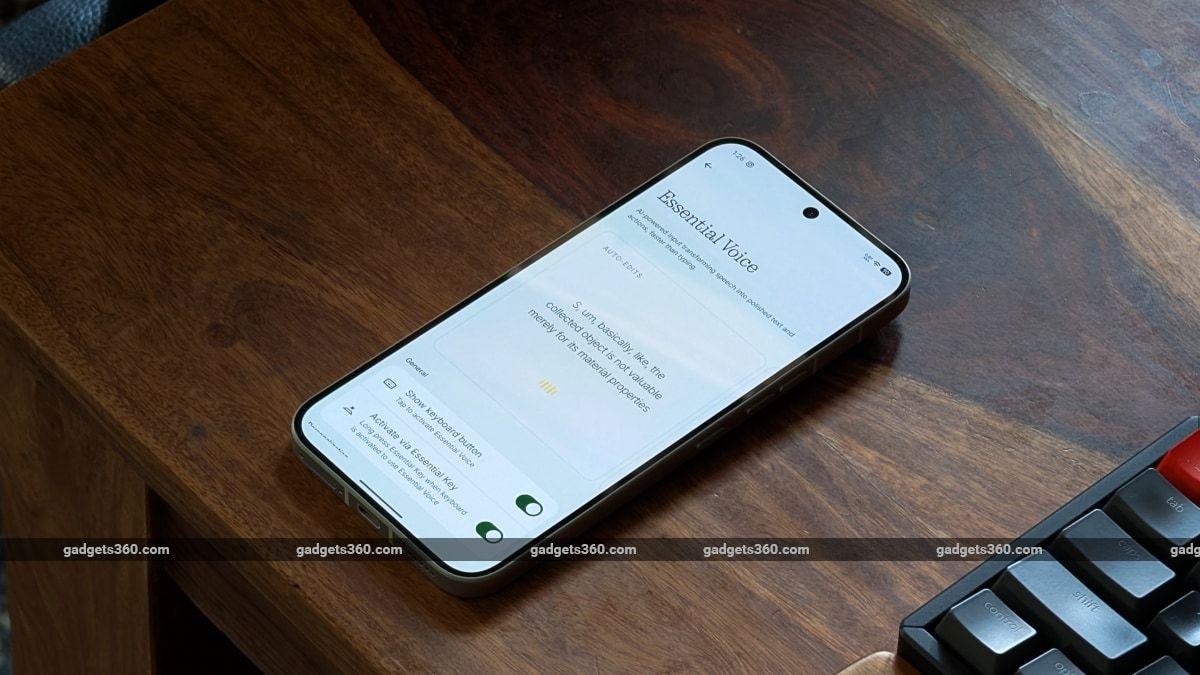
* Essential Voice only works on select Nothing devices * It's a tool built only for the Nothing ecosystem * The feature works well and understands context Love it or hate it, Artificial Intelligence (AI) is here to stay. It exists more on your phone than anywhere else, solely because the phone is no longer just a tool for making calls and checking messages; in 2026, it is literally the centre of our digital world. While Google kickstarted the AI revolution with its Pixel devices, every other brand (including Apple) has now followed suit. Today, we have a plethora of AI tools on our smartphones, whether it's for editing photographs or helping with composing messages right in the text field. Just like Google's Pixel, Samsung's Galaxy, and Apple's iPhones, the budding smartphone brand Nothing has been very vocal about AI but rather cautious in its approach to implementing it in its smartphones. While Nothing's smartphones ship with Google's Gemini models by default, Nothing has been focusing on its Intelligence Toolkit to deliver a more practical AI experience that's less intrusive. After the handy Essential Space, the uber-cool, retro-inspired News widget, and the all-important Essential Key, we now have something new from Nothing: Essential Voice. "Hello" Essential Voice Contrary to what its branding may lead you to believe, Essential Voice isn't an AI voice assistant like Google's Gemini or Samsung's Bixby (which got a major IQ boost with One UI 8.5). It is more basic in its approach, focusing on simply improving how we interact with our smartphones and how we use our voice to get things done on them. It is "essentially" a speech-to-text tool that, in more ways than one, reduces the need to manually modify or run keyboard AI tools after you have spoken out your thoughts. Once you speak out your thoughts, your voice gets transcribed, but instead of leaving you with fragmented lines of text, you literally get well-written text that, in all probability, can be sent across without any further tweaking. Essential Voice can be accessed in any app as it's integrated into Google's GBoard virtual keyboard on Nothing devices Now, Samsung's virtual keyboard already has Galaxy AI built in. Once you have spoken out your thoughts, you can use various tools on the keyboard to rephrase, make grammatical corrections and even translate the final output by using the various tools on the keyboard. Essential Voice uses just your voice and the power of AI to fill in these gaps, reducing the need to tweak things further, while retaining the meaning and context of what you have spoken out into crisp and clean text. This text can be saved to Essential Space or, when spoken using the keyboard, appears directly in the text field of any app you are currently using. Essential Voice currently supports two additional features beyond the basic AI-based autocorrection. There's a Translation Agent that can translate spoken voice into text in another language before inserting it into your text field. All you need to do is speak your thoughts and mention the language you need to translate to at the very end. Nothing claims Essential Voice currently supports 100+ languages, including regional variants, which seems quite promising for a new feature. Users can also add personal mappings, such as words, links, templates, and more, adding a personal and customisable touch to this tool. We had to test it out With early access to this new feature, I had to test it out. Essential Voice is mighty good at taking notes, whether you are using it to chat with a friend or even if you are speaking out ideas to a third-party notes app. It accurately transcribes your speech-to-text requests and crafts a clean, clutter-free note or text. Accuracy is impressive, and as expected, it will remove any stutters and even correct any additional words that you may have spoken by mistake before you said the right ones. Essential Voice does a fine job with accuracy and context I also tried out the language translation feature, and it worked beautifully, accurately translating my voice note from English to Hindi. In fact, when I read out the note in English, it even added bullet points where necessary, which is something I did not expect it to pull off. What Essential Voice cannot do, like Apple's or Google's keyboard-integrated Writing Tools, is rephrase the same text. However, neither Apple nor Google can pull this off with just spoken voice, and you will need to jam your digits to tweak things. One weird bit about using the Essential Voice button in GBoard is that the Phone 4a Pro can cancel your request or interrupt your thoughts completely. If the display decides to sleep while you are dictating an idea, a note, or even a message to someone, the Essential Voice keyboard tool simply cancels the request once the display sleeps and the phone locks. That is a bit stupid and annoying. Hopefully, future updates to Essential Voice can keep the display awake while speaking out long voice notes. How do I set up Essential Voice? Essential Voice is currently available only on select Nothing devices. This short list includes the Nothing Phone 3 and the Phone 4a Pro. The brand claims that Nothing Phone 4a will also join the fold in May, 2026. Setting up Essential Voice on your Nothing smartphone is fairly straightforward Our Nothing Phone 4a Pro review unit received early access to the feature via a software update. For users of the abovementioned supported devices, the new feature will also be enabled via OTA update, which is rolling out as you read this. This update, apart from bringing other updates to the Glyph Interface, includes visual and camera enhancements and new features, and also adds Essential Voice to the Intelligence Toolkit. Tapping on the Essential Voice in the menu simply opens a new section with a yellow button to "try out" the feature. This takes you to the Essential Voice section, where an on-screen demo shows how the feature works. Below are the toggles to make the Essential Voice button appear on the GBoard virtual keyboard and to activate it using the Essential Key button, which saves your voice notes to Essential Space. For those worried about privacy, Nothing states that Essential Voice will not listen to your conversations in the background, but only when you choose to activate the feature. Audio recordings are processed quickly on the server (not on-device), so you will need a stable Wi-Fi or data connection to use them. The text generated on the server is said to be sent back to the device and is not stored on Nothing's servers. And just in case you were wondering, Essential Voice uses Google's Gemini 3 Flash for its cloud-based processing. Nothing's Essential Voice sure does what it claims in a non-intrusive manner. It puts AI to work in the background, and it is quite useful and powerful, provided you happen to use one of the few supported Nothing smartphones. The brand also has future plans for Essential Voice. Nothing plans to introduce context awareness to Essential Voice, which would automatically change the tone depending on the app you are using. So, you can sound more professional when responding to Outlook emails or more casual when chatting on WhatsApp. The brief we received also mentions that Essential Voice is one of the building blocks for Nothing's future voice-first interface, which we don't yet know about.
[6]
Nothing launches 'Essential Voice' for smarter speech-to-text transcription
London-based consumer technology brand Nothing has announced the release of Essential Voice, a new software feature designed to enhance the speech-to-text experience on its smartphones. The feature is an extension of the company's existing Essential AI toolset, aimed at shifting device communication toward a voice-first interface. The primary goal of Essential Voice is to bridge the efficiency gap between typing and speaking. While average smartphone users type at approximately 36 words per minute, speaking allows for a much faster pace of around 150 words per minute. Although voice notes and traditional dictation tools exist, both present distinct challenges. Voice notes can be inconvenient to listen to in public spaces and difficult to scan for key information. Standard dictation, on the other hand, often produces raw, fragmented text that includes stutters and filler words. Essential Voice processes spoken input to generate clean, formatted text in real-time, aiming to combine the speed of speaking with the utility of written text. The feature is integrated directly into the device's keyboard and can also be activated via a long-press on the Essential Key, allowing users to dictate without leaving their current application. Key functionalities include: Regarding user privacy, Nothing states that Essential Voice does not listen in the background and only activates upon user initiation. Once triggered, the audio recording is encrypted and sent to Nothing's servers for processing. The generated text is then returned to the device, and the company confirms that audio data is not stored on its servers after the process is complete. Essential Voice is currently available on the Nothing Phone (3). The update is scheduled to roll out to the Phone (4a) Pro later this month, followed by the Phone (4a) in early May. Looking forward, Nothing plans to introduce context awareness to the feature, enabling the software to adapt its formatting and tone based on the application in use -- such as distinguishing between a casual text message and a formal work email. The company also noted intentions to eventually expand Essential Voice across its broader ecosystem of smart products.
Share
Share
Copy Link
Nothing has introduced Essential Voice, an AI-powered speech-to-text tool that transforms casual speech into clean, structured text. The feature removes filler words, supports translation across 100+ languages, and offers custom voice shortcuts called Personal Mappings. Available now on Nothing Phone (3), it aims to make voice typing faster and more natural than traditional dictation.
Nothing has launched Essential Voice, an AI voice-to-text feature designed to bridge the gap between how people naturally speak and the polished messages they want to send
2
. Unlike traditional dictation engines that transcribe every word verbatim, this AI-powered speech-to-text tool automatically removes filler words like "um," "uh," and "erm" while restructuring fragmented thoughts into coherent, readable text1
. The feature is built directly into the keyboard and accessible via the Essential Key on Nothing Phones, making it available across all apps including Gmail, Google Keep, and WhatsApp1
.
Source: FoneArena
The intelligent dictation tool addresses a fundamental inefficiency in smartphone communication. While the average person speaks at around 150 words per minute, typing on a smartphone typically happens at just 36 words per minute
4
. Essential Voice aims to close this gap by delivering finished-sounding text instead of requiring users to clean up their transcription afterward4
.One standout feature is Personal Mappings, which allows users to create custom voice shortcuts for frequently used information
1
. Users can add specific spellings, email addresses, or links that Essential Voice will automatically insert when triggered by a spoken phrase. For example, saying "Contact Details" could automatically insert your email address, or mentioning a favorite restaurant's name could prompt the tool to add its full address1
. This capability extends beyond simple auto-correction, offering a personalized and customizable approach to voice input5
.
Source: PC Magazine
Essential Voice translates over 100 languages with automatic language detection, allowing users to speak in one language and output text in another without leaving their current app
1
. The Translation Agent feature supports regional variants like Latin American Spanish and Simplified Chinese4
. Users simply speak their message and add "translate this into Spanish" at the end, and the tool handles the conversion3
. Early testing showed impressive accuracy, with successful transcription from English to Hindi while maintaining context and even adding bullet points where appropriate5
.
Source: Gadgets 360
Related Stories
Nothing has addressed privacy concerns by ensuring Essential Voice only activates when users choose to engage it, with no background listening
2
. Audio recordings are encrypted and processed on Nothing's servers, with the generated text sent back to the device and not stored on company servers2
. This approach differs from Google's recently launched AI Edge Eloquent app, which offers similar functionality but processes everything offline on-device2
.Essential Voice is available immediately on Nothing Phone (3) and will arrive on the Nothing Phone (4a) Pro later this month, with the Nothing Phone (4a) receiving support in early May
2
. The feature integrates into GBoard on Nothing devices and can be accessed through a long-press on the Essential Key4
. Nothing has confirmed that future updates will introduce context awareness, allowing the tool to adapt its tone based on where users are writing—whether composing messages, work emails, or search queries2
. The company also plans to expand Essential Voice across its broader product lineup as part of a larger push toward voice-first interaction4
.This addition to the Essential AI suite represents Nothing's continued focus on practical AI implementation that enhances voice typing without being intrusive
5
. For users of Nothing's smartphone ecosystem, Essential Voice offers a compelling alternative to manual typing and traditional dictation, though it remains exclusive to Nothing devices with no indication of broader Android availability1
.Summarized by
Navi
[2]
30 Sept 2025•Technology

10 Feb 2026•Technology

06 Aug 2025•Technology

1
Technology

2
Science and Research

3
Technology