Google Launches Linux Terminal on Googlebook to Power AI-Driven App Development


2 Sources
[1]
Googlebook gets a Linux terminal to help users build apps with AI
Google plans to add Linux GUI apps, USB debugging, dynamic memory and storage scaling, GPU/NPU acceleration, and better support for long-running tasks. Google has announced a new Linux terminal for Googlebook, giving users access to a virtual Linux environment for development, scripting, and AI
[2]
Googlebook will improve support for Linux apps eventually, but it's all about AI for now
Googlebook was always going to run into problems with app availability, but few expected the platform to regress its support for Linux apps from Chromebook's fairly robust solution. In a blog post, Google reiterates that the "Linux Terminal Preview" on Googlebook isn't for using Linux apps, but for
Share
Copy Link
Google unveiled a Linux terminal for Googlebook, prioritizing AI development over traditional app support. Running in an isolated virtual machine, the terminal enables AI agents like Antigravity to build apps while keeping user files protected. Future updates promise GUI support, GPU acceleration, and USB debugging capabilities.
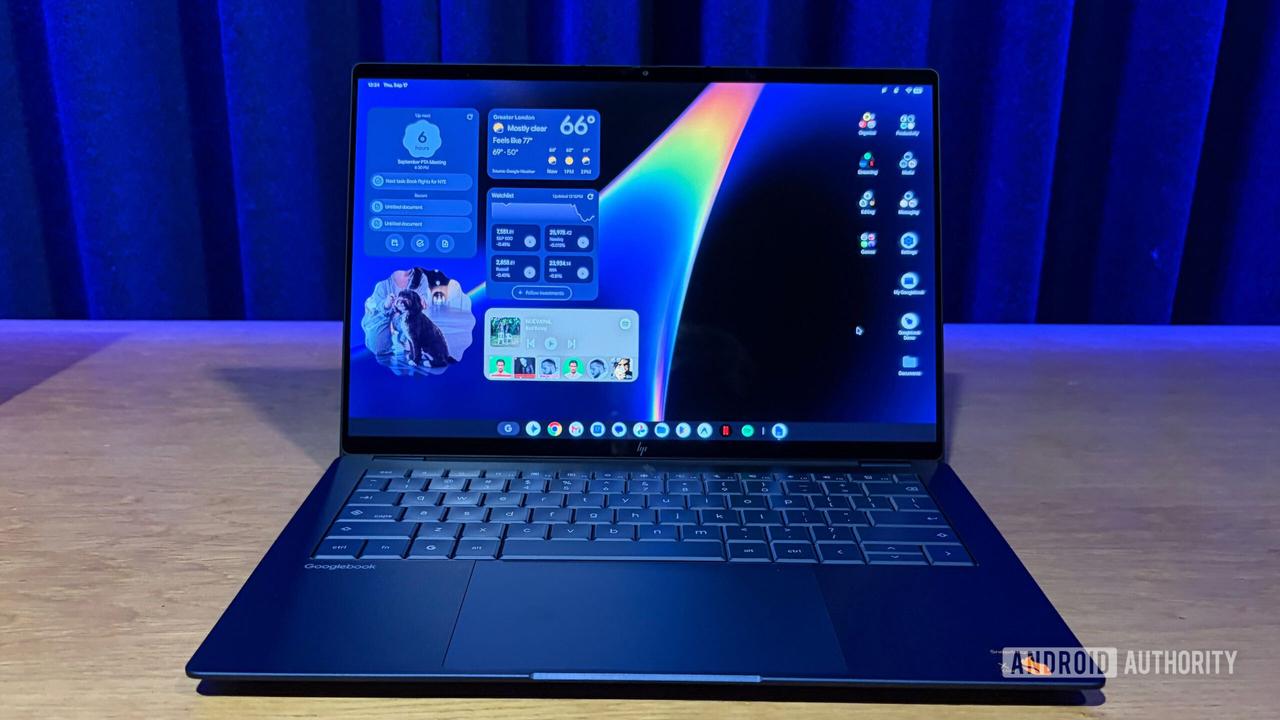
Google Introduces Linux Terminal for Googlebook with AI-First Approach
Google has launched a Linux terminal for Googlebook, marking a strategic shift toward AI development rather than traditional Linux app support. The terminal, now available in preview, provides users with a virtual Linux environment specifically optimized for AI-aided app development, scripting, and AI agent workflows
1
. Unlike ChromeOS's robust Linux app implementation, Googlebook's approach centers on enabling AI-driven prototyping and command-line access for building applications with AI assistance2
.The Linux terminal for Googlebook runs inside an isolated virtual machine to protect the main operating system from potentially harmful commands. This architecture allows users to grant AI tools, including Google's Antigravity, administrator privileges within the controlled environment without exposing their entire system to risk
1
. Folders remain private unless users explicitly grant permission to share them with the virtual machine, and a one-click reset feature enables users to start fresh without affecting files stored on the main system.Developer Tools and Programming Language Support
The virtual Linux environment is based on Debian and includes comprehensive support for developer tools such as apt, git, and ssh. Programming languages and runtimes available include Python, Node.js, Ruby, Go, and Rust, providing developers with flexibility for various AI development projects
1
. Automatic localhost port forwarding simplifies web development workflows, while users can access their Linux files directly through the Googlebook Files app, enabling seamless work with local documents and photos, including those synced from Android phones.Google emphasizes that the terminal serves as the "entry point" for AI agents, allowing tools like Antigravity to use command-line tools within the Linux virtual machine. This setup ensures private files remain isolated from agent access unless explicitly granted
2
. Users can adjust memory allocation for the virtual machine, optimizing performance for their specific AI agent workflows and development needs.Future Roadmap Focuses on Enhanced AI Capabilities
Google has outlined ambitious plans to expand the Linux terminal's capabilities beyond its current preview state. The roadmap includes support for Linux GUI apps that will integrate directly into the app launcher, addressing the main limitation of the current implementation where Linux apps don't appear alongside Android and web apps
2
. USB passthrough and USB-based Android Debug Bridge (ADB) support are coming, enabling local device debugging and expanding development possibilities for building apps across multiple devices1
.Dynamic memory and storage scaling will allow the virtual machine to handle more complex tasks seamlessly, while GPU/NPU acceleration will enable heavier local workloads by leveraging dedicated hardware for improved performance and power efficiency
2
. Google also plans to implement persistent virtual machines that can run long-running AI tasks independently of the terminal window, supporting more demanding agentic workloads without requiring constant user supervision.Related Stories

Strategic Shift from Traditional Linux App Support
The Googlebook implementation represents a deliberate departure from ChromeOS's approach to Linux apps. While ChromeOS introduced fairly robust support for Linux apps years ago, allowing users to expand their laptops' capabilities, Googlebook prioritizes AI development over user-facing Linux application functionality
2
. Google states the terminal is "optimized for rapid prototyping, web development, scripting, and agentic workflows via CLI," with future focus on "building not only on Googlebook but also for your other devices."This AI-first strategy positions Googlebook as a platform for users who want to build apps and automate tasks using AI assistance, even without traditional programming backgrounds. The emphasis on command-line access reflects Google's belief that AI workflows require terminal access to maximize effectiveness. As Google continues refining the experience for heavier workloads, the platform aims to become increasingly capable for developers and users experimenting with AI tools, though traditional Linux app users may need to wait for GUI support and fuller integration before Googlebook matches ChromeOS's previous capabilities.
References
Summarized by

Navi
[1]
Related Stories
Google unveils Googlebook, an AI-powered laptop built on Android to challenge premium market
12 May 2026•Technology

Google Launches $899 Googlebook: AI-Powered Laptop Merges Android and ChromeOS with Gemini Integration
21 Sept 2026•Technology
Google's Googlebook enters AI-native laptop market, but skepticism lingers over commitment
30 May 2026•Technology

Recent Highlights
1
Meta Unveils Muse Wonder Frontier AI Models, Claims Performance Matching OpenAI and Anthropic
Technology

2
Microsoft and Nvidia Launch Surface Laptop Ultra: A $2,599 AI-Ready PC With RTX Spark Chip
Technology

3
Meta Muse AI Agent Surges to 6.6M Downloads Despite Privacy and Security Controversies
Technology

Recent Highlights
Today's Top Stories





Don’t drown in AI news. We cut through the noise - filtering, ranking and summarizing the most important AI news, breakthroughs and research daily. Follow topics that matter to you and stay ahead.


