3 Sources
[1]
Microsoft finally admits the Copilot key wasn't a great idea, and it'll let you change it back soon
* Microsoft's Copilot key replaced the Right Ctrl/Context Menu on some PCs, disrupting keyboard workflows. * Microsoft admits the Copilot key hurts assistive tech and shortcuts. * A future Windows 11 update will let you remap the Copilot key to Right Ctrl or Context Menu. Back when Microsoft was going all-in on Copilot, we saw an update to the Windows keyboard for the first time in years. The update took the Right Ctrl key and turned it into a Copilot key. That way, you always have easy access to Microsoft's AI assistant; just give the Copilot key a press, and it'll pop up. Fast forward to today, and Microsoft is going through a major AI hangover. It had a wake-up call around the end of 2025 that maybe, just maybe, people didn't want Microsoft to sacrifice Windows 11's quality in the name of AI. In response, the company launched Windows K2, an internal initiative to roll back unnecessary Copilot integrations while also fixing some of Windows 11's biggest issues. Now, Microsoft has announced it's finally giving us the ability to revert the Copilot key to its old functionality. Microsoft spent two months overhauling Windows, and yes, that includes cutting Copilot Things are looking promising. Posts 6 By Simon Batt Microsoft admits that the Copilot key was breaking people's workflows It'll allow you to reclaim your Right Ctrl key in a future update As spotted by Windows Central, Microsoft has published some new documentation on its website titled "Understand updates to the Copilot key on Windows devices." In it, the company lays out how the Copilot key came to be, the problems it faced, and what Microsoft is doing to fix it. As it turns out, changing a keyboard staple to a Copilot-only key had its problems: Starting in 2024, hardware manufactures released new Windows 11 devices that include a dedicated Copilot key that provides quick access to Copilot experiences in Windows. This Copilot key sometimes replaces the Right Ctrl key or Context Menu key on select devices. Customers who rely on the Right Ctrl key or Context menu key for keyboard shortcuts or assistive technologies (such as screen readers) experienced some challenges to their workflows when using these devices. To remedy this, Microsoft says it will push a Windows 11 update "later this year." The update will add a new setting to the Settings > Bluetooth & devices > Keyboard screen that will let you remap the Copilot key to either the Context Menu key or the Right Ctrl key. Microsoft doesn't say when the update will arrive, but I'm sure anyone who found their workflows ruined by the addition of the Copilot key will be looking forward to its release. Microsoft is reportedly scrapping a Copilot feature that never made it out of the gate Plus, a few AI features that didn't get the Copilot branding Posts By Simon Batt
[2]
Microsoft admits Windows users 'experienced some challenges' with the forced CoPilot key -- now it's finally doing something about it
Microsoft made the biggest change to Windows keyboards in 30 years by adding a dedicated Copilot key to its Copilot+ PCs when they started rolling out a couple of years ago. Unfortunately, what looked like a means of leveraging Windows' massive adoption into an AI leadership position seems to have backfired. All it takes is a scroll through Reddit to see how much people dislike the button, and my colleague Tony Polanco called it the worst thing about Copilot+ PCs last year. Now, Microsoft appears to be relenting by officially announcing it will let users remap the Copilot button back to the Right Ctrl or Context menu options it replaced. In a recently published support document, Microsoft stated: "Customers who rely on the Right Ctrl key or Context menu key for keyboard shortcuts or assistive technologies (such as screen readers) experienced some challenges to their workflows when using these devices." "A Windows 11 update will ship later this year that will add a setting option to let you remap the Copilot key to act as the Context menu key or Right Ctrl key. When available, you can find this setting in: Settings > Bluetooth & devices > Keyboard" While I've never needed the Right Ctrl or Context menu for my own typical workflow, I've lost count of the number of times I've accidentally triggered Copilot by hitting that key. And while I use a number of different AI assistants over the course of a week, Copilot is very rarely among them. Some PC manufacturers do let users remap the Copilot key with their own on-device software and we have our own Tom's Guide tutorial on how to remap the Copilot key on Windows 11. However, both of those solutions will require additional steps and won't be as simple as a native solution within the OS that applies universally to all Windows 11 laptops with a Copilot key. Microsoft hasn't specified exactly when we may see this update, only noting it will be in a "future Windows 11 update." Microsoft typically drops major updates for Windows in October and, occasionally, in September. So in all likelihood, it could still be another five months before we see this change rolled out. In the meantime, here are 7 genius Copilot prompts that make Windows 11 instantly more useful. Follow Tom's Guide on Google News and add us as a preferred source to get our up-to-date news, analysis, and reviews in your feeds. Subscribe to Tom's Guide on YouTube and follow us on TikTok. Finally, you can visit our dedicated Tom's Guide Savings Squad hub for expert help on getting the best products for less.
[3]
Microsoft confirms Windows 11 update will let users remap the Copilot key back to Right Ctrl or Context Menu
Back in 2024, Microsoft almost started forcing laptop manufacturers to replace the Right Ctrl key on new Windows 11 PCs with a dedicated Copilot key, similar to the two Start keys. A few OEMs replaced the right-hand Ctrl or Context Menu key outright, while others made space for it. In all cases, the key has been practically useless to anyone uninterested in Microsoft's AI assistant. Microsoft has finally acknowledged the obvious. In a recently published support document, the company stated that customers who rely on the Right Ctrl key or Context Menu key for keyboard shortcuts or assistive technologies experienced workflow challenges on these devices. As a result, Microsoft has confirmed that a Windows 11 update coming in 2026 will add a setting to remap the Copilot key to either the Context Menu key or the Right Ctrl key. The new setting will be available under Settings > Bluetooth & devices > Keyboard. Some PC manufacturers already offer Copilot key remapping in their own software, but Microsoft's solution will be distinct in that it will apply across all Windows 11 PCs with a Copilot key, regardless of manufacturer. Microsoft is not entirely rolling back on its original decision since the hardware is already out there, making a software fix the natural solution. It is also not going as far as allowing users to freely reprogram the Copilot key to run macros or launch specific apps. Those who need more flexibility will still have to rely on third-party software. Nonetheless, this update allows anyone who relies on the right control or context menu key to restore that functionality natively within the OS. The change comes as Microsoft shifts away from its 2024 "year of AI PC" mantra and is now actively removing what it calls "unnecessary Copilot entry points" across Windows 11. That transition has already produced a number of welcome updates in recent weeks, with more highly requested features in the pipeline, including the ability to move the Taskbar and pause Windows updates indefinitely. Microsoft has not yet confirmed exactly when this particular update will arrive.
Share
Copy Link
Microsoft is reversing course on its dedicated Copilot key, acknowledging it caused workflow issues for users who rely on Right Ctrl and Context Menu keys. A Windows 11 update coming later this year will let users remap the Copilot key natively, marking a significant shift from the company's aggressive AI push in 2024.
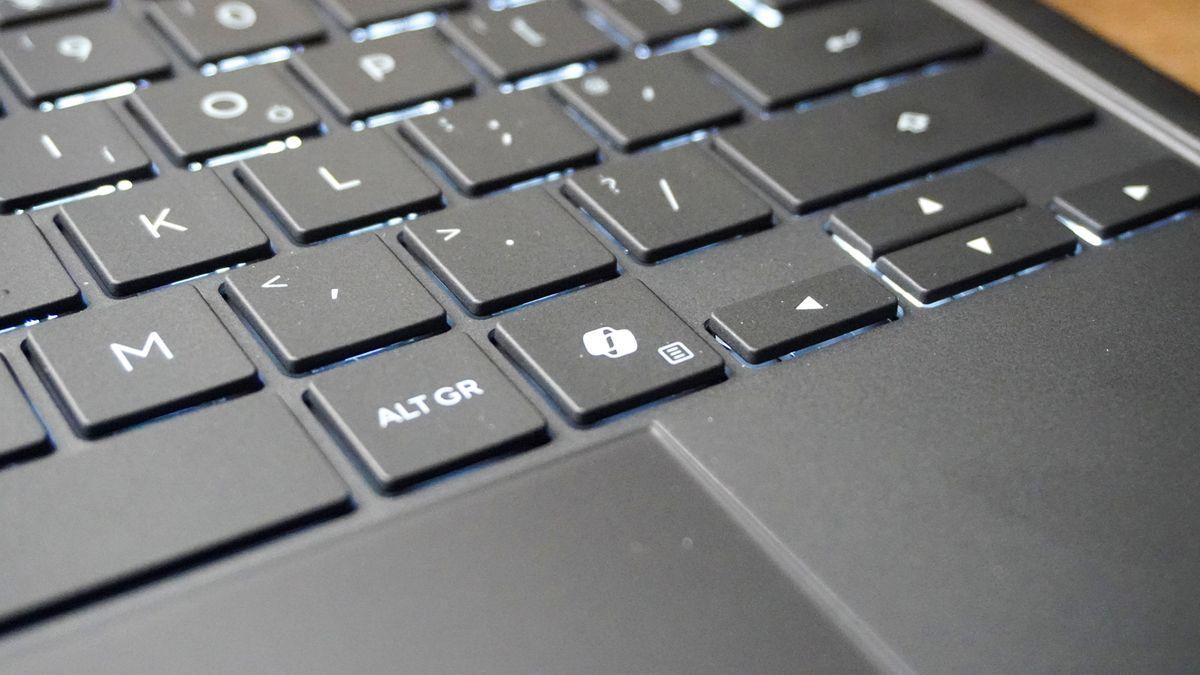
Microsoft has officially acknowledged that the dedicated Copilot key introduced on Windows 11 devices caused significant problems for users. In a newly published support document, the company admits that customers who rely on the Right Ctrl key or Context Menu key for keyboard shortcuts or assistive technologies experienced workflow challenges when using devices where the Copilot key replaced these essential keys
1
. Starting in 2024, hardware manufacturers released new Windows 11 devices with the Copilot key, which sometimes replaced the Right Ctrl key or Context Menu key on select devices, marking the biggest change to Windows keyboards in 30 years2
.Source: XDA-Developers
Microsoft has confirmed that a Windows 11 update coming later this year will add a new setting allowing users to remap the Copilot key back to either the Context Menu key or Right Ctrl key . The setting will be available under Settings > Bluetooth & devices > Keyboard, providing a native solution that will apply across all Windows 11 devices with a Copilot key, regardless of PC manufacturers
1
. While some PC manufacturers already offer Copilot key remapping through their own software, Microsoft's solution will be universal and simpler to implement3
.The Copilot key has faced widespread criticism since its introduction on Copilot+ PCs. User complaints flooded platforms like Reddit, with one tech journalist calling it "the worst thing about Copilot+ PCs" last year
2
. Many users reported accidentally triggering the AI assistant when reaching for keys they had used for years, disrupting their established keyboard workflows2
. What initially appeared to be a strategic move to leverage Windows' massive adoption into an AI leadership position during the "year of AI PC" mantra seems to have backfired3
.

Source: TweakTown
Related Stories
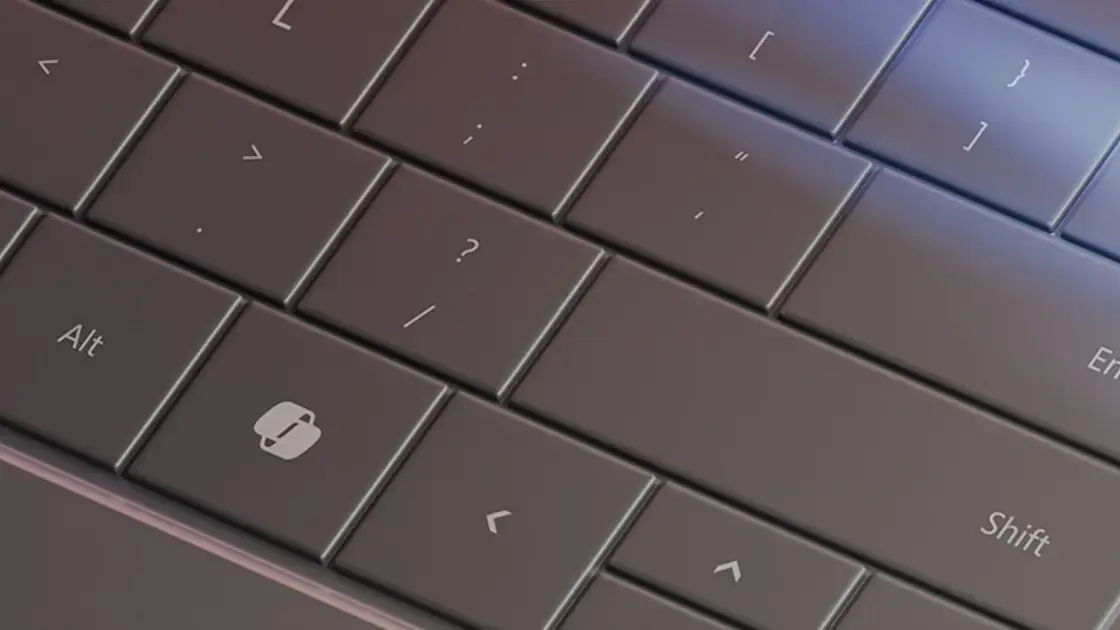
This change reflects Microsoft's broader retreat from aggressive AI integration. The company experienced what some describe as a major AI hangover, with a wake-up call around the end of 2025 that perhaps users didn't want Microsoft to sacrifice Windows 11's quality in the name of AI
1
. In response, Microsoft launched Windows K2, an internal initiative to roll back unnecessary Copilot entry points while fixing some of Windows 11's biggest issues1
. The company is now actively removing what it calls "unnecessary Copilot entry points" across Windows 11, with more highly requested features in the pipeline, including the ability to move the Taskbar and pause Windows updates indefinitely3
.
Source: Tom's Guide
Microsoft has not specified an exact release date for the update, stating only that it will arrive "later this year"
1
. Microsoft typically drops major updates for Windows in October and occasionally in September, suggesting the change could still be another five months away2
. However, Microsoft is not allowing users to freely reprogram the Copilot key to run macros or launch specific apps—those who need more flexibility will still have to rely on third-party software3
. For users whose workflows depend on these essential keys, the upcoming update represents a significant improvement in usability and accessibility.Summarized by
Navi
[1]
[2]
1
Science and Research

2
Technology

3
Policy and Regulation