5 Sources
[1]
I wore Google's Android XR glasses again - and my limit-testing should scare Meta and Apple
During Google's two-hour keynote this week, the company spent a generous 12 minutes discussing Android XR and the "Intelligent Eyewear" genre that it encompasses. But when you've got hardware partners in Samsung and Qualcomm, and a rich software ecosystem to build around, that's all the time you really need to send a message. Google is effectively launching three pairs of smart glasses by the end of this year: audio-only models from Warby Parker and Gentle Monster, Project Aura with Xreal, and a reference model with a single-view display. Also: Everything we saw at Google I/O: Gemini 3.5, Android XR glasses, Spark, and more I don't know how much each pair will cost when it eventually hits the market -- I'd ballpark something that's above comfort -- and I don't know how much of its capabilities will change in the months leading up to that. What I do know is that they're all supercharged by Gemini, and after demoing the latest features at Google I/O this week, I can live with that. It may be time for you to embrace it, too. My first encounter with Google's Android XR reference glasses, a pair with a built-in display, tap gestures, and multimodal Gemini capabilities, was exactly one year ago at I/O. It was a brief, five-minute demo that mainly highlighted the wearable's lightweight form factor for me. I tried them again in December, when the company was ready to showcase more camera-based tools that, while still controlled, showed more promise. For my third and latest demo, I was essentially limit-testing the glasses' AI capabilities, with free rein to prompt Gemini with things my wildest, post-keynote mind could imagine. "Pull up every FIFA World Cup game that the US is scheduled for, with the exception of when they play against Paraguay, and add them to my calendar," I asked the assistant. Within seconds, I saw scheduled events in the Calendar app of the demo phone. "Take a picture, turn every person in the frame into a Despicable Me minion, and change the color to grayscale," I briefly followed up. You can see the results below, stitched together from individual photos the glasses captured and saved to the paired phone's gallery. Let's face it: most of us aren't going to ask our smart glasses to play make-believe. But the idea of such wearables as a natural extension of our smartphones, thanks to seamless app integrations and ecosystems, feels like the best path -- one that Google has the right to win and, for now, use as leverage over Meta and Apple. Also: Google's Project Aura is a wild pair of supercharged Xreal glasses In another test, I asked Gemini to jot down all the ingredients I need for a dish I saw in a cookbook in front of me, and note that I'd like to prepare it next Tuesday. Moments later, I saw all of that information listed in a Google Keep entry. That's what my Google I/O demo was really about: cross-device and cross-app compatibility so seamless that I'm learning new things and accomplishing tasks within seconds of putting the glasses on. Google is fully embracing that aspect, and I'm all for it. I also tried Google's Project Aura glasses back in December, but my latest demo truly opened my eyes to its potential. The Xreal-designed wearable is, simply put, a more portable version of the Samsung Galaxy XR headset. You can engage with floating apps and windows anchored within the 70-degree field-of-view display, pinch and pull various UI elements, and stream content from a Steam Deck while running Gemini Live for in-game guidance. More interestingly, I demoed a few applications that, according to Google, were vibecoded in a week with Gemini Canvas and Antigravity. One app spawned a talking molecule whenever I made a pinch gesture on an object near me. Pinching a potted plant, for example, prompted the bubbly molecule to educate me about its species. I could see students and curious-minded folks alike benefiting from such a concept. Also: I tried ditching my laptop for a more futuristic setup - and found 5 surprising alternatives In another vibecoded app, 3D Paint, I was able to draw floating lines as if I were holding a piece of chalk. The premise of it is basic, and its appeal quickly wore off for me, but if these are among the use cases that developers can come up with in a week's time, I'm hopeful that we'll find more and better reasons to put on XR glasses when they officially launch later this year. I've spent a lot of time wondering where AI truly belongs in our lives, and I may have found my answer in Mountain View this week. Getting quick access to Gemini on your phone, laptop, and smartwatch is great, but its sweet spot is ambient accessibility. Whether you're holding onto a subway pole with smart glasses on, driving through traffic on a rainy day, or have lost your remote to navigate Netflix on your TV, a highly connected, hands-free assistant may just be the most plausible future of the technology.
[2]
It Feels Like Google Is Downplaying Smart Glasses With a Screen in Them
I had one mission today: try Google's "intelligent eyewear" and get a better sense of how "Gemini Intelligence" works on screen-equipped smart glasses. I waited just over an hour at I/O's "AI Sandbox" and had a demo that ran about seven minutes. I guess that's better than the 90 seconds I had last year. The device I tried was another prototype deviceâ€"not the audio glasses from Samsung and Gentle Monster or Warby Parkerâ€"and had a small screen in the right lens. I don't know what's going on, but it feels like Google doesn't want people to try out the smart glasses long enough that they'll see the screen's limitations. Or maybe Google is trying to avoid any comparisons to Google Glass. Here's how my demo went. I looked at an Ozzy Osbourne poster and asked Gemini (long press on the right arm's touchpad) to play one of his songs. The AI assistant did as commanded. I sat down at a table with a Go board and stones and asked Gemini to tell me about the game. I was brought over to a corner of the booth to briefly look at the screen's tiny widget showing the weather. Next, I experienced real-time translation. A staff member spoke Korean and the English translation promptly appeared on the screen after she had finished speaking. I wasn't allowed to speak in English and see a Korean translation. There was no back-and-forth conversation. Finally, I was instructed to take a selfie in front of a mirror and ask Gemini to use Google's Nano Banana image generator to "put me on the moon." The result was embarrassing: Nano Banana put me on the moon... and also made me appear more Caucasian. I definitely didn't ask Gemini to do that. I hate this photo. What is the point of having smart glasses slop-ify photos like this? What is the real-world utility? It's a gimmicky party trick that doesn't even work well. "Gemini Intelligence"â€"the ability to invoke the AI assistant to tell you about things the cameras "see"â€"could be very useful. The real-time translation seems really promising; identifying things and getting information is informative; and playing music from a poster is fun. Plus, Gemini was more responsive this year compared to last. But why isn't Google showing more examples for the single screen? It's making me wonder if Google is intentionally downplaying smart glasses that have a single screen in them. Why? Maybe it's privacy-related. Or maybe because the screen will have limited utility? The second you get a taste of a screen in smart glassesâ€"even one as tiny as the one in these Google smart glassesâ€"you can't help but expect more from it. People will want full-blown apps in their peripheral vision, and if Google can't deliver that, it's going to be a letdown. It's a problem that Meta is going through right now with its Ray-Ban Display. Those smart glasses also have a display in the right lens, but it launched without any third-party apps, which has made them a non-starter for a phone accessory that starts at $850. Meta is remedying the app situation with a new SDK for developers to build web apps, but who knows if that's actually the right move. The messaging seems to be: even if your smart glasses have a screen in them, you won't really use it often. You'll be invoking Gemini via audio more. In that way, smart glasses with a single screenâ€"not to be confused with XR smart glasses with better optics like Google's Xreal Project Aura made for more work and entertainmentâ€"may end up working more like a smartwatch, meaning it's unlikely to ever replace your phone.
[3]
I tried Google's AI glasses. They're what Google Glass always wanted to be
Despite improved public acceptance and seamless design, limitations include basic heads-up display, battery concerns, and sometimes forced AI features. A decade after Google launched Google Glass to spectacular failure, it's trying again. And I think that the world (and I) will be more receptive to what Google's online AI interpreter, Gemini, can do when plugged into your ear. I had a chance to try out a prototype version of Google's XR glasses at its Google I/O conference this week. All of the eyewear talk coming out of I/O is a little confusing; Xreal and Google showed Project Aura, a wearable XR glass project they talked about last year, and Google is partnering with Warby Parker and Gentle Monster on connected glasses that will debut first in an audio-only mode, then add a small heads-up display in the corner of your vision at a later time. I tried a Google prototype, manufactured by Samsung, that incorporates elements of the Warby Parker and Gentle Monster technologies. It's not a product, per se, but a vehicle to show off what Google hopes to accomplish in its new take on connected eyewear. Honestly, the whole thing still has an aura of unreality about it all. Google's first connected glasses, Google Glass, first debuted in 2012 as Project Glass, and honestly don't feel that different from what the company showed off at I/O 2026, more than a decade later. What's different is that attitudes towards smart glasses have completely changed; Google Glass wearers were derided as "Glassholes," especially those who recorded people using the Glass' onboard, outward-facing camera. Now, connected devices from Meta have been somewhat bafflingly accepted by society, even with anecdotal reports of users still taking pictures and recording video after modifying the eyewear to disable a small LED that signaled a recording is in progress. My colleague Adam Patrick Murray wears a pair around the office, and though I trust him, the recording potential still mildly unnerves me. Those capabilities are still built into Google's prototype, and I didn't see (or to be fair, ask) about if a similar LED would be there when I looked around the world. But the reason Glass worked, and I think that the new Google glasses will, too -- is that an AI assistant is still a handy thing to navigate the world. Google's AI glasses are surprisingly light Google didn't answer questions about the hardware: the specs, battery life, the features of the display, camera and so on. And to be fair, I wasn't particularly interested. The glasses are basically a way to push Google Gemini in front of you, replacing your phone. Physically, the most important thing is that they felt normal. There was no additional weight or thickness, nothing to indicate that you were wearing anything other than a pair of sunglasses out in the bright California sun. From the front, there's a small circle that signaled the presence of a camera, along with a small button along the right frame for snapping a photo. That right-hand side of the frame also included a touch-sensitive surface upon which you could swipe and tap to trigger Gemini and control the volume of the small, integrated speakers. (Those were a little faint for the busy room the glasses were demonstrated in.) That's all a plus in Google's favor, in my book. Most of technology right now seems to be oriented toward reminding that AI exists, and for you to use it. I'd rather Gemini sit in the background, and show up when I need it to. And it does. What can Gemini do in a pair of connected glasses? Gemini's there to fulfill its "traditional" role: serve as a search engine of sorts if you need help explaining what ratatouille is, for example, or how it's made. You can play songs from Spotify, or add a reminder to take the cat to the vet. But the glasses are supposed to allow Gemini an eye into the world, too, "looking" at a concert poster and looking into tickets, or explaining what sort of wine might pair with that dish you're looking to whip up for dinner. All of this gets piped into your eardrums via the speakers. Granted, there's a modicum of convenience in it all. The glasses don't stand alone; they connect to your phone, which in turn connects to Wi-Fi or cellular data. You could pull out your phone and take a snap of a recipe just as easily. What the glasses do is simply eliminate the steps of fishing your phone out, unlocking it, opening the app, and so on. (Oh, and there's no facial recognition being built in, I'm told. I made sure to ask.) Some of the AI feels decidedly forced. Do I want to snap a photo with the glasses and then restyle it into an anime? Absolutely not. But it can, and even send it to your phone or connected smartwatch. The on-glass heads-up-display (HUD) is also simplistic, and that's fine with me. I'm going to guess that most people will find the HUD most useful to pop up reminders, or to serve as a basic navigation aid. Though I was stuck in a large complex of buildings (the Shoreline Amphitheatre, adjoining Google's campus), the mapping feature seemed to just show me an overall map of my surroundings, rather than "turn left in 100 yards" step-by-step directions. I think I'd want that, especially navigating something like an airport, college campus, or museum, as well as just looking for a flat white. Some of the hardware concerns will be concerns: battery life, mainly. And I'm not sure what I'd want out of a HUD -- probably minimal distractions, certainly. So far, Gemini must be activated by tapping and holding the eyewear's button, though a wake word ("Hey Google") is intended for the final product. I still have qualms about privacy, though I think an overt signal (a tap or wake word) is helpful. I'm still a little hesitant about holding a close conversation with someone, then interjecting Gemini to add a reminder or an appointment or simply to ask it a question, though. That, I think is going to be a polarizing feature. In fact -- and I can't believe I'm saying this -- in certain situations, I might actually like an AI-connected eyewear to take an even more active, always-on role. Audio guides at museums steer you a curated list of exhibits, but imagine an AI popping up to relate a story on the subject of a painting after it noticed you glancing at it. There's room for exploration here. Still, as a general aid? Google's Gemini glasses do feel useful. Let's see how it all plays out.
[4]
I tested Google's "Intelligent Eyewear," and found the smart glasses that will defeat Ray-Ban Meta
So as you well know by now, the "intelligent eyewear" from Google and Samsung is launching this fall with designs by Gentle Monster and Warby Parker. While nobody was able to go actually hands (or eyes) on with these actual glasses, I did get to test the software that will be fuelling these specs and, well, the Ray-Ban Metas are kind of cooked. Basically, everything AI-related that Meta has brought to the table in its past couple generations has been usurped by what is set to launch on Google's glasses. We may not know what they will be called, and we don't know the price. But if they're competitive to Meta's specs, Zuckerberg has a big problem on his hands. Judging the styles So we've got Warby Parker and Gentle Monster doing the designs, and I wouldn't be surprised if most people went for the former. We only got to look at photos (ignore publications that said they got to "wear them all," because they didn't), so I can only give you my eyes-on perspective. The Warby Parker frames look less daring and more subtle on your face, whereas Gentle Monster is looking to make a statement. Nothing wrong with that at all, but the aesthetic is not going to be for everyone. As for specifics on them, Google didn't share much. But with these prototype specs weighing less than 50 grams, I'm quietly confident that they will also be lightweight and wearable in the very long-term. Plus, they'll definitely be prescription-friendly, as has been confirmed extensively here at I/O. All-round smoothness As for using them day-to-day, you'll get your standard interface that uses your phone as the brains of your glasses, with a little bit of local AI to run the basics. It's a method that has a proven track record so far, and they will be compatible with both Android and iOS devices. Gemini Live is the key to making these true Ray-Ban Meta beaters, and it frankly makes Meta AI seem feeble in comparison. Rather than having to follow rudimentary vocal steps to do certain things, a press and hold on the stem turns it on and I'm having a full conversational interaction with the AI about the world around me. As is the case with any of these demos, I had a bunch of props to work with -- figuring out a Van Gogh painting, or going through a Korean cookbook and ensuring that the recipes are safe for my peanut-allergic friends to consume. In all of these, the AI voice is extra descriptive of its determination and provides a nice helping hand in a way Meta AI has never really done so. Throw in all the Google app integration in here too and it gets even more interesting. You can receive a summary of your latest messages or turn-by-turn directions to the nearest bar (it's been a long day, don't judge me). It's clear that a real-time AI like Gemini has been the missing link that's going to bring everything together in a way that can reduce the number of times you need to pull out your phone. Turning on the display This is a feature that will not be coming to this first crop of smart glasses -- they are all display-free. But the monocular waveguide display in this prototype does add some fantastic visual aids to some key use cases. You've probably already read a lot about this when Mark went eyes-on with this same prototype last year. But to give you my thoughts, bringing Google services into a pair of smart glasses really brings a user-friendly advantage here with the likes of Google Maps and photo taking. Seeing a little HUD give directions or a GTA-style radar when you look down for a nice street layout is a nice touch. Then the image generation efforts with Nano Banana were frankly hilarious. I took a picture of my camera guy and asked it to turn him into a superhero...what does GL mean? Also his name is Paul Antill as clearly stated on the badge, but now he's Paul Arnold!? Regardless, it's clear that you'll have plenty of fun with the generative AI experiences of these specs. Watch out, Meta! And all of this exposes that while the Ray-Ban Metas may have a couple of years headstart, the usefulness updates over time have been rather minor and slow in the progress of things. I mean, sure, there are reminders of things, but do they actually mean something when they're not integrated into your services that matter? Or do turn-by-turn directions really help when the mapping technology doesn't hold a candle to Google Maps? So, I say this to Zuck. You have about five months-ish to figure out how to compete with this. I'm not sure what the answer is, but Google is about to bring actually useful AI to smart glasses, and Meta AI needs to catch up fast in both a simple Q&A fashion and in agentic use, too. Follow Tom's Guide on Google News and add us as a preferred source to get our up-to-date news, analysis, and reviews in your feeds. Subscribe to Tom's Guide on YouTube and follow us on TikTok. Finally, you can visit our dedicated Tom's Guide Savings Squad hub for expert help on getting the best products for less.
[5]
Google's Gemini Smart Glasses Make Meta Ray-Bans Look Outdated
Google's AI-powered smart glasses, introduced at Google I/O, integrate the Gemini AI system to deliver real-time, context-aware assistance. These glasses support tasks like turn-by-turn navigation, personalized dining suggestions and voice-activated smart home controls. According to The Smart Glasses Guy, this functionality allows the glasses to adapt to user needs in practical ways, offering a more tailored experience compared to Meta's Ray-Ban smart glasses, which focus on simpler features like photo capture and audio playback. Explore how Google's AI glasses handle hands-free task management, such as controlling music or managing daily schedules. Gain insight into their compatibility with the Google ecosystem, including advanced navigation and photo-sharing capabilities. Finally, learn how these glasses balance technical performance with everyday usability, making them a noteworthy option for diverse users. At the heart of Google's smart glasses lies Gemini AI, a highly sophisticated system designed to provide real-time, context-aware assistance. These glasses go beyond basic functionality by using personal data, such as emails, texts and location history, to deliver highly personalized recommendations and insights. For instance: This deep integration transforms the glasses into more than just a wearable device. They become an intelligent assistant, adapting dynamically to your needs and preferences. By combining AI with real-world applications, Google has created a product that redefines convenience and functionality. Google's AI glasses elevate convenience by allowing hands-free control over apps and tasks, powered by the robust capabilities of Gemini AI. These glasses are designed to autonomously perform actions on your smartphone, making everyday interactions more intuitive and efficient. Examples of their functionality include: The voice-controlled interface ensures that these interactions are seamless, allowing you to focus on what matters most. This hands-free capability not only simplifies routine tasks but also enhances productivity, making the glasses an indispensable tool for modern life. Gain further expertise in Google AI Glasses by checking out these recommendations. Google has prioritized both aesthetics and performance in the design of its AI glasses. Collaborating with renowned brands like Gentle Monster, the company has created a product that seamlessly integrates into your daily wardrobe. These glasses are not just a tech gadget, they are a lifestyle accessory that combines style with innovative technology. Compared to Meta's Ray-Ban smart glasses, Google's offering is more versatile and appeals to users who value both fashion and functionality. This balance ensures that the glasses are suitable for a wide range of users, from tech enthusiasts to fashion-conscious individuals. By focusing on design and usability, Google has created a product that stands out in a competitive market. One of the standout features of Google's AI glasses is their seamless integration with the broader Google ecosystem. When paired with other Google devices, such as the Pixel Watch or Pixel smartphones, the glasses unlock a range of advanced capabilities that enhance the user experience. Key features include: This level of connectivity positions the glasses as a central hub within a cohesive digital ecosystem. Rather than being a standalone device, they become an integral part of a larger, interconnected experience, offering users unparalleled convenience and functionality. While Meta's Ray-Ban smart glasses boast high-quality hardware and strong brand recognition, they fall short in terms of AI-driven functionality. Their capabilities are largely confined to basic tasks, such as visual searches and simple voice queries, which pale in comparison to the advanced features offered by Google's AI glasses. Google's glasses, powered by Gemini AI, deliver: This disparity underscores Google's clear advantage in both technology and usability. By using AI to its fullest potential, Google has created a product that outshines Meta's offering in nearly every aspect. Google's advancements in AI-powered smart glasses have the potential to significantly disrupt the wearable tech market, challenging Meta's current position and setting a new standard for the industry. However, the long-term success of these glasses will depend on addressing several critical factors, including: If Google can effectively tackle these challenges, its AI glasses could redefine the wearable technology market, influencing the direction of future innovations and setting a benchmark for competitors to follow. Google's AI-powered smart glasses represent a significant leap forward in wearable technology. By combining advanced AI capabilities with a user-centric design and seamless ecosystem integration, they have established themselves as a superior alternative to Meta's Ray-Ban glasses. With their focus on deeper functionality, stylish aesthetics and practical applications, Google's glasses are poised to reshape user expectations and set a new standard for this category of devices. As the market for smart glasses continues to evolve, Google's innovative approach positions it as a leader in the field, paving the way for the next generation of wearable technology. Disclosure: Some of our articles include affiliate links. If you buy something through one of these links, Geeky Gadgets may earn an affiliate commission. Learn about our Disclosure Policy.
Share
Copy Link
Google showcased AI glasses at I/O 2026 with Gemini AI integration, partnering with Warby Parker, Gentle Monster, and Samsung. The wearable tech features real-time translation, cross-device compatibility, and ambient accessibility that positions it ahead of Meta Ray-Ban smart glasses. Three models launch this fall, including audio-only versions and display-equipped prototypes.
Google devoted 12 minutes of its I/O 2026 keynote to Android XR and what it calls "Intelligent Eyewear," but that brief window proved sufficient to establish the company's ambitions in wearable tech
1
. The tech giant is launching three distinct pairs of Google smart glasses by year's end: audio-only models from Warby Parker and Gentle Monster, Project Aura with Xreal, and a reference model featuring a single-view display1
. Each variant is supercharged by Gemini AI, positioning Google's offering as a direct challenge to Meta and Apple in the smart eyewear market.
Source: ZDNet
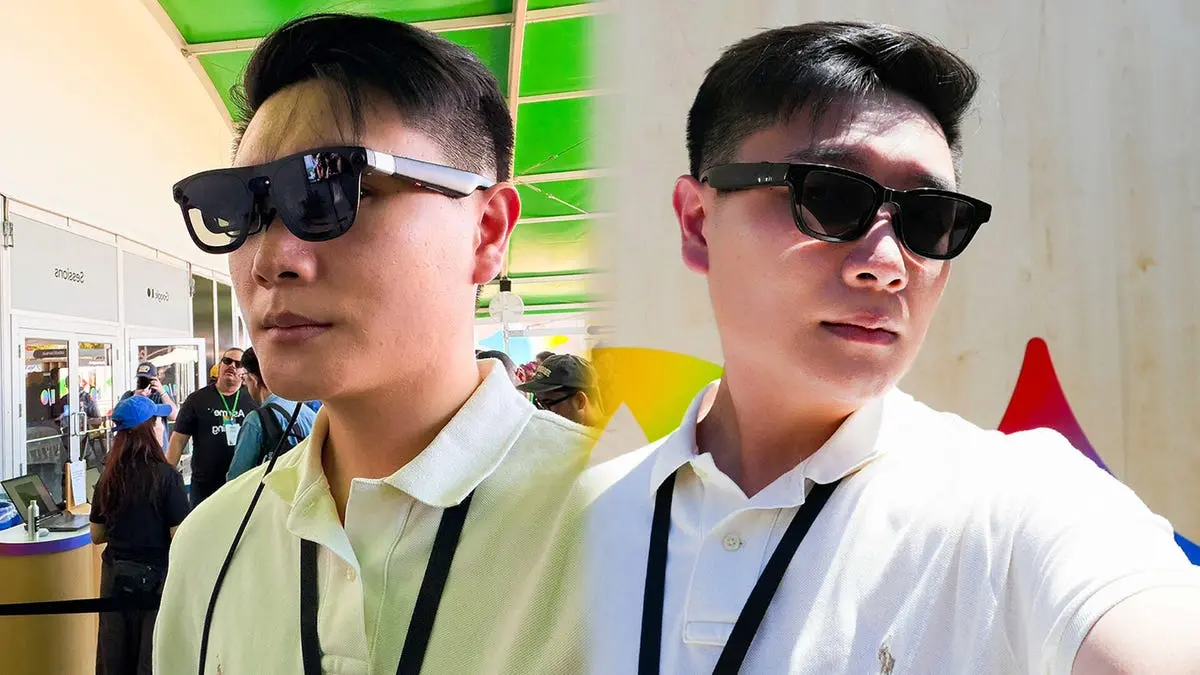
The prototype glasses weigh less than 50 grams and feel normal on the face, with no additional weight or thickness to indicate anything beyond ordinary sunglasses
3
. This represents a stark departure from Google Glass, which debuted in 2012 and failed spectacularly amid privacy concerns and social stigma3
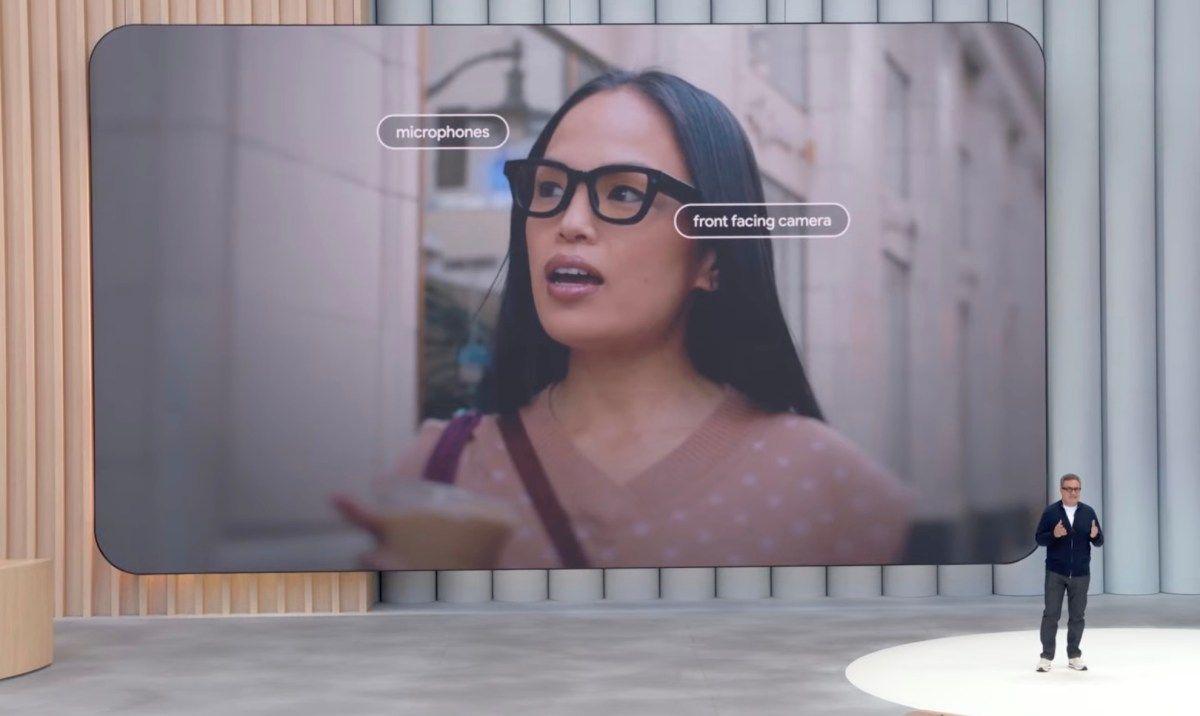
. The right frame houses a small circle indicating camera presence, a button for snapping photos, and a touch-sensitive surface for triggering Gemini AI and controlling integrated speakers3
.What sets Google's AI-powered smart glasses apart is seamless integration across the Google ecosystem. During hands-on testing, journalists pushed the AI glasses through complex prompts that demonstrated their capabilities. One tester asked Gemini to "pull up every FIFA World Cup game that the US is scheduled for, with the exception of when they play against Paraguay, and add them to my calendar"—a request the hands-free AI assistant completed within seconds
1
. Another prompt instructed the AI to photograph a scene, transform people into Despicable Me minions, and convert the image to grayscale, with results saved directly to the paired phone's gallery1
.
Source: Geeky Gadgets
This cross-device compatibility extends to Google Keep, where users can ask Gemini to note ingredients from a cookbook and schedule meal preparation. The Gemini smart glasses connect to smartphones for Wi-Fi or cellular data, eliminating steps like fishing out your phone, unlocking it, and opening apps
3
. They support both Android and iOS devices, with Gemini Live enabling full conversational interactions about the world around you4
.Google's Android XR glasses demonstrated real-time translation during I/O demos, with Korean speech promptly appearing as English text on the monocular waveguide display after the speaker finished
2
. The heads-up display, located in the right lens, shows weather widgets, navigation aids, and other information2
. Turn-by-turn directions appear with a GTA-style radar when you look down, leveraging Google Maps technology that outpaces Meta Ray-Ban alternatives4
.However, some observers noted Google appears to be downplaying the display functionality. One journalist's seven-minute demo felt rushed, leading to speculation that Google wants to avoid comparisons to Google Glass or doesn't want users discovering screen limitations
2
. The display-equipped versions won't launch with the first crop of audio-only glasses this fall4
.Project Aura, designed with Xreal, functions as a more portable version of the Samsung Galaxy XR headset
1
. Users can engage with floating apps and windows anchored within a 70-degree field-of-view display, pinch and pull UI elements, and stream content from devices like Steam Deck while running Gemini Live for in-game guidance1
. Developers reportedly "vibecoded" applications in one week using Gemini Canvas and Antigravity, including a talking molecule app that educates users about objects they pinch, and 3D Paint for drawing floating lines1
.Related Stories

Source: Gizmodo
While society has grown more accepting of smart glasses since the "Glassholes" era, privacy concerns persist
3
. Meta Ray-Ban users have reportedly modified eyewear to disable recording indicator LEDs3
. Google states no facial recognition is being built into the glasses3
.Generative AI features using Nano Banana drew mixed reactions. One tester asked to be placed "on the moon" and found the result "embarrassing," noting the AI altered their appearance to look "more Caucasian"
2
. Another test transformed a person into a superhero but misread their name badge4
. These gimmicky features raised questions about real-world utility versus party tricks2
.Meta Ray-Ban smart glasses, which start at $850 for display models, launched without third-party apps—a significant limitation
2
. Meta is addressing this with a new SDK for developers to build web apps, but Google's deep integration with services like Google Maps, Google Keep, and Calendar provides immediate practical value5
. While Meta's offering focuses on basic photo capture and audio playback, Google's AI glasses deliver context-aware assistance that adapts to user needs5
.Testers concluded that Meta has approximately five months to respond before Google launches its intelligent eyewear this fall
4
. The question facing Meta and Apple is whether they can match Google's ambient accessibility—the ability to access AI assistance while holding a subway pole, driving through traffic, or searching for a TV remote1
. Long-term success will depend on pricing, battery life, privacy protections, and whether developers embrace the platform to create compelling applications beyond what Google demonstrates at launch5
.Summarized by
Navi
[1]
[4]
[5]